crwdns2915892:0crwdne2915892:0
Replace a faulty fan to keep things cool.
crwdns2942213:0crwdne2942213:0
-
-
-
Remove the following ten screws securing the lower case to the upper case:
-
Three 13.5 mm (14.1 mm) Phillips screws.
-
Seven 3 mm Phillips screws.
 crwdns2952109:0crwdne2952109:0
-
-
-
Using both hands, lift the lower case near the vent to pop it off two clips securing it to the upper case.
-
Remove the lower case and set it aside.
-
-
-
-
-
Use the edge of a spudger to pry the battery connector upwards from its socket on the logic board.
-
-
-
-
Bend the battery cable slightly away from its socket on the logic board so it does not accidentally connect itself while you work.
-
-
-
-
-
Remove the following three screws securing the left fan to the logic board:
-
Two 3.5 mm T6 Torx screws.
-
One 4.2 mm T6 Torx screw.
-
-
-
Use the flat end of a spudger to disconnect the left fan connector from the logic board.
-
-
-
Lift the left fan out of the upper case.
-
-


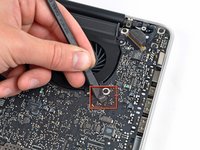
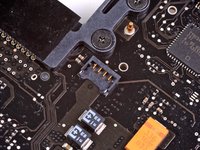
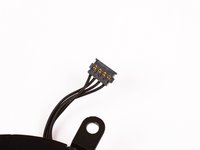

To reassemble your device, follow these instructions in reverse order.
crwdns2935221:0crwdne2935221:0
crwdns2935229:047crwdne2935229:0


crwdns2947412:03crwdne2947412:0
Are you sure that’s the left fan and not the right ?
If you click on the buy these parts” link it shows a picture of a different fan, the one on the other side of the MBP.
Would be nice if you could clear this up.
Thank you.
Konstantinos Bonotis - crwdns2934203:0crwdne2934203:0 crwdns2950251:0crwdne2950251:0
Yes its the left fan when you are typing on the Mac & that is what it’s called. When you replace it however it’s on the RHS of the upside down Mac with the motherboard exposed.
Stephen Fry - crwdns2934203:0crwdne2934203:0 crwdns2950251:0crwdne2950251:0
after cleaning the fans from dust, my left fan is making constantly noise. it’s not loud but it is annoying by time. can i fix this or is it because the fan is damaged?
butch coolidge - crwdns2934203:0crwdne2934203:0 crwdns2950251:0crwdne2950251:0
