crwdns2933423:0crwdne2933423:0
crwdns2947577:0crwdnd2947577:0crwdne2947577:0

MacBook Pro 15" Retina Display Mid 2015 Right Fan Replacement

crwdns2942213:0crwdne2942213:0

  1. MacBook Pro 15" Retina Display Mid 2015 Right Fan Replacement, Lower Case: crwdns2935265:01crwdnd2935265:01crwdnd2935265:01crwdne2935265:0
    • Remove the following P5 pentalobe screws securing the lower case to the MacBook Pro:

    • Eight 3.1 mm

    • Two 2.3 mm

    crwdns2952109:0crwdne2952109:0

    crwdns2917038:0crwdne2917038:0

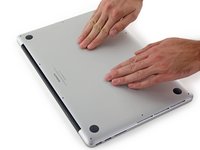
  2. MacBook Pro 15" Retina Display Mid 2015 Right Fan Replacement: crwdns2935265:02crwdnd2935265:01crwdnd2935265:02crwdne2935265:0 MacBook Pro 15" Retina Display Mid 2015 Right Fan Replacement: crwdns2935265:02crwdnd2935265:02crwdnd2935265:02crwdne2935265:0
    • Lifting from the edge nearest the clutch cover, lift the lower case off the MacBook Pro.

    crwdns2952109:0crwdne2952109:0

    crwdns2917038:0crwdne2917038:0

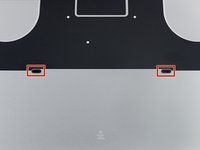
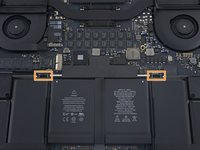
  3. MacBook Pro 15" Retina Display Mid 2015 Right Fan Replacement: crwdns2935265:03crwdnd2935265:01crwdnd2935265:03crwdne2935265:0 MacBook Pro 15" Retina Display Mid 2015 Right Fan Replacement: crwdns2935265:03crwdnd2935265:02crwdnd2935265:03crwdne2935265:0 MacBook Pro 15" Retina Display Mid 2015 Right Fan Replacement: crwdns2935265:03crwdnd2935265:03crwdnd2935265:03crwdne2935265:0
    • The lower case has two plastic pegs (red) that fit into plastic clips in the upper case (orange).

    • During reassembly, gently push down the center of the lower case to reattach the case to its two plastic clips.

    crwdns2952109:0crwdne2952109:0

    crwdns2917038:0crwdne2917038:0

  4. MacBook Pro 15" Retina Display Mid 2015 Right Fan Replacement, Battery Connector: crwdns2935265:04crwdnd2935265:01crwdnd2935265:01crwdne2935265:0
    • Peel back the sticker covering the battery connector.

    crwdns2952109:0crwdne2952109:0

    crwdns2917038:0crwdne2917038:0

  5. MacBook Pro 15" Retina Display Mid 2015 Right Fan Replacement: crwdns2935265:05crwdnd2935265:01crwdnd2935265:03crwdne2935265:0 MacBook Pro 15" Retina Display Mid 2015 Right Fan Replacement: crwdns2935265:05crwdnd2935265:02crwdnd2935265:03crwdne2935265:0 MacBook Pro 15" Retina Display Mid 2015 Right Fan Replacement: crwdns2935265:05crwdnd2935265:03crwdnd2935265:03crwdne2935265:0
    • Gently lift each side of the battery connector to pry the connector out of its socket on the logic board.

    • Bend the connector back toward the battery, ensuring that the battery connector doesn't accidentally make contact with the logic board.

    crwdns2952109:0crwdne2952109:0

    crwdns2917038:0crwdne2917038:0

  6. MacBook Pro 15" Retina Display Mid 2015 Right Fan Replacement, AirPort/Camera Cables: crwdns2935265:06crwdnd2935265:01crwdnd2935265:03crwdne2935265:0 MacBook Pro 15" Retina Display Mid 2015 Right Fan Replacement, AirPort/Camera Cables: crwdns2935265:06crwdnd2935265:02crwdnd2935265:03crwdne2935265:0 MacBook Pro 15" Retina Display Mid 2015 Right Fan Replacement, AirPort/Camera Cables: crwdns2935265:06crwdnd2935265:03crwdnd2935265:03crwdne2935265:0
    crwdns2935267:0crwdne2935267:0
    Tweezers
    $4.99
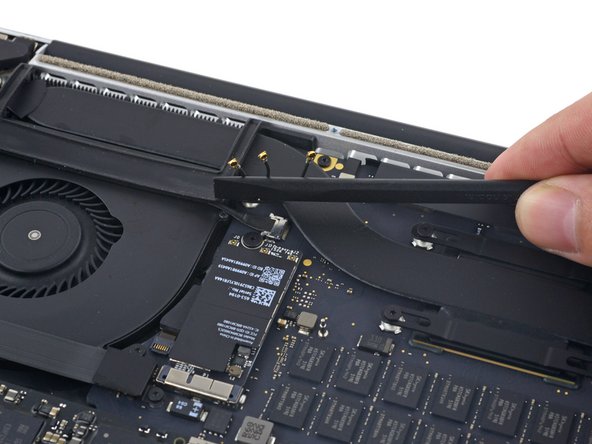
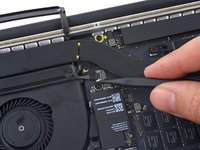
    • Use a spudger or tweezers to pry the three AirPort antenna cables straight up off of their sockets on the AirPort board, and bend them up and out of the way.

    • The cable connection points are very fragile. Be careful to lift only on the connector, and not on the socket or cable.

    • To reconnect, align the connector carefully into position over the socket, and press it down firmly with the flat of your spudger.

    crwdns2952109:0crwdne2952109:0

    crwdns2917038:0crwdne2917038:0

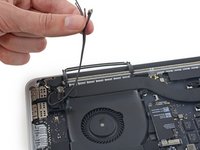
  7. MacBook Pro 15" Retina Display Mid 2015 Right Fan Replacement: crwdns2935265:07crwdnd2935265:01crwdnd2935265:02crwdne2935265:0 MacBook Pro 15" Retina Display Mid 2015 Right Fan Replacement: crwdns2935265:07crwdnd2935265:02crwdnd2935265:02crwdne2935265:0
    • Peel the right rubber cover up off the fan and fold it out of the way.

    crwdns2952109:0crwdne2952109:0

    crwdns2917038:0crwdne2917038:0

  8. MacBook Pro 15" Retina Display Mid 2015 Right Fan Replacement: crwdns2935265:08crwdnd2935265:01crwdnd2935265:02crwdne2935265:0 MacBook Pro 15" Retina Display Mid 2015 Right Fan Replacement: crwdns2935265:08crwdnd2935265:02crwdnd2935265:02crwdne2935265:0
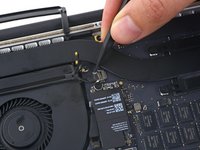
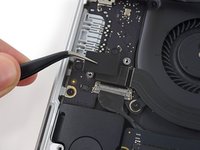
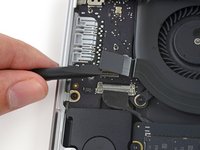
    • Use the tip of a spudger to push the camera cable connector out of its socket on the logic board.

    • Be sure to push parallel to the board, pushing first on one side, then the other to "walk" the connector out of its socket.

    crwdns2952109:0crwdne2952109:0

    crwdns2917038:0crwdne2917038:0

  9. MacBook Pro 15" Retina Display Mid 2015 Right Fan Replacement: crwdns2935265:09crwdnd2935265:01crwdnd2935265:03crwdne2935265:0 MacBook Pro 15" Retina Display Mid 2015 Right Fan Replacement: crwdns2935265:09crwdnd2935265:02crwdnd2935265:03crwdne2935265:0 MacBook Pro 15" Retina Display Mid 2015 Right Fan Replacement: crwdns2935265:09crwdnd2935265:03crwdnd2935265:03crwdne2935265:0
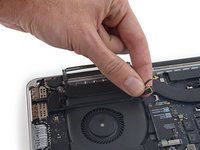
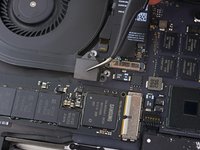
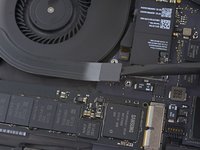
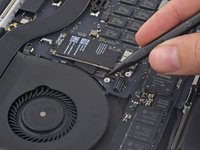
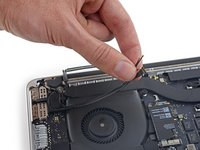
    • Use your fingers to pull the AirPort/Camera cables up off the fan.

    • The cables are adhered to the fan, so peel them up carefully to avoid damaging them.

    • Carefully de-route the cables from the plastic cable guide.

    • On reassembly, there should be enough adhesive still on these cables to stick them back down to the fan.

    crwdns2952109:0crwdne2952109:0

    crwdns2917038:0crwdne2917038:0

  10. MacBook Pro 15" Retina Display Mid 2015 Right Fan Replacement, I/O Board Cable (Top): crwdns2935265:010crwdnd2935265:01crwdnd2935265:01crwdne2935265:0
    • Remove the four 2.2 mm T5 Torx screws securing the I/O board cable connector covers.

    crwdns2952109:0crwdne2952109:0

    crwdns2917038:0crwdne2917038:0

  11. MacBook Pro 15" Retina Display Mid 2015 Right Fan Replacement: crwdns2935265:011crwdnd2935265:01crwdnd2935265:02crwdne2935265:0 MacBook Pro 15" Retina Display Mid 2015 Right Fan Replacement: crwdns2935265:011crwdnd2935265:02crwdnd2935265:02crwdne2935265:0
    • Remove the left connector cover.

    • Use the flat end of a spudger to pry the left end of the I/O board cable up from its socket on the logic board.

    crwdns2952109:0crwdne2952109:0

    crwdns2917038:0crwdne2917038:0

  12. MacBook Pro 15" Retina Display Mid 2015 Right Fan Replacement: crwdns2935265:012crwdnd2935265:01crwdnd2935265:02crwdne2935265:0 MacBook Pro 15" Retina Display Mid 2015 Right Fan Replacement: crwdns2935265:012crwdnd2935265:02crwdnd2935265:02crwdne2935265:0
    • Remove the right connector cover.

    • Use the flat end of a spudger to pry the right end of the I/O board cable up from its socket on the logic board.

    crwdns2952109:0crwdne2952109:0

    crwdns2917038:0crwdne2917038:0

  13. MacBook Pro 15" Retina Display Mid 2015 Right Fan Replacement: crwdns2935265:013crwdnd2935265:01crwdnd2935265:01crwdne2935265:0
    • Peel the I/O board cable up from the adhesive securing it to the fan.

    • Remove the cable.

    crwdns2952109:0crwdne2952109:0

    crwdns2917038:0crwdne2917038:0

  14. MacBook Pro 15" Retina Display Mid 2015 Right Fan Replacement, Right Fan: crwdns2935265:014crwdnd2935265:01crwdnd2935265:01crwdne2935265:0
    • Use a T5 Torx driver to remove the following three screws securing the right fan to the logic board:

    • One 5.0 mm screw with a 2.0 mm long shoulder

    • One 4.0 mm screw with a wide head

    • One 4.4 mm screw

    crwdns2952109:0crwdne2952109:0

    crwdns2917038:0crwdne2917038:0

  15. MacBook Pro 15" Retina Display Mid 2015 Right Fan Replacement: crwdns2935265:015crwdnd2935265:01crwdnd2935265:03crwdne2935265:0 MacBook Pro 15" Retina Display Mid 2015 Right Fan Replacement: crwdns2935265:015crwdnd2935265:02crwdnd2935265:03crwdne2935265:0 MacBook Pro 15" Retina Display Mid 2015 Right Fan Replacement: crwdns2935265:015crwdnd2935265:03crwdnd2935265:03crwdne2935265:0
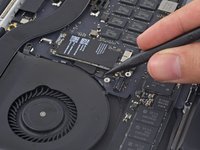
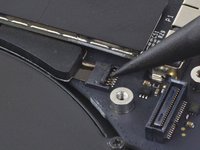
    • Use the tip of a spudger to flip up the retaining flap on the right fan ribbon cable ZIF socket.

    • Be sure you are prying up on the hinged retaining flap, not the socket itself.

    crwdns2952109:0crwdne2952109:0

    crwdns2917038:0crwdne2917038:0

  16. MacBook Pro 15" Retina Display Mid 2015 Right Fan Replacement: crwdns2935265:016crwdnd2935265:01crwdnd2935265:02crwdne2935265:0 MacBook Pro 15" Retina Display Mid 2015 Right Fan Replacement: crwdns2935265:016crwdnd2935265:02crwdnd2935265:02crwdne2935265:0
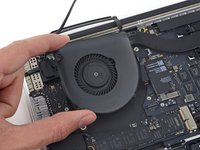
    • Lift the fan and push it gently towards the back edge of the MacBook to free the fan cable from its socket.

    • The fan cable may be adhered to the logic board—to avoid tearing the cable, gently peel it up while lifting the fan.

    • Remove the fan.

    crwdns2952109:0crwdne2952109:0

    crwdns2917038:0crwdne2917038:0

crwdns2915888:0crwdne2915888:0

To reassemble your device, follow these instructions in reverse order.

crwdns2935221:0crwdne2935221:0

crwdns2935229:047crwdne2935229:0

Andrew Optimus Goldheart

crwdns2935283:010/17/09crwdne2935283:0

515,196 crwdns2915208:0crwdne2915208:0

crwdns2935297:0407crwdne2935297:0

crwdns2935287:0crwdne2935287:0

iFixit crwdns2935289:0iFixitcrwdne2935289:0

Staff

crwdns2931471:0122crwdne2931471:0

crwdns2935297:026,617crwdne2935297:0

crwdns2947412:07crwdne2947412:0

Great tutorial. I did not notice the screw length in the beginning. Thanks. :)

Strange noise came out of my mac. I found a screw on my right fan fell off and got stuck in the right fan.

James Bond - crwdns2934203:0crwdne2934203:0 crwdns2950251:0crwdne2950251:0
Complimenti davvero, una guida veramente ben fatta. Il mio mac ringrazia :)

Gianluca Bruno - crwdns2934203:0crwdne2934203:0 crwdns2950251:0crwdne2950251:0
completed my first mac repair ever, so excited.

Franklin Byaruhanga - crwdns2934203:0crwdne2934203:0 crwdns2950251:0crwdne2950251:0

I was hearing a strange buzzing / grinding noise coming from my right speaker. After ensuring it wasn’t the speakers, I realized it was the fan (would only start making the noise when the fans were kicking into high gear). I opened it up and found that one of the screws on the right fan wasn’t attached to the logic board: Step 14, top right screw (orange) attaches to a silver nut (?) which should be attached to the logic board. The adhesive that attaches the nut to the logic board had detached! Gotta find what type of adhesive I need to get for this, but putting this here for anyone with a similar problem.

Rachel - crwdns2934203:0crwdne2934203:0 crwdns2950251:0crwdne2950251:0

Thank you so much - I used this to access and clean (but not replace) the fan.

CCC - crwdns2934203:0crwdne2934203:0 crwdns2950251:0crwdne2950251:0

crwdns2917038:0crwdne2917038:0

crwdns2936625:0crwdne2936625:0:

crwdns2936751:024crwdne2936751:0 4

crwdns2936753:07crwdne2936753:0 43

crwdns2936753:030crwdne2936753:0 221

crwdns2942667:0crwdne2942667:0 56,413