crwdns2933423:0crwdne2933423:0
crwdns2947577:0crwdnd2947577:0crwdne2947577:0

MacBook Pro 15" Retina Display Mid 2015 Feet Replacement

crwdns2942213:0crwdne2942213:0

    1. MacBook Pro 15" Retina Display Mid 2015 Feet Replacement, Lower Case: crwdns2935265:01crwdnd2935265:01crwdnd2935265:01crwdne2935265:0
      • Remove the following P5 pentalobe screws securing the lower case to the MacBook Pro:

      • Eight 3.1 mm

      • Two 2.3 mm

      crwdns2952109:0crwdne2952109:0

      crwdns2917038:0crwdne2917038:0

    2. MacBook Pro 15" Retina Display Mid 2015 Feet Replacement: crwdns2935265:02crwdnd2935265:01crwdnd2935265:02crwdne2935265:0 MacBook Pro 15" Retina Display Mid 2015 Feet Replacement: crwdns2935265:02crwdnd2935265:02crwdnd2935265:02crwdne2935265:0
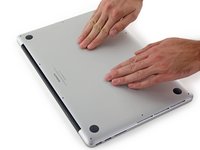
      • Lifting from the edge nearest the clutch cover, lift the lower case off the MacBook Pro.

      crwdns2952109:0crwdne2952109:0

      crwdns2917038:0crwdne2917038:0

    3. MacBook Pro 15" Retina Display Mid 2015 Feet Replacement: crwdns2935265:03crwdnd2935265:01crwdnd2935265:03crwdne2935265:0 MacBook Pro 15" Retina Display Mid 2015 Feet Replacement: crwdns2935265:03crwdnd2935265:02crwdnd2935265:03crwdne2935265:0 MacBook Pro 15" Retina Display Mid 2015 Feet Replacement: crwdns2935265:03crwdnd2935265:03crwdnd2935265:03crwdne2935265:0
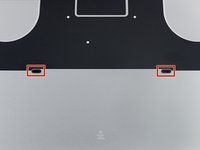
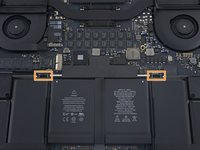
      • The lower case has two plastic pegs (red) that fit into plastic clips in the upper case (orange).

      • During reassembly, gently push down the center of the lower case to reattach the case to its two plastic clips.

      crwdns2952109:0crwdne2952109:0

      crwdns2917038:0crwdne2917038:0

    1. MacBook Pro 15" Retina Display Mid 2015 Feet Replacement, Feet: crwdns2935265:04crwdnd2935265:01crwdnd2935265:02crwdne2935265:0 MacBook Pro 15" Retina Display Mid 2015 Feet Replacement, Feet: crwdns2935265:04crwdnd2935265:02crwdnd2935265:02crwdne2935265:0
      • Peel away any stickers from the backside of the rear case covering the feet you have chosen to replace.

      • Any stickers you remove will most likely be unsalvageable for re-use. That's okay! Your MacBook does not need them to function.

      crwdns2952109:0crwdne2952109:0

      crwdns2917038:0crwdne2917038:0

    2. MacBook Pro 15" Retina Display Mid 2015 Feet Replacement: crwdns2935265:05crwdnd2935265:01crwdnd2935265:02crwdne2935265:0 MacBook Pro 15" Retina Display Mid 2015 Feet Replacement: crwdns2935265:05crwdnd2935265:02crwdnd2935265:02crwdne2935265:0
      crwdns2935267:0crwdne2935267:0
      Tweezers
      $4.99
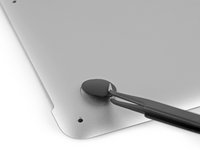
      • Remove any broken or damaged feet.

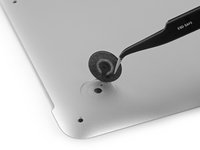
      • If the foot you are replacing is still intact, you can use your tweezers push it out from the inside.

      • If the old foot is difficult to remove, use a hair dryer or a heat gun to apply some heat to the area and loosen the adhesive.

      crwdns2952109:0crwdne2952109:0

      crwdns2917038:0crwdne2917038:0

    3. MacBook Pro 15" Retina Display Mid 2015 Feet Replacement: crwdns2935265:06crwdnd2935265:01crwdnd2935265:01crwdne2935265:0
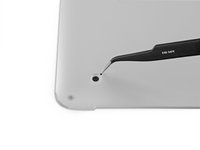
      • Scrub the foot cavity with adhesive remover to remove any remaining adhesive.

      crwdns2952109:0crwdne2952109:0

      crwdns2917038:0crwdne2917038:0

    4. MacBook Pro 15" Retina Display Mid 2015 Feet Replacement: crwdns2935265:07crwdnd2935265:01crwdnd2935265:01crwdne2935265:0
      • Wipe the foot cavity with an isopropyl alcohol prep pad to remove any cleaner residue and prep the area for the adhesive on the new foot.

      crwdns2952109:0crwdne2952109:0

      crwdns2917038:0crwdne2917038:0

    5. MacBook Pro 15" Retina Display Mid 2015 Feet Replacement: crwdns2935265:08crwdnd2935265:01crwdnd2935265:01crwdne2935265:0
      • Peel a replacement foot from the plastic backing.

      • The adhesive is fairly strong—make sure that you are peeling the foot up, not tearing the plastic backing.

      crwdns2952109:0crwdne2952109:0

      crwdns2917038:0crwdne2917038:0

    6. MacBook Pro 15" Retina Display Mid 2015 Feet Replacement: crwdns2935265:09crwdnd2935265:01crwdnd2935265:03crwdne2935265:0 MacBook Pro 15" Retina Display Mid 2015 Feet Replacement: crwdns2935265:09crwdnd2935265:02crwdnd2935265:03crwdne2935265:0 MacBook Pro 15" Retina Display Mid 2015 Feet Replacement: crwdns2935265:09crwdnd2935265:03crwdnd2935265:03crwdne2935265:0
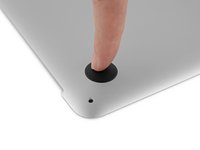
      • Align the new foot inside the cavity.

      • Make sure the alignment nub on the foot is lined up with the small hole near the perimeter of the pad.

      • You may want to use a pencil to lightly mark where the alignment nub is located. Be careful not to scratch the lower case with your pencil.

      • Lay the foot down while keeping it properly aligned.

      • Check for proper alignment from the inside of the case. The alignment nub should be slightly visible through the alignment hole.

      crwdns2952109:0crwdne2952109:0

      crwdns2917038:0crwdne2917038:0

    7. MacBook Pro 15" Retina Display Mid 2015 Feet Replacement: crwdns2935265:010crwdnd2935265:01crwdnd2935265:02crwdne2935265:0 MacBook Pro 15" Retina Display Mid 2015 Feet Replacement: crwdns2935265:010crwdnd2935265:02crwdnd2935265:02crwdne2935265:0
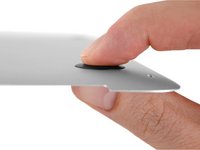
      • Press the new foot into place firmly with your finger, then apply pressure by pinching the foot from either side of the case with your finger and your thumb.

      • Maintain pressure for 30 seconds to set the pressure-sensitive adhesive.

      • Repeat the last seven steps for any remaining broken or worn feet.

      crwdns2952109:0crwdne2952109:0

      crwdns2917038:0crwdne2917038:0

crwdns2915888:0crwdne2915888:0

To reassemble your device, follow these instructions in reverse order.

crwdns2935221:0crwdne2935221:0

crwdns2935229:025crwdne2935229:0

Taylor Dixon

crwdns2935283:006/26/18crwdne2935283:0

72,876 crwdns2915208:0crwdne2915208:0

crwdns2935297:094crwdne2935297:0

crwdns2947412:00crwdne2947412:0

crwdns2917038:0crwdne2917038:0

crwdns2936625:0crwdne2936625:0:

crwdns2936751:024crwdne2936751:0 3

crwdns2936753:07crwdne2936753:0 43

crwdns2936753:030crwdne2936753:0 162

crwdns2942667:0crwdne2942667:0 22,340