crwdns2933423:0crwdne2933423:0
crwdns2947577:0crwdnd2947577:0crwdne2947577:0

MacBook Pro 15" Retina Display Mid 2015 Display Assembly Replacement

crwdns2942213:0crwdne2942213:0

  1. MacBook Pro 15" Retina Display Mid 2015 Display Assembly Replacement, Lower Case: crwdns2935265:01crwdnd2935265:01crwdnd2935265:01crwdne2935265:0
    • Remove the following P5 pentalobe screws securing the lower case to the MacBook Pro:

    • Eight 3.1 mm

    • Two 2.3 mm

    crwdns2952109:0crwdne2952109:0

    crwdns2917038:0crwdne2917038:0

  2. MacBook Pro 15" Retina Display Mid 2015 Display Assembly Replacement: crwdns2935265:02crwdnd2935265:01crwdnd2935265:02crwdne2935265:0 MacBook Pro 15" Retina Display Mid 2015 Display Assembly Replacement: crwdns2935265:02crwdnd2935265:02crwdnd2935265:02crwdne2935265:0
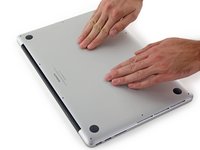
    • Lifting from the edge nearest the clutch cover, lift the lower case off the MacBook Pro.

    crwdns2952109:0crwdne2952109:0

    crwdns2917038:0crwdne2917038:0

  3. MacBook Pro 15" Retina Display Mid 2015 Display Assembly Replacement: crwdns2935265:03crwdnd2935265:01crwdnd2935265:03crwdne2935265:0 MacBook Pro 15" Retina Display Mid 2015 Display Assembly Replacement: crwdns2935265:03crwdnd2935265:02crwdnd2935265:03crwdne2935265:0 MacBook Pro 15" Retina Display Mid 2015 Display Assembly Replacement: crwdns2935265:03crwdnd2935265:03crwdnd2935265:03crwdne2935265:0
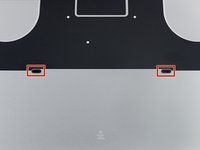
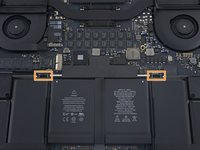
    • The lower case has two plastic pegs (red) that fit into plastic clips in the upper case (orange).

    • During reassembly, gently push down the center of the lower case to reattach the case to its two plastic clips.

    crwdns2952109:0crwdne2952109:0

    crwdns2917038:0crwdne2917038:0

  4. MacBook Pro 15" Retina Display Mid 2015 Display Assembly Replacement, Battery Connector: crwdns2935265:04crwdnd2935265:01crwdnd2935265:01crwdne2935265:0
    • Peel back the sticker covering the battery connector.

    crwdns2952109:0crwdne2952109:0

    crwdns2917038:0crwdne2917038:0

  5. MacBook Pro 15" Retina Display Mid 2015 Display Assembly Replacement: crwdns2935265:05crwdnd2935265:01crwdnd2935265:03crwdne2935265:0 MacBook Pro 15" Retina Display Mid 2015 Display Assembly Replacement: crwdns2935265:05crwdnd2935265:02crwdnd2935265:03crwdne2935265:0 MacBook Pro 15" Retina Display Mid 2015 Display Assembly Replacement: crwdns2935265:05crwdnd2935265:03crwdnd2935265:03crwdne2935265:0
    • Gently lift each side of the battery connector to pry the connector out of its socket on the logic board.

    • Bend the connector back toward the battery, ensuring that the battery connector doesn't accidentally make contact with the logic board.

    crwdns2952109:0crwdne2952109:0

    crwdns2917038:0crwdne2917038:0

  6. MacBook Pro 15" Retina Display Mid 2015 Display Assembly Replacement, AirPort/Camera Cables: crwdns2935265:06crwdnd2935265:01crwdnd2935265:03crwdne2935265:0 MacBook Pro 15" Retina Display Mid 2015 Display Assembly Replacement, AirPort/Camera Cables: crwdns2935265:06crwdnd2935265:02crwdnd2935265:03crwdne2935265:0 MacBook Pro 15" Retina Display Mid 2015 Display Assembly Replacement, AirPort/Camera Cables: crwdns2935265:06crwdnd2935265:03crwdnd2935265:03crwdne2935265:0
    crwdns2935267:0crwdne2935267:0
    Tweezers
    $4.99
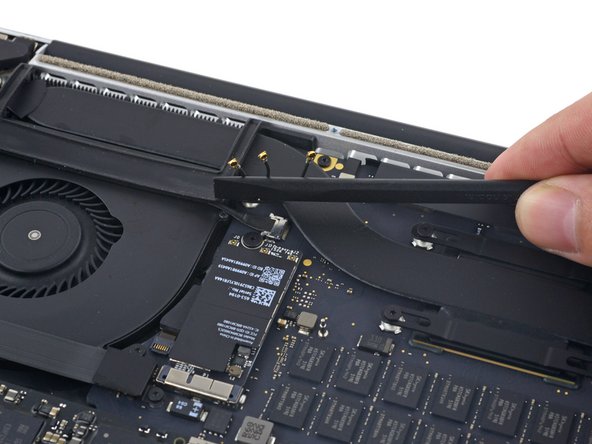
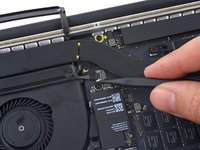
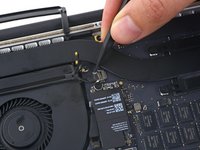
    • Use a spudger or tweezers to pry the three AirPort antenna cables straight up off of their sockets on the AirPort board, and bend them up and out of the way.

    • The cable connection points are very fragile. Be careful to lift only on the connector, and not on the socket or cable.

    • To reconnect, align the connector carefully into position over the socket, and press it down firmly with the flat of your spudger.

    crwdns2952109:0crwdne2952109:0

    crwdns2917038:0crwdne2917038:0

  7. MacBook Pro 15" Retina Display Mid 2015 Display Assembly Replacement: crwdns2935265:07crwdnd2935265:01crwdnd2935265:02crwdne2935265:0 MacBook Pro 15" Retina Display Mid 2015 Display Assembly Replacement: crwdns2935265:07crwdnd2935265:02crwdnd2935265:02crwdne2935265:0
    • Peel the right rubber cover up off the fan and fold it out of the way.

    crwdns2952109:0crwdne2952109:0

    crwdns2917038:0crwdne2917038:0

  8. MacBook Pro 15" Retina Display Mid 2015 Display Assembly Replacement: crwdns2935265:08crwdnd2935265:01crwdnd2935265:02crwdne2935265:0 MacBook Pro 15" Retina Display Mid 2015 Display Assembly Replacement: crwdns2935265:08crwdnd2935265:02crwdnd2935265:02crwdne2935265:0
    • Use the tip of a spudger to push the camera cable connector out of its socket on the logic board.

    • Be sure to push parallel to the board, pushing first on one side, then the other to "walk" the connector out of its socket.

    crwdns2952109:0crwdne2952109:0

    crwdns2917038:0crwdne2917038:0

  9. MacBook Pro 15" Retina Display Mid 2015 Display Assembly Replacement: crwdns2935265:09crwdnd2935265:01crwdnd2935265:03crwdne2935265:0 MacBook Pro 15" Retina Display Mid 2015 Display Assembly Replacement: crwdns2935265:09crwdnd2935265:02crwdnd2935265:03crwdne2935265:0 MacBook Pro 15" Retina Display Mid 2015 Display Assembly Replacement: crwdns2935265:09crwdnd2935265:03crwdnd2935265:03crwdne2935265:0
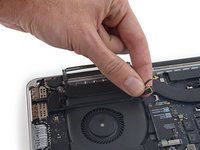
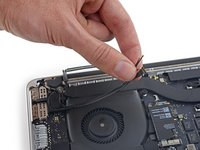
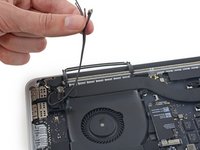
    • Use your fingers to pull the AirPort/Camera cables up off the fan.

    • The cables are adhered to the fan, so peel them up carefully to avoid damaging them.

    • Carefully de-route the cables from the plastic cable guide.

    • On reassembly, there should be enough adhesive still on these cables to stick them back down to the fan.

    crwdns2952109:0crwdne2952109:0

    crwdns2917038:0crwdne2917038:0

  10. MacBook Pro 15" Retina Display Mid 2015 Display Assembly Replacement, Display Assembly: crwdns2935265:010crwdnd2935265:01crwdnd2935265:03crwdne2935265:0 MacBook Pro 15" Retina Display Mid 2015 Display Assembly Replacement, Display Assembly: crwdns2935265:010crwdnd2935265:02crwdnd2935265:03crwdne2935265:0 MacBook Pro 15" Retina Display Mid 2015 Display Assembly Replacement, Display Assembly: crwdns2935265:010crwdnd2935265:03crwdnd2935265:03crwdne2935265:0
    • Use the tip of a spudger to flip up the display data cable lock and rotate it toward the MagSafe 2 power port side of the computer.

    • Pull the display data cable straight out of its socket on the logic board.

    • Do not lift up on the display data cable, as its socket is very fragile. Pull the cable parallel to the face of the logic board.

    • Do not touch the contacts on the data connector or its socket with your fingers or any tools, as you may deposit oils or damage the pins.

    crwdns2952109:0crwdne2952109:0

    crwdns2917038:0crwdne2917038:0

  11. MacBook Pro 15" Retina Display Mid 2015 Display Assembly Replacement: crwdns2935265:011crwdnd2935265:01crwdnd2935265:02crwdne2935265:0 MacBook Pro 15" Retina Display Mid 2015 Display Assembly Replacement: crwdns2935265:011crwdnd2935265:02crwdnd2935265:02crwdne2935265:0
    • Remove the two rubber hinge covers.

    crwdns2952109:0crwdne2952109:0

    crwdns2917038:0crwdne2917038:0

  12. MacBook Pro 15" Retina Display Mid 2015 Display Assembly Replacement: crwdns2935265:012crwdnd2935265:01crwdnd2935265:02crwdne2935265:0 MacBook Pro 15" Retina Display Mid 2015 Display Assembly Replacement: crwdns2935265:012crwdnd2935265:02crwdnd2935265:02crwdne2935265:0
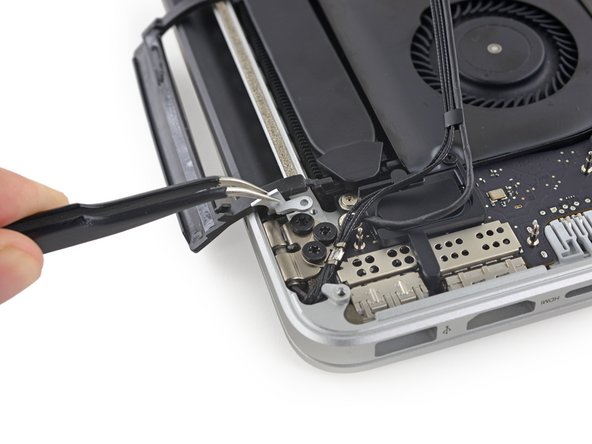
    • Remove the two 3.2 mm T5 Torx screws securing the aluminum hinge covers to the upper case.

    crwdns2952109:0crwdne2952109:0

    crwdns2917038:0crwdne2917038:0

  13. MacBook Pro 15" Retina Display Mid 2015 Display Assembly Replacement: crwdns2935265:013crwdnd2935265:01crwdnd2935265:03crwdne2935265:0 MacBook Pro 15" Retina Display Mid 2015 Display Assembly Replacement: crwdns2935265:013crwdnd2935265:02crwdnd2935265:03crwdne2935265:0 MacBook Pro 15" Retina Display Mid 2015 Display Assembly Replacement: crwdns2935265:013crwdnd2935265:03crwdnd2935265:03crwdne2935265:0
    • Remove the two aluminum hinge covers from the MacBook Pro.

    crwdns2952109:0crwdne2952109:0

    crwdns2917038:0crwdne2917038:0

  14. MacBook Pro 15" Retina Display Mid 2015 Display Assembly Replacement: crwdns2935265:014crwdnd2935265:01crwdnd2935265:02crwdne2935265:0 MacBook Pro 15" Retina Display Mid 2015 Display Assembly Replacement: crwdns2935265:014crwdnd2935265:02crwdnd2935265:02crwdne2935265:0
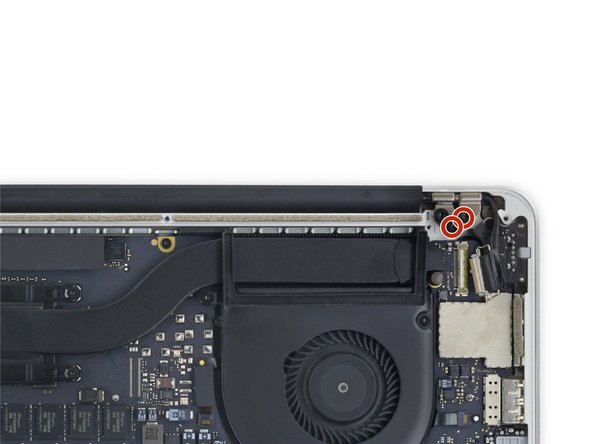
    • Remove four out of the six 5.3 mm T8 Torx screws securing the display to the upper case.

    • Leave the innermost screws (one from each hinge) in place.

    • When reassembling, be sure the two screws going back into the hinge on the left go back through the webcam/AirPort cable bracket.

    crwdns2952109:0crwdne2952109:0

    crwdns2917038:0crwdne2917038:0

  15. MacBook Pro 15" Retina Display Mid 2015 Display Assembly Replacement: crwdns2935265:015crwdnd2935265:01crwdnd2935265:01crwdne2935265:0
    • Open the MacBook Pro approximately 110 degrees, and place it sideways on the table, as shown.

    crwdns2952109:0crwdne2952109:0

    crwdns2917038:0crwdne2917038:0

  16. MacBook Pro 15" Retina Display Mid 2015 Display Assembly Replacement: crwdns2935265:016crwdnd2935265:01crwdnd2935265:01crwdne2935265:0
    • While holding the display and upper case together with your left hand, remove the remaining T8 Torx screw from the lower (closer to the table) display bracket.

    crwdns2952109:0crwdne2952109:0

    crwdns2917038:0crwdne2917038:0

  17. MacBook Pro 15" Retina Display Mid 2015 Display Assembly Replacement: crwdns2935265:017crwdnd2935265:01crwdnd2935265:01crwdne2935265:0
    • Be sure to hold the display and upper case together with your left hand. Failure to do so may cause the freed display/upper case to fall, potentially damaging each component.

    • While holding the display and upper case together with your left hand, remove the remaining T8 Torx screw from the upper display bracket.

    crwdns2952109:0crwdne2952109:0

    crwdns2917038:0crwdne2917038:0

  18. MacBook Pro 15" Retina Display Mid 2015 Display Assembly Replacement: crwdns2935265:018crwdnd2935265:01crwdnd2935265:03crwdne2935265:0 MacBook Pro 15" Retina Display Mid 2015 Display Assembly Replacement: crwdns2935265:018crwdnd2935265:02crwdnd2935265:03crwdne2935265:0 MacBook Pro 15" Retina Display Mid 2015 Display Assembly Replacement: crwdns2935265:018crwdnd2935265:03crwdnd2935265:03crwdne2935265:0
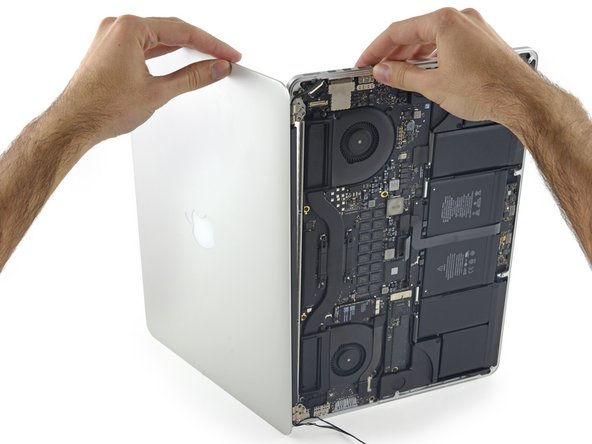
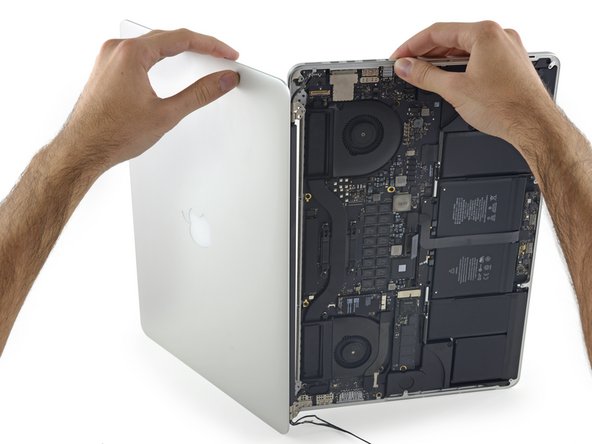
    • Grip both halves of the device, one in each hand.

    • Gently push forward on the bottom half of the device to detach it from the display assembly.

    • Carefully set each component aside, making sure to set down the bottom half keyboard-side down to avoid damaging internal components.

    • Replacement displays may not have their hinges adjusted to the correct angle. Use needle nose pliers to gently adjust them to match the hinges on the display being replaced.

    crwdns2952109:0crwdne2952109:0

    crwdns2917038:0crwdne2917038:0

crwdns2915888:0crwdne2915888:0

To reassemble your device, follow these instructions in reverse order.

crwdns2935221:0crwdne2935221:0

crwdns2935229:0161crwdne2935229:0

Andrew Optimus Goldheart

crwdns2935283:010/17/09crwdne2935283:0

515,142 crwdns2915208:0crwdne2915208:0

crwdns2935297:0407crwdne2935297:0

crwdns2935287:0crwdne2935287:0

iFixit crwdns2935289:0iFixitcrwdne2935289:0

Staff

crwdns2931471:0122crwdne2931471:0

crwdns2935297:026,456crwdne2935297:0

crwdns2947412:058crwdne2947412:0

Can the clutch be replaced in the 2015 15" Retina MacBook Pro?

Thomas Taggart - crwdns2934203:0crwdne2934203:0 crwdns2950251:0crwdne2950251:0
Successfully replaced screen and everything is working great. One mechanical exception - the black clutch cover is loose on one side (the left side looking at the keyboard). i can "lift it" towards myself. it wasn't obvious while i was in there that there was a step to "hook it" into anything. what has it let go from and how do i go about ensuring that it's secure when it's flipped? Anyone know?
Thnaks!

J Allard - crwdns2934203:0crwdne2934203:0 crwdns2950251:0crwdne2950251:0

Thank you! These instructions couldn't be better.

Devin Fredericks - crwdns2934203:0crwdne2934203:0 crwdns2950251:0crwdne2950251:0

Do you have any intention of releasing a guide for the new A1707 2016 pro retina model with touch bar? Thanks for your help.

Michael Moore - crwdns2934203:0crwdne2934203:0 crwdns2950251:0crwdne2950251:0

crwdns2917038:0crwdne2917038:0

crwdns2936625:0crwdne2936625:0:

crwdns2936751:024crwdne2936751:0 14

crwdns2936753:07crwdne2936753:0 115

crwdns2936753:030crwdne2936753:0 559

crwdns2942667:0crwdne2942667:0 251,840