crwdns2933423:0crwdne2933423:0
crwdns2947577:0crwdnd2947577:0crwdne2947577:0

MacBook Pro 15" Retina Display Mid 2014 IO Board Cable Replacement

crwdns2942213:0crwdne2942213:0

  1. MacBook Pro 15" Retina Display Mid 2014 IO Board Cable Replacement, Lower Case: crwdns2935265:01crwdnd2935265:01crwdnd2935265:01crwdne2935265:0
    • Remove the following P5 pentalobe screws securing the lower case to the MacBook Pro:

    • Eight 3.0 mm

    • Two 2.3 mm

    crwdns2952109:0crwdne2952109:0

    crwdns2917038:0crwdne2917038:0

  2. MacBook Pro 15" Retina Display Mid 2014 IO Board Cable Replacement: crwdns2935265:02crwdnd2935265:01crwdnd2935265:01crwdne2935265:0
    • Lifting from the edge nearest the clutch cover, lift the lower case off the MacBook Pro.

    • Set the lower case aside.

    crwdns2952109:0crwdne2952109:0

    crwdns2917038:0crwdne2917038:0

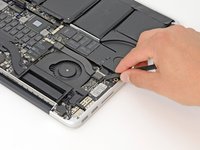
  3. MacBook Pro 15" Retina Display Mid 2014 IO Board Cable Replacement, Battery Connector: crwdns2935265:03crwdnd2935265:01crwdnd2935265:01crwdne2935265:0
    • Peel back the warning label covering the battery connector.

    crwdns2952109:0crwdne2952109:0

    crwdns2917038:0crwdne2917038:0

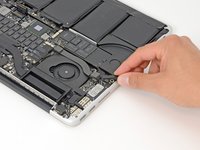
  4. MacBook Pro 15" Retina Display Mid 2014 IO Board Cable Replacement: crwdns2935265:04crwdnd2935265:01crwdnd2935265:02crwdne2935265:0 MacBook Pro 15" Retina Display Mid 2014 IO Board Cable Replacement: crwdns2935265:04crwdnd2935265:02crwdnd2935265:02crwdne2935265:0
    • Using the flat end of a spudger, gently pry the battery connector straight up out of its socket on the logic board.

    • Bend the battery cables back and out of the way, ensuring that the battery connector doesn't accidentally make contact with the logic board.

    crwdns2952109:0crwdne2952109:0

    crwdns2917038:0crwdne2917038:0

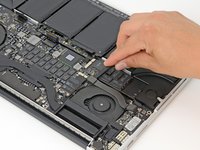
  5. MacBook Pro 15" Retina Display Mid 2014 IO Board Cable Replacement, I/O Board Cable: crwdns2935265:05crwdnd2935265:01crwdnd2935265:03crwdne2935265:0 MacBook Pro 15" Retina Display Mid 2014 IO Board Cable Replacement, I/O Board Cable: crwdns2935265:05crwdnd2935265:02crwdnd2935265:03crwdne2935265:0 MacBook Pro 15" Retina Display Mid 2014 IO Board Cable Replacement, I/O Board Cable: crwdns2935265:05crwdnd2935265:03crwdnd2935265:03crwdne2935265:0
    • Using the flat end of a spudger, pry the I/O board cable straight up out of its socket on the I/O board.

    • In a similar fashion, remove the I/O board cable from its socket on the I/O board.

    crwdns2952109:0crwdne2952109:0

    crwdns2917038:0crwdne2917038:0

  6. MacBook Pro 15" Retina Display Mid 2014 IO Board Cable Replacement: crwdns2935265:06crwdnd2935265:01crwdnd2935265:01crwdne2935265:0
    • Remove the I/O board cable from the MacBook Pro.

    crwdns2952109:0crwdne2952109:0

    crwdns2917038:0crwdne2917038:0

crwdns2915888:0crwdne2915888:0

To reassemble your device, follow these instructions in reverse order.

crwdns2935221:0crwdne2935221:0

crwdns2935227:0crwdne2935227:0

Andrew Optimus Goldheart

crwdns2935283:010/17/09crwdne2935283:0

515,224 crwdns2915208:0crwdne2915208:0

crwdns2935297:0407crwdne2935297:0

crwdns2935287:0crwdne2935287:0

iFixit crwdns2935289:0iFixitcrwdne2935289:0

Staff

crwdns2931471:0122crwdne2931471:0

crwdns2935297:027,491crwdne2935297:0

crwdns2947412:00crwdne2947412:0

crwdns2917038:0crwdne2917038:0

crwdns2936625:0crwdne2936625:0:

crwdns2936751:024crwdne2936751:0 3

crwdns2936753:07crwdne2936753:0 7

crwdns2936753:030crwdne2936753:0 57

crwdns2942667:0crwdne2942667:0 7,108