crwdns2915892:0crwdne2915892:0
Replace the lower case in your MacBook Pro 13" Unibody Mid 2010.
crwdns2942213:0crwdne2942213:0
-
-
-
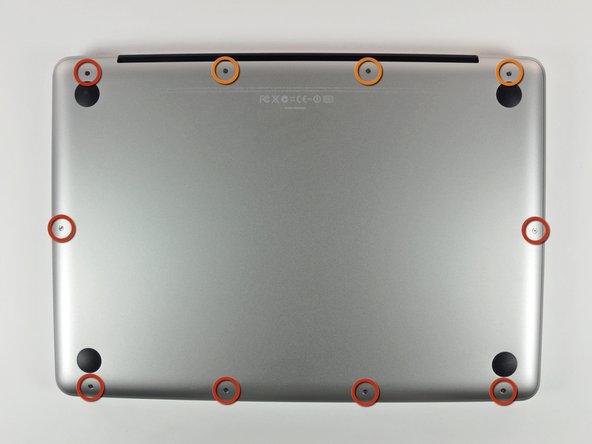
Remove the following 10 screws securing the lower case to the MacBook Pro 13" Unibody:
-
Seven 3 mm Phillips screws.
-
Three 13.5 mm Phillips screws.
 crwdns2952109:0crwdne2952109:0
-
-
-
-
Slightly lift the lower case and push it toward the rear of the computer to free the mounting tabs.
-
-

To reassemble your device, follow these instructions in reverse order.
crwdns2935221:0crwdne2935221:0
crwdns2935229:044crwdne2935229:0

crwdns2947410:01crwdne2947410:0
Those are actually not seven identical 3 mm screws. The screw located at the ventilation side next to the three 13.5 mm screws does not have a shaft as compared to the other six 3 mm screws.
glaubitz - crwdns2934203:0crwdne2934203:0 crwdns2950251:0crwdne2950251:0
