crwdns2933423:0crwdne2933423:0
crwdns2947577:0crwdnd2947577:0crwdne2947577:0

MacBook Pro 13" Unibody Early 2011 Optical Drive Replacement

crwdns2862623:0crwdne2862623:0
crwdns2948751:0crwdne2948751:0

crwdns2942213:0crwdne2942213:0

    1. MacBook Pro 13" Unibody Early 2011 Optical Drive Replacement, Optical Drive: crwdns2935265:01crwdnd2935265:01crwdnd2935265:01crwdne2935265:0
      • Use the flat end of a spudger to pry the AirPort/Bluetooth ribbon cable connector up from its socket on the logic board.

      crwdns2952109:0crwdne2952109:0

      crwdns2917038:0crwdne2917038:0

    2. MacBook Pro 13" Unibody Early 2011 Optical Drive Replacement: crwdns2935265:02crwdnd2935265:01crwdnd2935265:01crwdne2935265:0
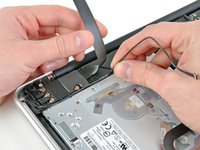
      • Carefully pull the camera cable out of its socket on the logic board.

      • Though not recommended by iFixit staff, some users opt to omit this step completely. For information on this, see the step comments.

      • Pull the cable parallel to the face of the logic board. Pulling it upward may damage the logic board or the cable itself.

      crwdns2952109:0crwdne2952109:0

      crwdns2917038:0crwdne2917038:0

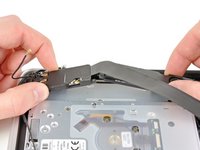
    3. MacBook Pro 13" Unibody Early 2011 Optical Drive Replacement: crwdns2935265:03crwdnd2935265:01crwdnd2935265:02crwdne2935265:0 MacBook Pro 13" Unibody Early 2011 Optical Drive Replacement: crwdns2935265:03crwdnd2935265:02crwdnd2935265:02crwdne2935265:0
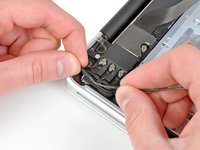
      • Carefully move the AirPort/Bluetooth ribbon cable out of the way as you peel the camera cable off the adhesive securing it to the subwoofer and the AirPort/Bluetooth bracket.

      • De-route the camera cable out from under the retaining finger molded into the AirPort/Bluetooth bracket.

      crwdns2952109:0crwdne2952109:0

      crwdns2917038:0crwdne2917038:0

    4. MacBook Pro 13" Unibody Early 2011 Optical Drive Replacement: crwdns2935265:04crwdnd2935265:01crwdnd2935265:02crwdne2935265:0 MacBook Pro 13" Unibody Early 2011 Optical Drive Replacement: crwdns2935265:04crwdnd2935265:02crwdnd2935265:02crwdne2935265:0
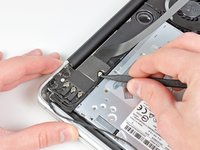
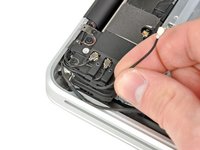
      • Use the tip of a spudger to pry the antenna connector closest to the logic board up from its socket on the AirPort/Bluetooth board.

      • De-route the antenna cable from under the finger molded into the AirPort/Bluetooth bracket.

      crwdns2952109:0crwdne2952109:0

      crwdns2917038:0crwdne2917038:0

    5. MacBook Pro 13" Unibody Early 2011 Optical Drive Replacement: crwdns2935265:05crwdnd2935265:01crwdnd2935265:01crwdne2935265:0
      • Use a Phillips #00 screwdriver to remove the following five screws:

      • Two 10.3 mm screws

      • Two 3.1 mm screws

      • One 5 mm screw

      crwdns2952109:0crwdne2952109:0

      crwdns2917038:0crwdne2917038:0

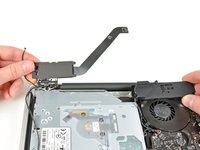
    6. MacBook Pro 13" Unibody Early 2011 Optical Drive Replacement: crwdns2935265:06crwdnd2935265:01crwdnd2935265:02crwdne2935265:0 MacBook Pro 13" Unibody Early 2011 Optical Drive Replacement: crwdns2935265:06crwdnd2935265:02crwdnd2935265:02crwdne2935265:0
      • Pull the AirPort/Bluetooth assembly and the Subwoofer upward near the center of the side of the optical drive until they clear each other.

      • Move the AirPort/Bluetooth assembly and the subwoofer away from the top of the optical drive.

      crwdns2952109:0crwdne2952109:0

      crwdns2917038:0crwdne2917038:0

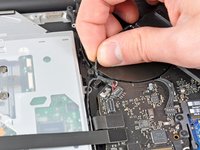
    7. MacBook Pro 13" Unibody Early 2011 Optical Drive Replacement: crwdns2935265:07crwdnd2935265:01crwdnd2935265:02crwdne2935265:0 MacBook Pro 13" Unibody Early 2011 Optical Drive Replacement: crwdns2935265:07crwdnd2935265:02crwdnd2935265:02crwdne2935265:0
      • Pull the right speaker/subwoofer cable out from under the retaining finger near the side of the optical drive.

      • Pull the right speaker/subwoofer cable upward to disconnect it from the logic board.

      crwdns2952109:0crwdne2952109:0

      crwdns2917038:0crwdne2917038:0

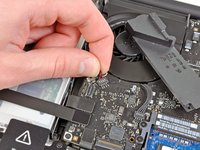
    8. MacBook Pro 13" Unibody Early 2011 Optical Drive Replacement: crwdns2935265:08crwdnd2935265:01crwdnd2935265:01crwdne2935265:0
      • Use the flat end of a spudger to pry the hard drive cable connector up from its socket on the logic board.

      • Bend the hard drive cable away from the optical drive.

      crwdns2952109:0crwdne2952109:0

      crwdns2917038:0crwdne2917038:0

    9. MacBook Pro 13" Unibody Early 2011 Optical Drive Replacement: crwdns2935265:09crwdnd2935265:01crwdnd2935265:01crwdne2935265:0
      • Use the flat end of a spudger to pry the optical drive connector up from its socket on the logic board.

      crwdns2952109:0crwdne2952109:0

      crwdns2917038:0crwdne2917038:0

    10. MacBook Pro 13" Unibody Early 2011 Optical Drive Replacement: crwdns2935265:010crwdnd2935265:01crwdnd2935265:01crwdne2935265:0
      • Remove the three 2.7 mm Phillips screws securing the optical drive to the upper case.

      crwdns2952109:0crwdne2952109:0

      crwdns2917038:0crwdne2917038:0

    11. MacBook Pro 13" Unibody Early 2011 Optical Drive Replacement: crwdns2935265:011crwdnd2935265:01crwdnd2935265:01crwdne2935265:0
      • Pull the optical drive upward from its edge closest to the display and remove it from the upper case.

      crwdns2952109:0crwdne2952109:0

      crwdns2917038:0crwdne2917038:0

crwdns2915888:0crwdne2915888:0

To reassemble your device, follow these instructions in reverse order.

crwdns2935221:0crwdne2935221:0

crwdns2947412:00crwdne2947412:0

crwdns2917038:0crwdne2917038:0

crwdns2936625:0crwdne2936625:0:

crwdns2936751:024crwdne2936751:0 2

crwdns2936753:07crwdne2936753:0 8

crwdns2936753:030crwdne2936753:0 26

crwdns2942667:0crwdne2942667:0 1,243