crwdns2933423:0crwdne2933423:0
crwdns2947577:0crwdnd2947577:0crwdne2947577:0

MacBook Pro 13" Retina Display Late 2012 Battery Connector Replacement

crwdns2862623:0crwdne2862623:0
crwdns2948751:0crwdne2948751:0

crwdns2942213:0crwdne2942213:0

    1. MacBook Pro 13" Retina Display Late 2012 Battery Connector Replacement, Battery Connector: crwdns2935265:01crwdnd2935265:01crwdnd2935265:01crwdne2935265:0
      • Remove the plastic cover adhered to the battery contact board.

      crwdns2952109:0crwdne2952109:0

      crwdns2917038:0crwdne2917038:0

    2. MacBook Pro 13" Retina Display Late 2012 Battery Connector Replacement: crwdns2935265:02crwdnd2935265:01crwdnd2935265:01crwdne2935265:0
      • Remove the following screws securing the battery connector board to the logic board:

      • Two 2.8 mm T6 Torx screws

      • One 7.0 mm T6 Torx shouldered screw

      crwdns2952109:0crwdne2952109:0

      crwdns2917038:0crwdne2917038:0

    3. MacBook Pro 13" Retina Display Late 2012 Battery Connector Replacement: crwdns2935265:03crwdnd2935265:01crwdnd2935265:02crwdne2935265:0 MacBook Pro 13" Retina Display Late 2012 Battery Connector Replacement: crwdns2935265:03crwdnd2935265:02crwdnd2935265:02crwdne2935265:0
      crwdns2935267:0crwdne2935267:0
      Tweezers
      $4.99
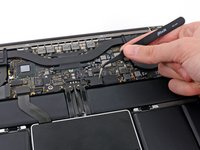
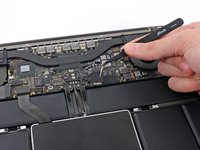
      • Use tweezers to remove the small plastic cover located near the bottom right of the battery connector board.

      crwdns2952109:0crwdne2952109:0

      crwdns2917038:0crwdne2917038:0

    4. MacBook Pro 13" Retina Display Late 2012 Battery Connector Replacement: crwdns2935265:04crwdnd2935265:01crwdnd2935265:01crwdne2935265:0
      • Remove the wide head 6.4 mm T6 Torx screw securing the battery connector to the logic board assembly.

      crwdns2952109:0crwdne2952109:0

      crwdns2917038:0crwdne2917038:0

    5. MacBook Pro 13" Retina Display Late 2012 Battery Connector Replacement: crwdns2935265:05crwdnd2935265:01crwdnd2935265:02crwdne2935265:0 MacBook Pro 13" Retina Display Late 2012 Battery Connector Replacement: crwdns2935265:05crwdnd2935265:02crwdnd2935265:02crwdne2935265:0
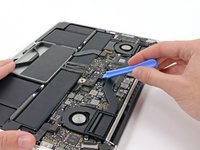
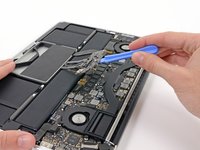
      • Carefully lift the battery connector board up off the logic board.

      • It is recommended to bend the battery cables just slightly, to keep the board suspended up above the logic board and out of the way.

      • Do not fold the board completely over, or crease the cables, as this may damage the battery.

      crwdns2952109:0crwdne2952109:0

      crwdns2917038:0crwdne2917038:0

crwdns2915888:0crwdne2915888:0

To reassemble your device, follow these instructions in reverse order.

crwdns2935221:0crwdne2935221:0

Walter Galan

711,205 crwdns2915208:0crwdne2915208:0

crwdns2935297:01,203crwdne2935297:0

crwdns2947412:00crwdne2947412:0

crwdns2917038:0crwdne2917038:0

crwdns2936625:0crwdne2936625:0:

crwdns2936751:024crwdne2936751:0 0

crwdns2936753:07crwdne2936753:0 2

crwdns2936753:030crwdne2936753:0 18

crwdns2942667:0crwdne2942667:0 739