crwdns2933423:0crwdne2933423:0
crwdns2947577:0crwdnd2947577:0crwdne2947577:0

MacBook Pro 13" Retina Display Early 2015 MagSafe DC-In Board Replacement

crwdns2942213:0crwdne2942213:0

    1. MacBook Pro 13" Retina Display Early 2015 MagSafe DC-In Board Replacement, Lower Case: crwdns2935265:01crwdnd2935265:01crwdnd2935265:01crwdne2935265:0
      crwdns2935267:0crwdne2935267:0
      Magnetic Project Mat
      $19.95
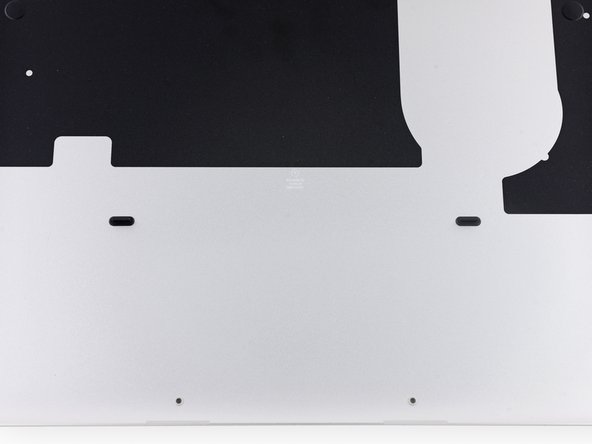
      • Remove the following ten screws securing the lower case to the upper case:

      • Two 2.3 mm P5 Pentalobe screws

      • Eight 3.0 mm P5 Pentalobe screws

      • Throughout this repair, keep track of each screw and make sure it goes back exactly where it came from to avoid damaging your device.

      crwdns2952109:0crwdne2952109:0

      crwdns2917038:0crwdne2917038:0

    2. MacBook Pro 13" Retina Display Early 2015 MagSafe DC-In Board Replacement: crwdns2935265:02crwdnd2935265:01crwdnd2935265:01crwdne2935265:0
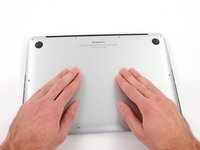
      • Wedge your fingers between the upper case and the lower case.

      • Gently pull the lower case away from the upper case to remove it.

      crwdns2952109:0crwdne2952109:0

      crwdns2917038:0crwdne2917038:0

    3. MacBook Pro 13" Retina Display Early 2015 MagSafe DC-In Board Replacement: crwdns2935265:03crwdnd2935265:01crwdnd2935265:02crwdne2935265:0 MacBook Pro 13" Retina Display Early 2015 MagSafe DC-In Board Replacement: crwdns2935265:03crwdnd2935265:02crwdnd2935265:02crwdne2935265:0
      • The lower case is connected to the upper case with two plastic clips near its center.

      • During reassembly, gently push down the center of the lower case to reattach the two plastic clips.

      crwdns2952109:0crwdne2952109:0

      crwdns2917038:0crwdne2917038:0

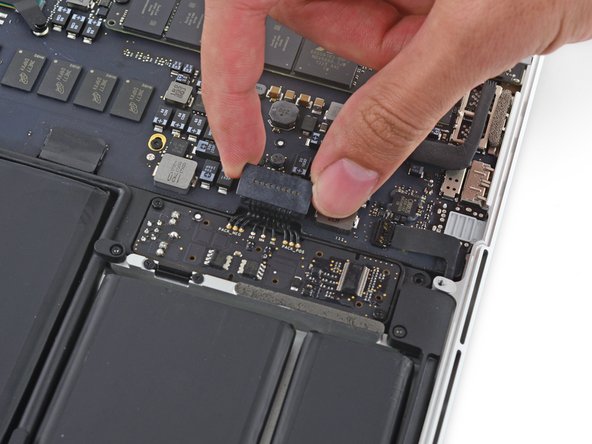
    1. MacBook Pro 13" Retina Display Early 2015 MagSafe DC-In Board Replacement, Battery Connector: crwdns2935265:04crwdnd2935265:01crwdnd2935265:01crwdne2935265:0
      • If necessary, remove the plastic cover adhered to the battery contact board.

      crwdns2952109:0crwdne2952109:0

      crwdns2917038:0crwdne2917038:0

    2. MacBook Pro 13" Retina Display Early 2015 MagSafe DC-In Board Replacement: crwdns2935265:05crwdnd2935265:01crwdnd2935265:02crwdne2935265:0 MacBook Pro 13" Retina Display Early 2015 MagSafe DC-In Board Replacement: crwdns2935265:05crwdnd2935265:02crwdnd2935265:02crwdne2935265:0
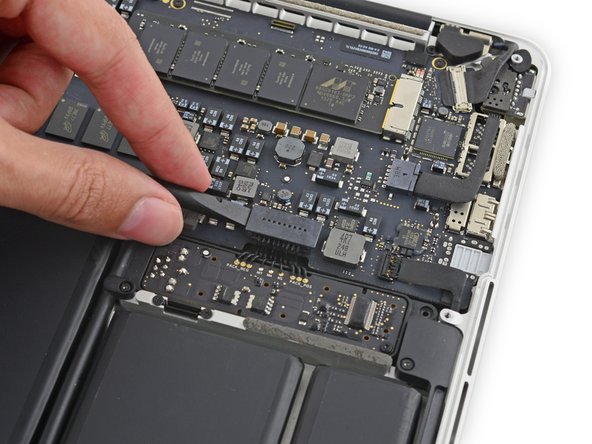
      • Use the flat end of a spudger to lift the battery connector straight up out of its socket on the logic board.

      • Be sure you lift up only on the connector itself, not the socket, or you risk permanent damage to the logic board.

      crwdns2952109:0crwdne2952109:0

      crwdns2917038:0crwdne2917038:0

    3. MacBook Pro 13" Retina Display Early 2015 MagSafe DC-In Board Replacement: crwdns2935265:06crwdnd2935265:01crwdnd2935265:01crwdne2935265:0
      • Bend the battery connector up out of the way to prevent accidental contact with its socket during your repair.

      crwdns2952109:0crwdne2952109:0

      crwdns2917038:0crwdne2917038:0

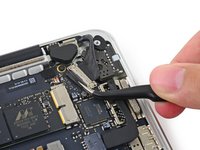
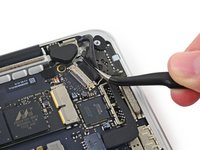
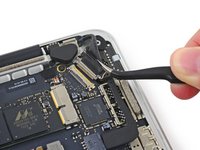
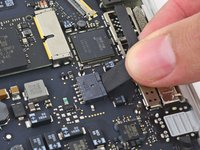
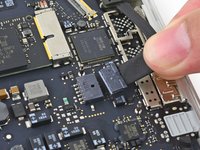
    1. MacBook Pro 13" Retina Display Early 2015 MagSafe DC-In Board Replacement, MagSafe DC-In Board: crwdns2935265:07crwdnd2935265:01crwdnd2935265:03crwdne2935265:0 MacBook Pro 13" Retina Display Early 2015 MagSafe DC-In Board Replacement, MagSafe DC-In Board: crwdns2935265:07crwdnd2935265:02crwdnd2935265:03crwdne2935265:0 MacBook Pro 13" Retina Display Early 2015 MagSafe DC-In Board Replacement, MagSafe DC-In Board: crwdns2935265:07crwdnd2935265:03crwdnd2935265:03crwdne2935265:0
      • Grab the black plastic tab to flip the display cable connector open and pull it straight out of its socket on the logic board.

      • Pull in the direction of the cable, parallel to the logic board. Do not pull up.

      crwdns2952109:0crwdne2952109:0

      crwdns2917038:0crwdne2917038:0

    2. MacBook Pro 13" Retina Display Early 2015 MagSafe DC-In Board Replacement: crwdns2935265:08crwdnd2935265:01crwdnd2935265:02crwdne2935265:0 MacBook Pro 13" Retina Display Early 2015 MagSafe DC-In Board Replacement: crwdns2935265:08crwdnd2935265:02crwdnd2935265:02crwdne2935265:0
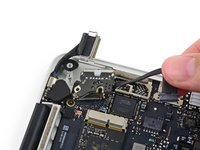
      • Pull the DC-In board connector straight out of its socket on the logic board.

      crwdns2952109:0crwdne2952109:0

      crwdns2917038:0crwdne2917038:0

    3. MacBook Pro 13" Retina Display Early 2015 MagSafe DC-In Board Replacement: crwdns2935265:09crwdnd2935265:01crwdnd2935265:01crwdne2935265:0
      • Remove the two 3.5 mm T5 Torx screws securing the MagSafe DC-In board to the upper case.

      • You may need to gently push the display cable out of the way to expose the screws.

      crwdns2952109:0crwdne2952109:0

      crwdns2917038:0crwdne2917038:0

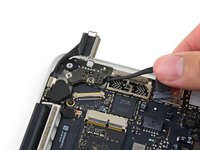
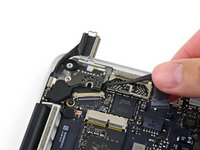
    4. MacBook Pro 13" Retina Display Early 2015 MagSafe DC-In Board Replacement: crwdns2935265:010crwdnd2935265:01crwdnd2935265:03crwdne2935265:0 MacBook Pro 13" Retina Display Early 2015 MagSafe DC-In Board Replacement: crwdns2935265:010crwdnd2935265:02crwdnd2935265:03crwdne2935265:0 MacBook Pro 13" Retina Display Early 2015 MagSafe DC-In Board Replacement: crwdns2935265:010crwdnd2935265:03crwdnd2935265:03crwdne2935265:0
      • Use the MagSafe DC-In board cable to pull the board out and up from the upper case to remove it.

      crwdns2952109:0crwdne2952109:0

      crwdns2917038:0crwdne2917038:0

crwdns2915888:0crwdne2915888:0

To reassemble your device, follow these instructions in reverse order.

crwdns2935221:0crwdne2935221:0

crwdns2935229:053crwdne2935229:0

Andrew Optimus Goldheart

crwdns2935283:010/17/09crwdne2935283:0

515.692 crwdns2915208:0crwdne2915208:0

crwdns2935297:0406crwdne2935297:0

crwdns2935287:0crwdne2935287:0

iFixit crwdns2935289:0iFixitcrwdne2935289:0

Staff

crwdns2931471:0122crwdne2931471:0

crwdns2935297:086.241crwdne2935297:0

crwdns2947412:07crwdne2947412:0

Since a few days the area around the MagSafe-DC is getting quite hot, regardless of wether the Mac is running or idle. Does this have anything to do with the MagSafe-DC? Any recommendations?

Nils Fenske - crwdns2934203:0crwdne2934203:0 crwdns2950251:0crwdne2950251:0

Hi Folks,

Just went through these very clear steps on replacing the DC-in board after the pins on my old one were burned.

First off, success…ish with the replacement and the mac is back to charging again in high spirits. However, I am now notified of a “service battery" beneath the charge drop down menu. In checking the system information, the battery is at a cycle count of 824.

I am not quite sure what to do at this point and appreciate any tips.

Best,

random guy on the internet

Joseph Van Linn - crwdns2934203:0crwdne2934203:0 crwdns2950251:0crwdne2950251:0

Hi there !
My mac won't charge the freshly replaced new battery... event tho it's running fine and recognized by the system...

I've been Changing the battery / Reseting SMC & NVRAM / Clean install on Monterey...


It still tells me :

Power source : power adapter
Battery is not charging


Do you think replacing the DC-in board would help ?

Thanks for your advices !

pulla - crwdns2934203:0crwdne2934203:0 crwdns2950251:0crwdne2950251:0

I’ve replaced my charging cables and battery. Will be replacing the charging port but if it still doesn’t charge … what might be the problem?

vp3130 - crwdns2934203:0crwdne2934203:0 crwdns2950251:0crwdne2950251:0

crwdns2917038:0crwdne2917038:0

crwdns2936625:0crwdne2936625:0:

crwdns2936751:024crwdne2936751:0 11

crwdns2936753:07crwdne2936753:0 73

crwdns2936753:030crwdne2936753:0 320

crwdns2942667:0crwdne2942667:0 39,330