crwdns2915892:0crwdne2915892:0
Use this guide to replace a dead or noisy fan.
crwdns2942213:0crwdne2942213:0
-
-
crwdns2935267:0crwdne2935267:0P5 Pentalobe Screwdriver Retina MacBook Pro and Air$5.99
-
Use a P5 Pentalobe driver to remove ten screws securing the lower case, of the following lengths:
-
Two 9 mm screws
-
Eight 2.6 mm screws
 crwdns2952109:0crwdne2952109:0
-
-
-
Wedge your fingers between the display and the lower case and pull upward to pop the lower case off the Air.
-
Remove the lower case and set it aside.
-
-
-
-
-
Grab the clear plastic pull tab attached to the battery connector and pull it toward the front edge of the Air to disconnect the battery from the logic board.
-
-
-
-
-
Use the flat end of a spudger to pry the I/O board cable connector upward out of its socket on the I/O board.
-
-
-
-
Carefully peel the I/O board cable from the top of the fan.
-
-
-
While gently pulling the I/O board cable upward near its connection to the logic board, use the tip of a spudger to pry upward on alternating sides of the connector to help "walk" it out of its socket.
-
Remove the I/O board cable.
-
-
-
-
-
Use the tip of a spudger to carefully flip up the retaining flap on the fan cable ZIF socket.
-
-
-
Peel the rubber gasket off the adhesive on the top of the fan.
-
-
-
Remove the following three screws securing the fan to the upper case:
-
One 3.6 mm T5 Torx screw
-
One 2.7 mm T5 Torx screw
-
One 3.6 mm T5 Torx screw with a short head
-
-
-
Lift the fan out of the upper case and carefully pull the fan ribbon cable out of its socket as you remove it from the Air.
-
-


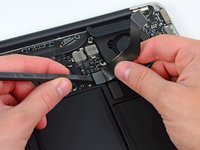
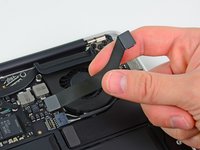


To reassemble your device, follow these instructions in reverse order.
crwdns2935221:0crwdne2935221:0
crwdns2935229:059crwdne2935229:0


crwdns2947412:04crwdne2947412:0
Great guide! Worked seamlessly! Big thumbs up!
Chris Strickland - crwdns2934203:0crwdne2934203:0 crwdns2950251:0crwdne2950251:0
The 13” mid 2012 requires a P4 Pentalobe screwdriver to remove case and change the fan.
The P5 is too large.
Mario Salas - crwdns2934203:0crwdne2934203:0 crwdns2950251:0crwdne2950251:0
MacBook Air 13" Mid 2012 repaired! Thank you for this great guide. I have used:
- Tournevis Pentalobe P5
- Tournevis Torx T5
- Halberd Spudger
- Spudger (carbon)
[deleted] - crwdns2934203:0crwdne2934203:0 crwdns2950251:0crwdne2950251:0
I recently replaced my battery (thanks to your awesome guidance and battery!). When I opened the cover, I saw that there was so much dust in there from over the years. I wiped off what I could and used a cotton swab to gently removed what I could. I noticed that there was tons and tons of dust on the inner ring of the fan. It seems to work but I have had issues with overheating. I am wondering whether I need to get a new fan or whether I can try cleaning the fan I have. If the latter, how do I do that? Should I just use one of those air cans that one uses for removing dust between keyboard keys? Or is there some other, better way to do it, without damaging anything?
Larisa Reznik - crwdns2934203:0crwdne2934203:0 crwdns2950251:0crwdne2950251:0
