crwdns2933423:0crwdne2933423:0
crwdns2947577:0crwdnd2947577:0crwdne2947577:0

MacBook Air 13" Mid 2011 Logic Board Replacement

crwdns2862623:0crwdne2862623:0
crwdns2948751:0crwdne2948751:0

crwdns2942213:0crwdne2942213:0

    1. MacBook Air 13" Mid 2011 Logic Board Replacement, Logic Board: crwdns2935265:01crwdnd2935265:01crwdnd2935265:02crwdne2935265:0 MacBook Air 13" Mid 2011 Logic Board Replacement, Logic Board: crwdns2935265:01crwdnd2935265:02crwdnd2935265:02crwdne2935265:0
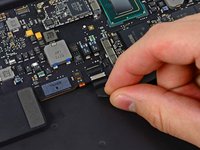
      • Use the tip of a spudger or your fingernail to flip up the retaining flap on the trackpad ribbon cable ZIF socket.

      • Be sure you are prying up on the hinged retaining flap, not the socket itself.

      • Pull the trackpad ribbon cable straight out of its socket toward the front edge of the Air.

      crwdns2952109:0crwdne2952109:0

      crwdns2917038:0crwdne2917038:0

    2. MacBook Air 13" Mid 2011 Logic Board Replacement: crwdns2935265:02crwdnd2935265:01crwdnd2935265:02crwdne2935265:0 MacBook Air 13" Mid 2011 Logic Board Replacement: crwdns2935265:02crwdnd2935265:02crwdnd2935265:02crwdne2935265:0
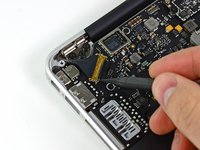
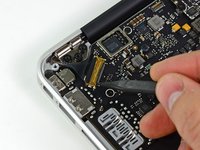
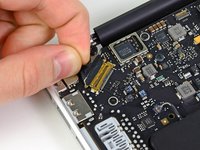
      • Use the tip of a spudger to flip up the retaining flap on the keyboard backlight ribbon cable ZIF socket.

      • Be sure you are prying up on the hinged retaining flap, not the socket itself.

      • Use your spudger to help pull the cable out of its socket.

      crwdns2952109:0crwdne2952109:0

      crwdns2917038:0crwdne2917038:0

    3. MacBook Air 13" Mid 2011 Logic Board Replacement: crwdns2935265:03crwdnd2935265:01crwdnd2935265:01crwdne2935265:0
      • Use the flat end of a spudger to pry the right speaker cable connector up and out of its socket on the logic board.

      • Pry up from beneath the cables.

      crwdns2952109:0crwdne2952109:0

      crwdns2917038:0crwdne2917038:0

    4. MacBook Air 13" Mid 2011 Logic Board Replacement: crwdns2935265:04crwdnd2935265:01crwdnd2935265:03crwdne2935265:0 MacBook Air 13" Mid 2011 Logic Board Replacement: crwdns2935265:04crwdnd2935265:02crwdnd2935265:03crwdne2935265:0 MacBook Air 13" Mid 2011 Logic Board Replacement: crwdns2935265:04crwdnd2935265:03crwdnd2935265:03crwdne2935265:0
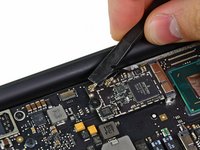
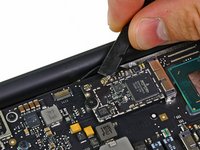
      • Gently push the tip of a spudger under the black plastic flap stuck to the display data cable lock to make the lock pop upward and away from the socket.

      • While holding the lock away from the socket, use the tip of a spudger and your fingers to gently remove the display data cable from its socket.

      • Do not pull upward on the display data cable as you disconnect it, as its socket may break off the logic board.

      crwdns2952109:0crwdne2952109:0

      crwdns2917038:0crwdne2917038:0

    5. MacBook Air 13" Mid 2011 Logic Board Replacement: crwdns2935265:05crwdnd2935265:01crwdnd2935265:02crwdne2935265:0 MacBook Air 13" Mid 2011 Logic Board Replacement: crwdns2935265:05crwdnd2935265:02crwdnd2935265:02crwdne2935265:0
      • Use the flat end of a spudger to pry both antenna cable connectors up and off their sockets on the AirPort/Bluetooth card.

      crwdns2952109:0crwdne2952109:0

      crwdns2917038:0crwdne2917038:0

    6. MacBook Air 13" Mid 2011 Logic Board Replacement: crwdns2935265:06crwdnd2935265:01crwdnd2935265:01crwdne2935265:0
      • Gently de-route the antenna cables from the slot cut into the logic board.

      crwdns2952109:0crwdne2952109:0

      crwdns2917038:0crwdne2917038:0

    7. MacBook Air 13" Mid 2011 Logic Board Replacement: crwdns2935265:07crwdnd2935265:01crwdnd2935265:01crwdne2935265:0
      • Remove the single 2.85 mm T5 Torx screw securing the SSD to the logic board.

      crwdns2952109:0crwdne2952109:0

      crwdns2917038:0crwdne2917038:0

    8. MacBook Air 13" Mid 2011 Logic Board Replacement: crwdns2935265:08crwdnd2935265:01crwdnd2935265:02crwdne2935265:0 MacBook Air 13" Mid 2011 Logic Board Replacement: crwdns2935265:08crwdnd2935265:02crwdnd2935265:02crwdne2935265:0
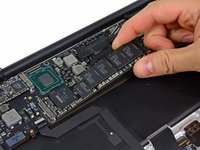
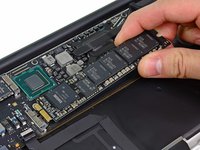
      • To avoid damaging its socket, do not lift the end of the SSD excessively.

      • Pull the drive straight out of its socket and remove it from the logic board.

      • When reinstalling the SSD, be sure it is properly seated before reinstalling its retaining screw.

      crwdns2952109:0crwdne2952109:0

      crwdns2917038:0crwdne2917038:0

    9. MacBook Air 13" Mid 2011 Logic Board Replacement: crwdns2935265:09crwdnd2935265:01crwdnd2935265:01crwdne2935265:0
      • Remove the six 6.3 mm T5 Torx screws securing the logic board to the upper case.

      crwdns2952109:0crwdne2952109:0

      crwdns2917038:0crwdne2917038:0

    10. MacBook Air 13" Mid 2011 Logic Board Replacement: crwdns2935265:010crwdnd2935265:01crwdnd2935265:01crwdne2935265:0
      • Remove the inner two 4.9 mm T8 Torx screws securing the antenna cable retainer and left clutch hinge to the upper case.

      crwdns2952109:0crwdne2952109:0

      crwdns2917038:0crwdne2917038:0

    11. MacBook Air 13" Mid 2011 Logic Board Replacement: crwdns2935265:011crwdnd2935265:01crwdnd2935265:01crwdne2935265:0
      • Push the antenna cable retainer away slightly and remove the 3 mm T5 Torx screw securing the end of the heat sink to the upper case.

      crwdns2952109:0crwdne2952109:0

      crwdns2917038:0crwdne2917038:0

    12. MacBook Air 13" Mid 2011 Logic Board Replacement: crwdns2935265:012crwdnd2935265:01crwdnd2935265:01crwdne2935265:0
      • Carefully remove the logic board assembly from the upper case, minding any cables that may get caught.

      • Hold the antenna cables out of the way as you lift the heat sink end of the logic board out of the upper case.

      crwdns2952109:0crwdne2952109:0

      crwdns2917038:0crwdne2917038:0

crwdns2935217:0crwdne2935217:0

crwdns2935221:0crwdne2935221:0

crwdns2935229:04crwdne2935229:0

crwdns2947410:01crwdne2947410:0

Excellent guide, thank you very much.

Logic board removed from my daughter’s Air, cooked for 8m at 200C, cooled, reinstalled, and now works again.

I was able to remove and replace the 5th heatsink retaining screw without moving the antenna retainer.

Cheers, Aidan

Aidan Killian - crwdns2934203:0crwdne2934203:0 crwdns2950251:0crwdne2950251:0

crwdns2917038:0crwdne2917038:0

crwdns2936625:0crwdne2936625:0:

crwdns2936751:024crwdne2936751:0 0

crwdns2936753:07crwdne2936753:0 0

crwdns2936753:030crwdne2936753:0 11

crwdns2942667:0crwdne2942667:0 2,013