crwdns2933423:0crwdne2933423:0
crwdns2947577:0crwdnd2947577:0crwdne2947577:0

Mac mini Mid 2011 Cowling Replacement

crwdns2942213:0crwdne2942213:0

    1. Mac mini Mid 2011 Cowling Replacement, Bottom Cover: crwdns2935265:01crwdnd2935265:01crwdnd2935265:02crwdne2935265:0 Mac mini Mid 2011 Cowling Replacement, Bottom Cover: crwdns2935265:01crwdnd2935265:02crwdnd2935265:02crwdne2935265:0
      • Place your thumbs in the depressions cut into the bottom cover.

      • Rotate the bottom cover counter-clockwise until the white dot painted on the bottom cover is aligned with the ring inscribed on the outer case.

      • You do not need to apply much downward pressure while turning.

      crwdns2952109:0crwdne2952109:0

      crwdns2917038:0crwdne2917038:0

    2. Mac mini Mid 2011 Cowling Replacement: crwdns2935265:02crwdnd2935265:01crwdnd2935265:01crwdne2935265:0
      • Tilt the mini enough to allow the bottom cover to fall away from the outer case.

      • Remove the bottom cover and set it aside.

      crwdns2952109:0crwdne2952109:0

      crwdns2917038:0crwdne2917038:0

    1. Mac mini Mid 2011 Cowling Replacement, Fan: crwdns2935265:03crwdnd2935265:01crwdnd2935265:01crwdne2935265:0
      • Remove the two 11.3 mm T6 Torx screws securing the fan to the logic board near the antenna plate.

      crwdns2952109:0crwdne2952109:0

      crwdns2917038:0crwdne2917038:0

    2. Mac mini Mid 2011 Cowling Replacement: crwdns2935265:04crwdnd2935265:01crwdnd2935265:01crwdne2935265:0
      • Lift the ear of the fan nearest the RAM up off the standoff secured to the outer case.

      • Removing the standoff screw is not necessary to remove the fan. You need only raise the fan enough to lift it off the standoff screw.

      crwdns2952109:0crwdne2952109:0

      crwdns2917038:0crwdne2917038:0

    3. Mac mini Mid 2011 Cowling Replacement: crwdns2935265:05crwdnd2935265:01crwdnd2935265:03crwdne2935265:0 Mac mini Mid 2011 Cowling Replacement: crwdns2935265:05crwdnd2935265:02crwdnd2935265:03crwdne2935265:0 Mac mini Mid 2011 Cowling Replacement: crwdns2935265:05crwdnd2935265:03crwdnd2935265:03crwdne2935265:0
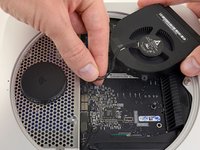
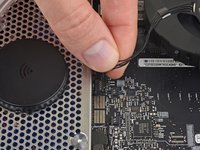
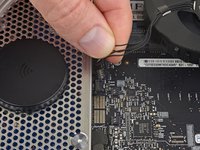
      • Lift the fan out of the mini for enough clearance to access its connector.

      • Grab all the wires at once and gently pull straight up to disconnect the fan from the logic board.

      • Do not pry at the socket, or you may rip it from the logic board.

      • Remove the fan.

      crwdns2952109:0crwdne2952109:0

      crwdns2917038:0crwdne2917038:0

    1. Mac mini Mid 2011 Cowling Replacement, Cowling: crwdns2935265:06crwdnd2935265:01crwdnd2935265:01crwdne2935265:0
      • Remove the single 3.5 mm T6 Torx screw securing the cowling to the heat sink.

      crwdns2952109:0crwdne2952109:0

      crwdns2917038:0crwdne2917038:0

    2. Mac mini Mid 2011 Cowling Replacement: crwdns2935265:07crwdnd2935265:01crwdnd2935265:01crwdne2935265:0
      • Lift the cowling from the end nearest the antenna plate.

      • Rotate the cowling away from the outer case and remove it from the mini.

      crwdns2952109:0crwdne2952109:0

      crwdns2917038:0crwdne2917038:0

crwdns2935217:0crwdne2935217:0

crwdns2935221:0crwdne2935221:0

crwdns2935229:09crwdne2935229:0

Walter Galan

711,235 crwdns2915208:0crwdne2915208:0

crwdns2935297:01,203crwdne2935297:0

crwdns2947412:00crwdne2947412:0

crwdns2917038:0crwdne2917038:0

crwdns2936625:0crwdne2936625:0:

crwdns2936751:024crwdne2936751:0 3

crwdns2936753:07crwdne2936753:0 22

crwdns2936753:030crwdne2936753:0 106

crwdns2942667:0crwdne2942667:0 7,381