crwdns2915892:0crwdne2915892:0
This guide will show you how to repair or replace the Hard Drive for the MSI GS70. Replacement of the Hard Drive is fairly easy as you will only need a JIS #1 Screwdriver and a magnetic mat (Optional, but recommended)
crwdns2942213:0crwdne2942213:0
-
-
-
Using your JIS #1, locate and remove all screws from the backplate.
-
When all the screws are removed, proceed to remove the backplate. The hard drive will be located right next to the battery.
 crwdns2952109:0crwdne2952109:0
-
-
-
Locate the black rubber spacer
-
Remove the spacer by gently pulling the flap
-
-
-
-
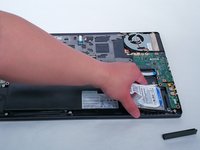
With two hands slide the Hard Drive to the left.
-
-
-
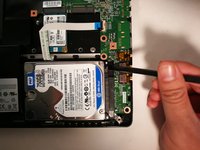
Carfully lift up the Hard Drive using your Spudger.
-
Next, pull up your hard drive from the battery end and proceed to remove the hard drive
-
-


To reassemble your device, follow these instructions in reverse order.
crwdns2935221:0crwdne2935221:0
crwdns2935229:012crwdne2935229:0

crwdns2947412:02crwdne2947412:0
The screws on my machine were Philips not torx don't know if it is different or has changed at all but all internal and external were Phillips
rambo33hockey - crwdns2934203:0crwdne2934203:0 crwdns2950251:0crwdne2950251:0
bonjour
comment accéder au disque dur msata sur le msi gs 70
Vivabzh côtes d'armors - crwdns2934203:0crwdne2934203:0 crwdns2950251:0crwdne2950251:0
