crwdns2933423:0crwdne2933423:0
crwdns2947577:0crwdnd2947577:0crwdne2947577:0

Lorex LW2742 Lens Replacement

crwdns2942213:0crwdne2942213:0

    1. Lorex LW2742 Lens Replacement, Lens: crwdns2935265:01crwdnd2935265:01crwdnd2935265:02crwdne2935265:0 Lorex LW2742 Lens Replacement, Lens: crwdns2935265:01crwdnd2935265:02crwdnd2935265:02crwdne2935265:0
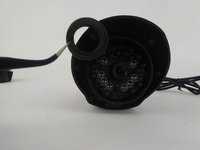
      • Remove the six 10mm Torx T10 screws on the camera face.

      crwdns2952109:0crwdne2952109:0

      crwdns2917038:0crwdne2917038:0

    2. Lorex LW2742 Lens Replacement: crwdns2935265:02crwdnd2935265:01crwdnd2935265:01crwdne2935265:0
      • Remove the exterior lens cover.

      crwdns2952109:0crwdne2952109:0

      crwdns2917038:0crwdne2917038:0

    3. Lorex LW2742 Lens Replacement: crwdns2935265:03crwdnd2935265:01crwdnd2935265:03crwdne2935265:0 Lorex LW2742 Lens Replacement: crwdns2935265:03crwdnd2935265:02crwdnd2935265:03crwdne2935265:0 Lorex LW2742 Lens Replacement: crwdns2935265:03crwdnd2935265:03crwdnd2935265:03crwdne2935265:0
      crwdns2935267:0crwdne2935267:0
      Tweezers
      $4.99
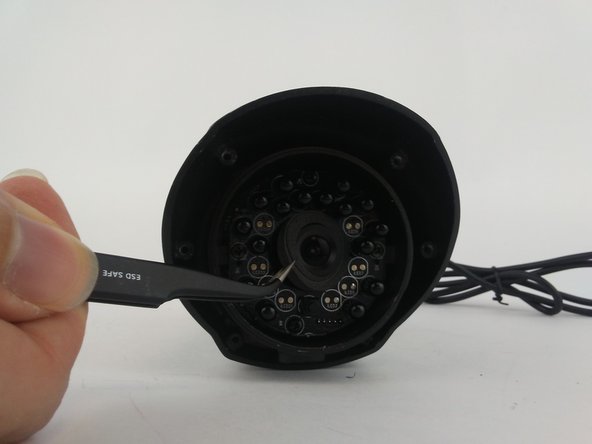
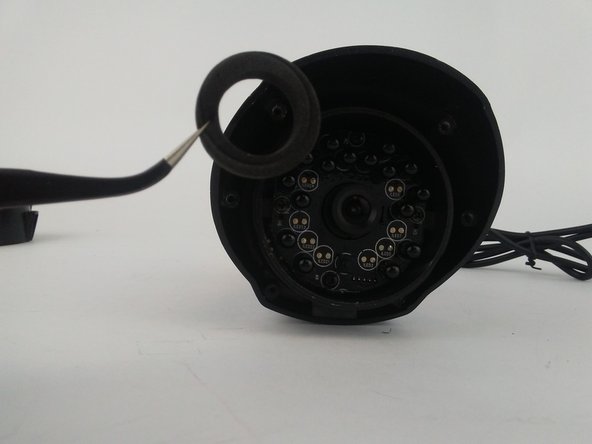
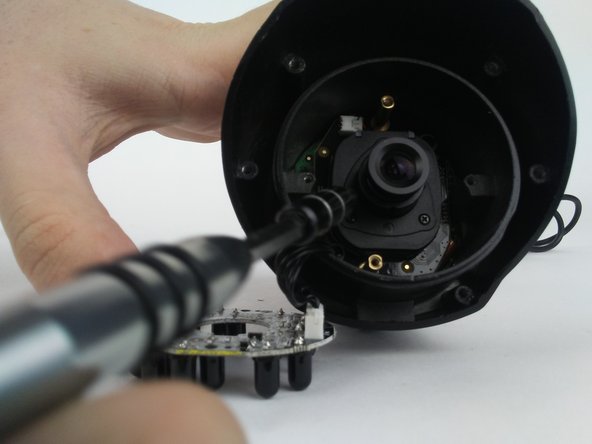
      • Remove the foam ring around the lens with tweezers.

      • Be aware, the electronic components of the LED board may be compromised if you use your fingers instead of tweezers for this step.

      crwdns2952109:0crwdne2952109:0

      crwdns2917038:0crwdne2917038:0

    4. Lorex LW2742 Lens Replacement: crwdns2935265:04crwdnd2935265:01crwdnd2935265:01crwdne2935265:0
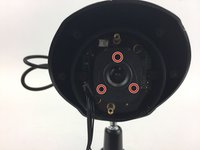
      • Remove the two 5mm Phillips #1 screws.

      • Remove the two 8mm Phillips #0 screws.

      • When reassembling, tighten the top and bottom 5mm screws first, followed by the left and right 8mm screws.

      crwdns2952109:0crwdne2952109:0

      crwdns2917038:0crwdne2917038:0

    5. Lorex LW2742 Lens Replacement: crwdns2935265:05crwdnd2935265:01crwdnd2935265:01crwdne2935265:0
      • Remove the LED board with tweezers.

      • It is unnecessary to unplug the LED board from internal components for lens replacement.

      crwdns2952109:0crwdne2952109:0

      crwdns2917038:0crwdne2917038:0

    6. Lorex LW2742 Lens Replacement: crwdns2935265:06crwdnd2935265:01crwdnd2935265:02crwdne2935265:0 Lorex LW2742 Lens Replacement: crwdns2935265:06crwdnd2935265:02crwdnd2935265:02crwdne2935265:0
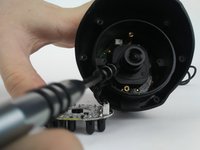
      • Use the Phillips #000 to remove the three 3mm screws on the face of the camera lens

      crwdns2952109:0crwdne2952109:0

      crwdns2917038:0crwdne2917038:0

    7. Lorex LW2742 Lens Replacement: crwdns2935265:07crwdnd2935265:01crwdnd2935265:01crwdne2935265:0
      • Remove the camera lens.

      • After replacing camera lens and before reassembly it is encouraged to clean new lens surface with a microfiber lens cleaning cloth

      crwdns2952109:0crwdne2952109:0

      crwdns2917038:0crwdne2917038:0

crwdns2915888:0crwdne2915888:0

To reassemble your device, follow these instructions in reverse order.

crwdns2935221:0crwdne2935221:0

Alex Kusmierz

crwdns2935283:009/26/16crwdne2935283:0

601 crwdns2915208:0crwdne2915208:0

crwdns2935297:05crwdne2935297:0

crwdns2935287:0crwdne2935287:0

USF Tampa, Team 16-1, Eyestone Fall 2016 crwdns2935289:0USF Tampa, Team 16-1, Eyestone Fall 2016crwdne2935289:0

USFT-EYESTONE-F16S16G1

crwdns2931471:04crwdne2931471:0

crwdns2935297:012crwdne2935297:0

crwdns2947412:00crwdne2947412:0

crwdns2917038:0crwdne2917038:0

crwdns2936625:0crwdne2936625:0:

crwdns2936751:024crwdne2936751:0 1

crwdns2936753:07crwdne2936753:0 7

crwdns2936753:030crwdne2936753:0 30

crwdns2942667:0crwdne2942667:0 1,397