crwdns2933423:0crwdne2933423:0
crwdns2947577:0crwdnd2947577:0crwdne2947577:0

Logitech UE Hyperboom Motherboard Replacement

crwdns2942213:0crwdne2942213:0

  1. Logitech UE Hyperboom Motherboard Replacement, Handle: crwdns2935265:01crwdnd2935265:01crwdnd2935265:02crwdne2935265:0 Logitech UE Hyperboom Motherboard Replacement, Handle: crwdns2935265:01crwdnd2935265:02crwdnd2935265:02crwdne2935265:0
    • Unscrew the two black flat-top screws that attach the handle to the speaker with your hands.

    • You may need pliers to grip the screws.

    crwdns2952109:0crwdne2952109:0
  2. Logitech UE Hyperboom Motherboard Replacement, Top Panel: crwdns2935265:02crwdnd2935265:01crwdnd2935265:02crwdne2935265:0 Logitech UE Hyperboom Motherboard Replacement, Top Panel: crwdns2935265:02crwdnd2935265:02crwdnd2935265:02crwdne2935265:0
    • Use your hands to carefully pry the plastic cover off of the speaker.

    crwdns2952109:0crwdne2952109:0
  3. Logitech UE Hyperboom Motherboard Replacement: crwdns2935265:03crwdnd2935265:01crwdnd2935265:03crwdne2935265:0 Logitech UE Hyperboom Motherboard Replacement: crwdns2935265:03crwdnd2935265:02crwdnd2935265:03crwdne2935265:0 Logitech UE Hyperboom Motherboard Replacement: crwdns2935265:03crwdnd2935265:03crwdnd2935265:03crwdne2935265:0
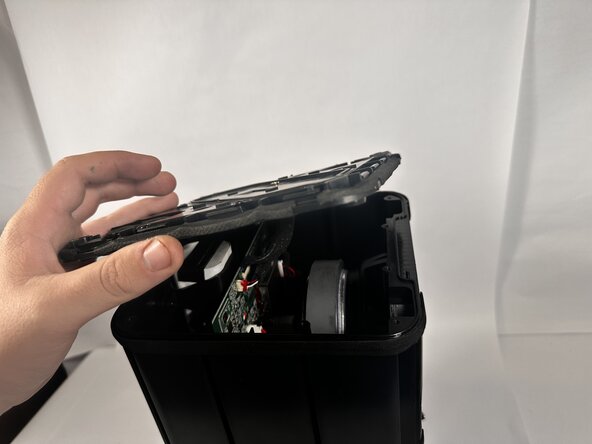
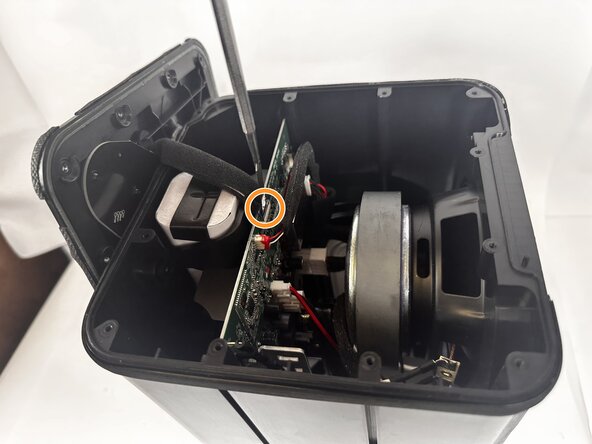
    • Use a Phillips #0 screwdriver to remove the ten 11.7mm screws on the top panel.

    • Remove the top panel to access the internal components.

    • Use a metal spudger to completely disconnect the top panel.

    crwdns2952109:0crwdne2952109:0
  4. Logitech UE Hyperboom Motherboard Replacement, Speaker Drivers and Tweeters: crwdns2935265:04crwdnd2935265:01crwdnd2935265:02crwdne2935265:0 Logitech UE Hyperboom Motherboard Replacement, Speaker Drivers and Tweeters: crwdns2935265:04crwdnd2935265:02crwdnd2935265:02crwdne2935265:0
    • Use the Jimmy to pry the fiber mesh cover away from the speaker.

    • Take the fiber mesh off of the speaker completely.

    crwdns2952109:0crwdne2952109:0
  5. Logitech UE Hyperboom Motherboard Replacement: crwdns2935265:05crwdnd2935265:01crwdnd2935265:03crwdne2935265:0 Logitech UE Hyperboom Motherboard Replacement: crwdns2935265:05crwdnd2935265:02crwdnd2935265:03crwdne2935265:0 Logitech UE Hyperboom Motherboard Replacement: crwdns2935265:05crwdnd2935265:03crwdnd2935265:03crwdne2935265:0
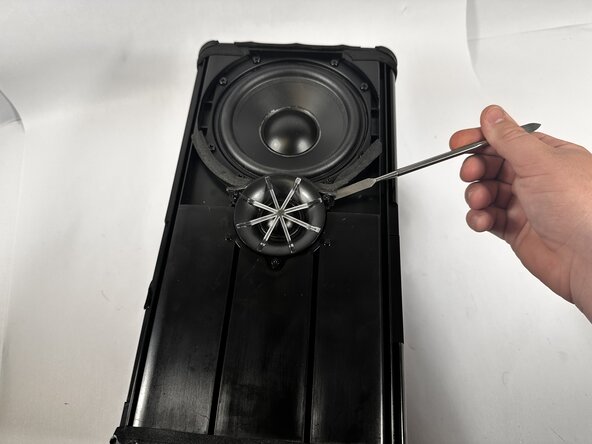
    • Use the Phillips #0 screwdriver to unscrew the three 9.2mm screws around the tweeter speaker.

    • Use the Phillips #0 screwdriver to unscrew the eight 10.1mm screws around the speaker driver.

    • Use a metal spudger to pry the tweeter speaker out of the socket.

    crwdns2952109:0crwdne2952109:0
  6. Logitech UE Hyperboom Motherboard Replacement: crwdns2935265:06crwdnd2935265:01crwdnd2935265:03crwdne2935265:0 Logitech UE Hyperboom Motherboard Replacement: crwdns2935265:06crwdnd2935265:02crwdnd2935265:03crwdne2935265:0 Logitech UE Hyperboom Motherboard Replacement: crwdns2935265:06crwdnd2935265:03crwdnd2935265:03crwdne2935265:0
    • Use a metal spudger to break the adhesive seal around the speaker driver.

    • Use your hands to push the speaker driver out of its socket.

    • A lot of force will be necessary, so it is possible the power and ground cables might disconnect from the force of dislodging the speaker driver.

    • Disconnect the power and ground cables from both the speaker driver and tweeter.

    crwdns2952109:0crwdne2952109:0
  7. Logitech UE Hyperboom Motherboard Replacement: crwdns2935265:07crwdnd2935265:01crwdnd2935265:01crwdne2935265:0
    • Turn the speaker over, and face the two other speaker driver towards you.

    • Use the Phillips #0 screwdriver to remove the three 9.2mm screws around the speaker tweeter.

    • Use the Phillips #0 screwdriver to remove the eight 10.1mm screws around the speaker driver.

    crwdns2952109:0crwdne2952109:0
  8. Logitech UE Hyperboom Motherboard Replacement: crwdns2935265:08crwdnd2935265:01crwdnd2935265:02crwdne2935265:0 Logitech UE Hyperboom Motherboard Replacement: crwdns2935265:08crwdnd2935265:02crwdnd2935265:02crwdne2935265:0
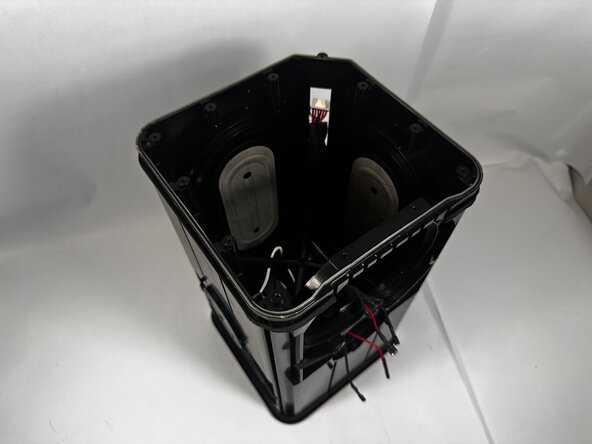
    • Use a metal spudger to break the adhesive between the tweeter and the casing.

    • Disconnect the power and ground cables from the tweeter speaker to remove it completely.

    crwdns2952109:0crwdne2952109:0
  9. Logitech UE Hyperboom Motherboard Replacement: crwdns2935265:09crwdnd2935265:01crwdnd2935265:03crwdne2935265:0 Logitech UE Hyperboom Motherboard Replacement: crwdns2935265:09crwdnd2935265:02crwdnd2935265:03crwdne2935265:0 Logitech UE Hyperboom Motherboard Replacement: crwdns2935265:09crwdnd2935265:03crwdnd2935265:03crwdne2935265:0
    • Use your hands to remove the speaker driver from its socket.

    • Disconnect the power and ground cables to remove it completely.

    crwdns2952109:0crwdne2952109:0
  10. Logitech UE Hyperboom Motherboard Replacement, Motherboard: crwdns2935265:010crwdnd2935265:01crwdnd2935265:02crwdne2935265:0 Logitech UE Hyperboom Motherboard Replacement, Motherboard: crwdns2935265:010crwdnd2935265:02crwdnd2935265:02crwdne2935265:0
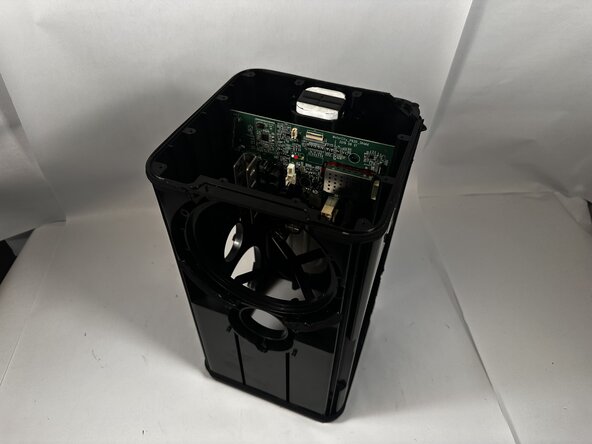
    • Disconnect all of the cables connected to the motherboard.

    crwdns2952109:0crwdne2952109:0
  11. Logitech UE Hyperboom Motherboard Replacement: crwdns2935265:011crwdnd2935265:01crwdnd2935265:03crwdne2935265:0 Logitech UE Hyperboom Motherboard Replacement: crwdns2935265:011crwdnd2935265:02crwdnd2935265:03crwdne2935265:0 Logitech UE Hyperboom Motherboard Replacement: crwdns2935265:011crwdnd2935265:03crwdnd2935265:03crwdne2935265:0
    • Use a Phillips #0 screwdriver to remove the four supporting 7.9mm screws.

    • Slide the motherboard out of the top of the speaker.

    crwdns2952109:0crwdne2952109:0
crwdns2915888:0crwdne2915888:0

To reassemble your device, follow these instructions in reverse order.

Ethan Abbott

crwdns2935283:003/10/26crwdne2935283:0

859 crwdns2915208:0crwdne2915208:0

crwdns2935297:08crwdne2935297:0

crwdns2935287:0crwdne2935287:0

Idaho State University, Team 1-2, Watkins Spring 2026 crwdns2935289:0Idaho State University, Team 1-2, Watkins Spring 2026crwdne2935289:0

ISU-WATKINS-S26S1G2

crwdns2931471:03crwdne2931471:0

crwdns2935297:08crwdne2935297:0

crwdns2947412:00crwdne2947412:0

crwdns2917038:0crwdne2917038:0

crwdns2936625:0crwdne2936625:0:

crwdns2936751:024crwdne2936751:0 0

crwdns2936753:07crwdne2936753:0 11

crwdns2936753:030crwdne2936753:0 23

crwdns2942667:0crwdne2942667:0 42