crwdns2933423:0crwdne2933423:0
crwdns2947577:0crwdnd2947577:0crwdne2947577:0

Logitech Performance MX Disassembly

  1. Logitech Performance MX Disassembly, Remove the Mouse Feet: crwdns2935265:01crwdnd2935265:01crwdnd2935265:02crwdne2935265:0 Logitech Performance MX Disassembly, Remove the Mouse Feet: crwdns2935265:01crwdnd2935265:02crwdnd2935265:02crwdne2935265:0
    • Peel off the three thin, plastic mouse feet on the bottom of the mouse. Make sure to carefully remove the adhesive along with the pad.

    • Use a thin flat object such as a flathead screwdriver to help remove if necessary.

    crwdns2952109:0crwdne2952109:0

    crwdns2917038:0crwdne2917038:0

  2. Logitech Performance MX Disassembly, Remove the First Four Screws: crwdns2935265:02crwdnd2935265:01crwdnd2935265:02crwdne2935265:0 Logitech Performance MX Disassembly, Remove the First Four Screws: crwdns2935265:02crwdnd2935265:02crwdnd2935265:02crwdne2935265:0
    • Using a screwdriver, unscrew the four screws that were under the mouse feet.

    • Remove the battery from the mouse if not done already.

    crwdns2952109:0crwdne2952109:0

    crwdns2917038:0crwdne2917038:0

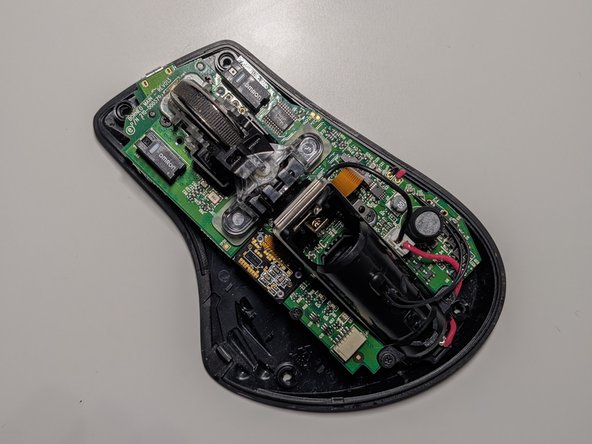
  3. Logitech Performance MX Disassembly, Separate the Top and Bottom: crwdns2935265:03crwdnd2935265:01crwdnd2935265:03crwdne2935265:0 Logitech Performance MX Disassembly, Separate the Top and Bottom: crwdns2935265:03crwdnd2935265:02crwdnd2935265:03crwdne2935265:0 Logitech Performance MX Disassembly, Separate the Top and Bottom: crwdns2935265:03crwdnd2935265:03crwdnd2935265:03crwdne2935265:0
    • Gently pull the top of the mouse off from the base, making sure the wires and components are in place.

    • Carefully pull out the white enclosure from its port to safely take the top apart from the bottom.

    crwdns2952109:0crwdne2952109:0

    crwdns2917038:0crwdne2917038:0

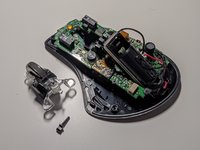
  4. Logitech Performance MX Disassembly, Remove the Scroll Wheel Base: crwdns2935265:04crwdnd2935265:01crwdnd2935265:02crwdne2935265:0 Logitech Performance MX Disassembly, Remove the Scroll Wheel Base: crwdns2935265:04crwdnd2935265:02crwdnd2935265:02crwdne2935265:0
    • Pull out the plastic pin in-between the scroll wheel and the battery enclosure and pull up on the scroll wheel base to remove.

    crwdns2952109:0crwdne2952109:0

    crwdns2917038:0crwdne2917038:0

  5. Logitech Performance MX Disassembly, Unscrew for the Battery Capsule: crwdns2935265:05crwdnd2935265:01crwdnd2935265:02crwdne2935265:0 Logitech Performance MX Disassembly, Unscrew for the Battery Capsule: crwdns2935265:05crwdnd2935265:02crwdnd2935265:02crwdne2935265:0
    • Remove the 2 small springs underneath the scroll wheel base.

    • Unscrew the four screws holding the battery capsule onto the PCB.

    crwdns2952109:0crwdne2952109:0

    crwdns2917038:0crwdne2917038:0

  6. Logitech Performance MX Disassembly, Unplug the Ribbon Cable: crwdns2935265:06crwdnd2935265:01crwdnd2935265:02crwdne2935265:0 Logitech Performance MX Disassembly, Unplug the Ribbon Cable: crwdns2935265:06crwdnd2935265:02crwdnd2935265:02crwdne2935265:0
    • Unplug the ribbon cable from the circuit board. Be careful to not remove the cable’s locking mechanism.

    crwdns2952109:0crwdne2952109:0

    crwdns2917038:0crwdne2917038:0

  7. Logitech Performance MX Disassembly, Remove Scroll Wheel Support: crwdns2935265:07crwdnd2935265:01crwdnd2935265:02crwdne2935265:0 Logitech Performance MX Disassembly, Remove Scroll Wheel Support: crwdns2935265:07crwdnd2935265:02crwdnd2935265:02crwdne2935265:0
    • Unscrew the four screws to take out the black scroll wheel support in the center and the two black pads that lie on both sides of the support.

    crwdns2952109:0crwdne2952109:0

    crwdns2917038:0crwdne2917038:0

  8. Logitech Performance MX Disassembly, Pull Up Circuit Board: crwdns2935265:08crwdnd2935265:01crwdnd2935265:02crwdne2935265:0 Logitech Performance MX Disassembly, Pull Up Circuit Board: crwdns2935265:08crwdnd2935265:02crwdnd2935265:02crwdne2935265:0
    • Pull the circuit board up to find the on and off switch. Take out the clear plastic bit that held the springs.

    crwdns2952109:0crwdne2952109:0

    crwdns2917038:0crwdne2917038:0

  9. Logitech Performance MX Disassembly, Disassembly Finished!: crwdns2935265:09crwdnd2935265:01crwdnd2935265:01crwdne2935265:0
    • All parts should be visible to repair or for replacement.

    crwdns2952109:0crwdne2952109:0

    crwdns2917038:0crwdne2917038:0

crwdns2915888:0crwdne2915888:0

To reassemble your device, follow these instructions in reverse order.

crwdns2935221:0crwdne2935221:0

crwdns2935229:04crwdne2935229:0

Harika Vuppalapati

crwdns2935283:011/23/21crwdne2935283:0

286 crwdns2915208:0crwdne2915208:0

crwdns2935295:0crwdne2935295:0

crwdns2947410:01crwdne2947410:0

Although useful, sadly this guide does not show how to disassemble the upper parts where the 3 switches for zoom, back and forward are located. Step 3 is the only place that shows this area, but only focuses on the disconnection of it.

Phil Millard - crwdns2934203:0crwdne2934203:0 crwdns2950251:0crwdne2950251:0

crwdns2917038:0crwdne2917038:0

crwdns2936625:0crwdne2936625:0:

crwdns2936751:024crwdne2936751:0 6

crwdns2936753:07crwdne2936753:0 24

crwdns2936753:030crwdne2936753:0 111

crwdns2942667:0crwdne2942667:0 5,369