
Logitech MX Keys Key Removal and Replacement

crwdns2959932:0crwdnd2959932:0sitaranecrwdnd2959932:0crwdnd2959932:0crwdnd2959932:06crwdnd2959932:0crwdne2959932:0
crwdns2959936:0N'w 5, 2024crwdne2959936:0
crwdns2869540:0crwdne2869540:0: 93K
crwdns2959988:0crwdne2959988:0
- crwdns2959990:0crwdne2959990:0
- 58
- crwdns2959992:0crwdne2959992:0
- 675
- crwdns2959994:0crwdne2959994:0
- 2,553
- crwdns2959996:0crwdne2959996:0
- 92,651
crwdns2955950:0crwdne2955950:0: 32
crwdns2960004:02crwdne2960004:0, crwdns2960008:030crwdne2960008:0
crwdns2960000:0crwdne2960000:0crwdns2959984:0crwdne2959984:0: 29 30
crwdns2959974:029crwdne2959974:0
crwdns2959970:030crwdne2959970:0
crwdns2959986:0crwdne2959986:0: 4 5
crwdns2959982:04crwdne2959982:0
crwdns2959978:05crwdne2959978:0
crwdns2944444:0crwdne2944444:0
crwdns2944446:0crwdne2944446:0
crwdns2915892:0crwdne2915892:0
crwdns2959928:0crwdne2959928:0 ↓Useful for rearranging the layout, or cleaning a key if it doesn't move right.
crwdns2959930:0crwdne2959930:0
crwdns2943215:0crwdne2943215:0

-
-
-
Insert something thin under the top of the key.
-
Apply a little force. It comes out easily.
 crwdns2952109:0crwdne2952109:0
-
-
-
-
Slide in bottom first
-
Gently push the top part in. It clips easily.
-
-


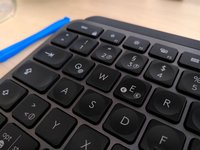

You've successfully removed and replaced a keycap on your Logitech MX Keys keyboard.
crwdns2935221:0crwdne2935221:0
crwdns2935229:029crwdne2935229:0

crwdns2947412:030crwdne2947412:0
Do you think the clips are durable?
Joshua M - crwdns2934203:0crwdne2934203:0 crwdns2950251:0crwdne2950251:0
No, they break easily.
ikomrad - crwdns2934203:0crwdne2934203:0 crwdns2950251:0crwdne2950251:0
Where can I find the keys for the replacement? I can only find keys for like $15 per key...
Fritz Freund - crwdns2934203:0crwdne2934203:0 crwdns2950251:0crwdne2950251:0
I need to know this too!
ikomrad - crwdns2934203:0crwdne2934203:0 crwdns2950251:0crwdne2950251:0
If you are having sticky key issues, take the key out, clean out the area beneath the key, and underneath the key, and reinsert the same key. In most cases, this will fix your issue. This may happen if debree/dust gets in-between the keys.
Gitesh Agarwal - crwdns2934203:0crwdne2934203:0 crwdns2950251:0crwdne2950251:0
