
Logitech MBJ58 Mouse Resistance Spring Replacement

crwdns2959932:0crwdnd2959932:0Maximilian Betkowskicrwdnd2959932:0crwdnd2959932:0crwdnd2959932:012crwdnd2959932:0crwdne2959932:0
crwdns2959936:0Dzi 28, 2020crwdne2959936:0
crwdns2869540:0crwdne2869540:0: 14 k
crwdns2959988:0crwdne2959988:0
- crwdns2959990:0crwdne2959990:0
- 8
- crwdns2959992:0crwdne2959992:0
- 45
- crwdns2959994:0crwdne2959994:0
- 189
- crwdns2959996:0crwdne2959996:0
- 13,927
crwdns2955950:0crwdne2955950:0: 20
crwdns2960004:010crwdne2960004:0, crwdns2960008:010crwdne2960008:0
crwdns2960000:0crwdne2960000:0crwdns2959984:0crwdne2959984:0: 15 16
crwdns2959974:015crwdne2959974:0
crwdns2959970:016crwdne2959970:0
crwdns2959986:0crwdne2959986:0: 1 2
crwdns2959980:01crwdne2959980:0
crwdns2959978:02crwdne2959978:0
crwdns2915892:0crwdne2915892:0
crwdns2959928:0crwdne2959928:0 ↓The spring in the Logitech MBJ58 Mouse may wear down over time making it hard to scroll smoothly with consistent notches. This may require an easy replacement of the spring to return the mouse to normal functionality. This guide will help you learn how to remove and install the resistance spring of your mouse.
crwdns2959930:0crwdne2959930:0
crwdns2943215:0crwdne2943215:0

-
-
-
Hold the mouse so that the bottom is facing up.
-
Remove the single Phillips #1 screw from the bottom half of the mouse.
 crwdns2952109:0crwdne2952109:0
-
-
-
Place the mouse so that the bottom is resting against a hard surface.
-
Lift the top cover of the mouse gently, and remove it.
-
-
-
-
-
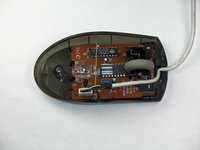
Locate the scroll wheel on the mouse.
-
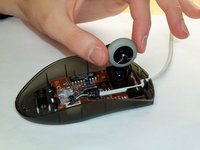
Grab the scroll wheel with your thumb and index finger.
-
Gently lift up, to remove the scroll wheel from the mouse.
-
-
-
-
-
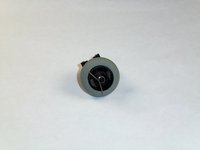
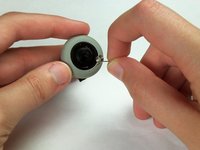
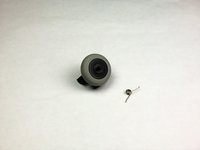
Locate the spring on the scroll wheel, and carefully remove the spring.
-
-
-
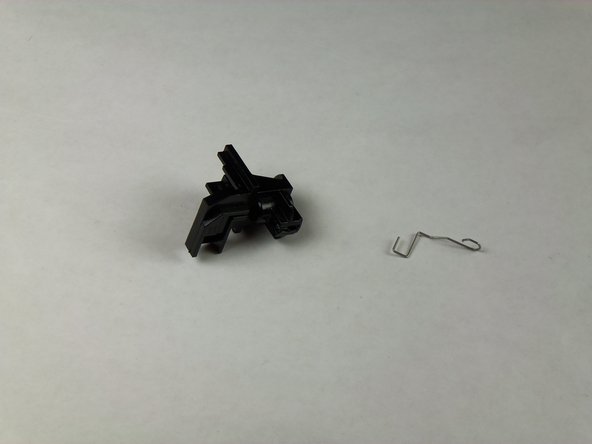
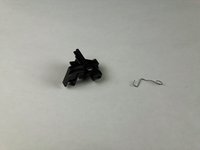
Place the replacement spring on the correct side of the wheel (shown in the images) with the prongs pointing down.
-
-
-
-
-
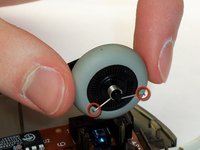
Use the images to locate where the resistance spring is.
-
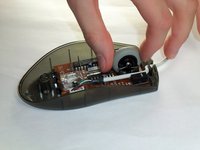
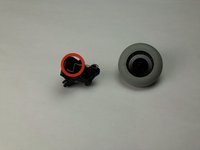
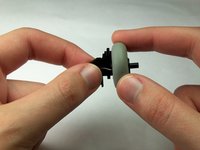
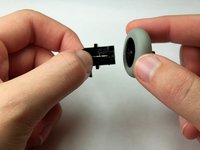
Grab the scroll wheel and its mount and gently pull them apart.
-
-
-
-
-
-
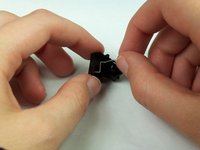
Grasp the top of the resistance spring and pull it towards yourself, letting the hook slide out of its hole.
-
-
-
Insert the hooked section of the replacement spring into the corresponding hole on the mount.
-
-










To reassemble your device, follow these instructions in reverse order.
crwdns2935221:0crwdne2935221:0
crwdns2935229:015crwdne2935229:0

crwdns2935287:0crwdne2935287:0

Cal Poly, Team 5-14, Forte Winter 2013 crwdns2935289:0Cal Poly, Team 5-14, Forte Winter 2013crwdne2935289:0
CPSU-FORTE-W13S5G14
crwdns2931471:05crwdne2931471:0
crwdns2935297:084crwdne2935297:0
crwdns2947412:010crwdne2947412:0
This mouse was also available from Dell as an OEM device under the model name "M-UVDEL1". Hopefully the Google juice will help folks repair their devices. I know I would have spent far more time than I did if it weren't for the photos on how to put the spring back. Thanks Maximilian!
Bastien Nocera - crwdns2934203:0crwdne2934203:0 crwdns2950251:0crwdne2950251:0
The spring installation details were lifesavers. Thank you!
LB
byard - crwdns2934203:0crwdne2934203:0 crwdns2950251:0crwdne2950251:0
thank you! could not have done it without your help.
taiyo_yuden_dvd - crwdns2934203:0crwdne2934203:0 crwdns2950251:0crwdne2950251:0
Brilliant. Thanks. Easy once you know how. The springs were the hard part.
Charles Thomson - crwdns2934203:0crwdne2934203:0 crwdns2950251:0crwdne2950251:0
Thank you so much!! You made it very easy and quick!
vulcanmeister - crwdns2934203:0crwdne2934203:0 crwdns2950251:0crwdne2950251:0
