
Logitech M215 Scroll Wheel Replacement

crwdns2959932:0crwdnd2959932:0Hannah Patecrwdnd2959932:0crwdnd2959932:0crwdnd2959932:02crwdnd2959932:0crwdne2959932:0
crwdns2959936:0Mha 24, 2015crwdne2959936:0
crwdns2869540:0crwdne2869540:0: 15K
crwdns2959988:0crwdne2959988:0
- crwdns2959990:0crwdne2959990:0
- 9
- crwdns2959992:0crwdne2959992:0
- 30
- crwdns2959994:0crwdne2959994:0
- 138
- crwdns2959996:0crwdne2959996:0
- 14,897
crwdns2955950:0crwdne2955950:0: 15
crwdns2960004:09crwdne2960004:0, crwdns2960008:06crwdne2960008:0
crwdns2960000:0crwdne2960000:0crwdns2959984:0crwdne2959984:0: 9 10
crwdns2959974:09crwdne2959974:0
crwdns2959970:010crwdne2959970:0
crwdns2959986:0crwdne2959986:0: 0 1
crwdns2959958:0crwdne2959958:0
crwdns2959976:01crwdne2959976:0
crwdns2915892:0crwdne2915892:0
crwdns2959928:0crwdne2959928:0 ↓Make sure the power is off and the battery removed before attempting this replacement.
crwdns2959930:0crwdne2959930:0
crwdns2943215:0crwdne2943215:0


-
-
-
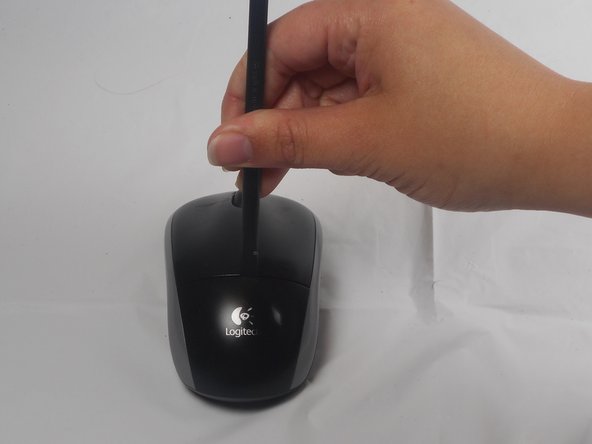
The battery compartment cover is located on the top of the mouse. The seam running horizontally across the mouse is the top of the cover.
-
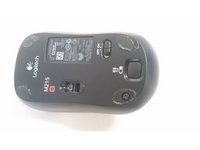
There is a button to pop off the cover. It is located on the bottom of the mouse. you may need to press hard on this button to pop the cover.
-
If the button does not work, you will need to pry off the cover. You can use your fingernails or a prying tool in order to do this, as seen in the third image.
 crwdns2952109:0crwdne2952109:0
-
-
-
Remember to insert the new battery in the same orientation as the old one. The positive (plus) end should be facing away from the buttons.
-
-
-
-
-
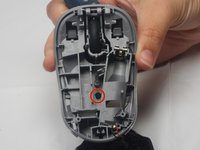
Use your fingernail to carefully remove the two skid stickers from the fat (non-button) end of the bottom of the mouse to reveal two Philips head screws. Remove these, then unclip the bottom cover. Don't get the sticky dusty. Now remove buttons; they're both attached by one 0.5mm Phillips head screw. It is located in the center of the top cover.
-
-
-
The button are now only attached by a small overhang near the front. You will need to use the pry tool to push the button plate off of this overhang as shown.
-
The button plate should be able to be completely removed at this point.
-
-
-
-
-
-
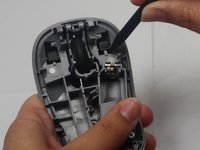
Use the prying tool to remove the scroll wheel. The wheel is held in place by two pegs which stick into the plastic holder.
-
-






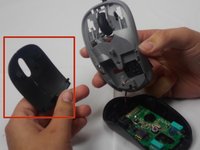

To reassemble your device, follow these instructions in reverse order.
crwdns2935221:0crwdne2935221:0
crwdns2935229:09crwdne2935229:0

crwdns2935287:0crwdne2935287:0

USF Tampa, Team 1-1, Watkins Winter 2015 crwdns2935289:0USF Tampa, Team 1-1, Watkins Winter 2015crwdne2935289:0
USFT-WATKINS-W15S1G1
crwdns2931471:04crwdne2931471:0
crwdns2935297:084crwdne2935297:0
crwdns2947412:06crwdne2947412:0
glad I was able to find this info on disassembly. Gave it a good cleaning and works better than it did before. Had the Phillips screwdriver. and used another small screwdriver and a small pocket knife to pry with. Be gentle - doesn’t look like it would take much force to break those plastic bits.
carmenanddave - crwdns2934203:0crwdne2934203:0 crwdns2950251:0crwdne2950251:0
Thanks! Mouse wheel windows were blocked by lint.
levensonjb - crwdns2934203:0crwdne2934203:0 crwdns2950251:0crwdne2950251:0
Very useful. Cleaned coffee out of mouse wheel spokes/windows and off of chipboard. Works better than before. Thanks!
OGrady Watson - crwdns2934203:0crwdne2934203:0 crwdns2950251:0crwdne2950251:0
Probably the BROWN stuff wasn’t coffee, I too cleaned the spokes/windows. the brown stuff is oil from out hands which lands on scroll wheel, then by heat gets transferred to the spokes. touch a finger on the mirror, the fingerprint on the mirror is because of OIL on hands. it is the same oil in that mouse wheel spokes.
tejaswin_jain - crwdns2934203:0crwdne2934203:0 crwdns2950251:0crwdne2950251:0
There is a spring here connected to the wheel. Seems to be the thing to give tactical feedback when scrolling. It fell out when I took out the wheel not 100% how to put it back
Dan Molnar - crwdns2934203:0crwdne2934203:0 crwdns2950251:0crwdne2950251:0
