
Logitech M215 Battery Replacement

crwdns2959932:0crwdnd2959932:0Hannah Patecrwdnd2959932:0crwdnd2959932:0crwdnd2959932:02crwdnd2959932:0crwdne2959932:0
crwdns2959936:0Mha 24, 2015crwdne2959936:0
crwdns2869540:0crwdne2869540:0: 125K
crwdns2959988:0crwdne2959988:0
- crwdns2959990:0crwdne2959990:0
- 8
- crwdns2959992:0crwdne2959992:0
- 63
- crwdns2959994:0crwdne2959994:0
- 260
- crwdns2959996:0crwdne2959996:0
- 124,904
crwdns2955950:0crwdne2955950:0: 19
crwdns2960004:09crwdne2960004:0, crwdns2960008:010crwdne2960008:0
crwdns2960000:0crwdne2960000:0crwdns2959984:0crwdne2959984:0: 28 29
crwdns2959974:028crwdne2959974:0
crwdns2959970:029crwdne2959970:0
crwdns2959986:0crwdne2959986:0: 2 3
crwdns2959982:02crwdne2959982:0
crwdns2959978:03crwdne2959978:0
crwdns2915892:0crwdne2915892:0
crwdns2959928:0crwdne2959928:0 ↓For this replacement you do not need any tools, however a prying tool may make the replacement easier.
Make sure that the mouse is turned off before replacing the battery. This will reduce the chance of damaging internal components with a surge of power from the new battery.
crwdns2959930:0crwdne2959930:0
crwdns2943213:0crwdne2943213:0

crwdns2943215:0crwdne2943215:0


-
-
-
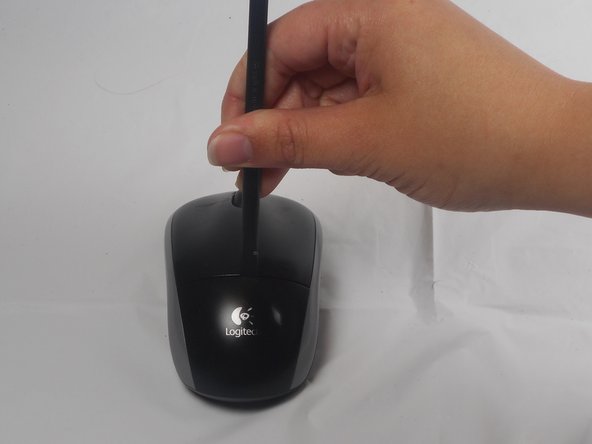
The battery compartment cover is located on the top of the mouse. The seam running horizontally across the mouse is the top of the cover.
-
There is a button to pop off the cover. It is located on the bottom of the mouse. you may need to press hard on this button to pop the cover.
-
If the button does not work, you will need to pry off the cover. You can use your fingernails or a prying tool in order to do this, as seen in the third image.
 crwdns2952109:0crwdne2952109:0
-
-
-
Remember to insert the new battery in the same orientation as the old one. The positive (plus) end should be facing away from the buttons.
-
-
-




To reassemble your device, follow these instructions in reverse order.
crwdns2935221:0crwdne2935221:0
crwdns2935229:028crwdne2935229:0

crwdns2935287:0crwdne2935287:0

USF Tampa, Team 1-1, Watkins Winter 2015 crwdns2935289:0USF Tampa, Team 1-1, Watkins Winter 2015crwdne2935289:0
USFT-WATKINS-W15S1G1
crwdns2931471:04crwdne2931471:0
crwdns2935297:084crwdne2935297:0
crwdns2947412:010crwdne2947412:0
I disassembled this exactly as stated and now I can't get the cover back on?
Rei Peterson - crwdns2934203:0crwdne2934203:0 crwdns2950251:0crwdne2950251:0
I am a electronic technologist and this is a poor design for a mouse. No wonder the later version is different.
Joseph Wonderless - crwdns2934203:0crwdne2934203:0 crwdns2950251:0crwdne2950251:0
Thanks for the information. It worked perfectly for me. Easy removal. Images and instructions were very helpful.
Tracy Moore - crwdns2934203:0crwdne2934203:0 crwdns2950251:0crwdne2950251:0
The green battery light went on, although the lazar light did not. What should I do?
Susan Petho - crwdns2934203:0crwdne2934203:0 crwdns2950251:0crwdne2950251:0
well this is a bit horrible, because i don’t have an extra AA battery.. and i have a M325, but the battery life is dead..
Diana Lee - crwdns2934203:0crwdne2934203:0 crwdns2950251:0crwdne2950251:0
