
Logitech Gamepad F310 Case Replacement

crwdns2959932:0crwdnd2959932:0Alan Mendoza DracoKingcrwdnd2959932:0crwdnd2959932:0crwdnd2959932:03crwdnd2959932:0crwdne2959932:0
crwdns2959936:0Kho 12, 2024crwdne2959936:0
crwdns2869540:0crwdne2869540:0: 1K
crwdns2959988:0crwdne2959988:0
- crwdns2959990:0crwdne2959990:0
- 3
- crwdns2959992:0crwdne2959992:0
- 20
- crwdns2959994:0crwdne2959994:0
- 84
- crwdns2959996:0crwdne2959996:0
- 1,032
crwdns2955950:0crwdne2955950:0: 1
crwdns2960002:01crwdne2960002:0.
crwdns2959984:0crwdne2959984:0: 0 1
crwdns2959956:0crwdne2959956:0
crwdns2959968:01crwdne2959968:0
crwdns2959986:0crwdne2959986:0: 0 1
crwdns2959958:0crwdne2959958:0
crwdns2959976:01crwdne2959976:0
crwdns2915892:0crwdne2915892:0
crwdns2959928:0crwdne2959928:0 ↓Use this guide to replace a damaged or cracked controller case on your Logitech Gamepad F310. The controller case is what holds your controller together. That is reason to replace controller case.
Follow this guide in order to replace your Logitech Gamepad F310 controller case.
No special tools or skills required.
crwdns2959930:0crwdne2959930:0
crwdns2943215:0crwdne2943215:0


-
-
-
Use a Phillips #1 screwdriver to remove all seven 3 mm screws that secure the rear case.
 crwdns2952109:0crwdne2952109:0
-
-
-
Press along the seams of the controller and gently pull the front and rear case apart.
-
-
-
Separate the front and rear case.
-
-
-
-
-
-
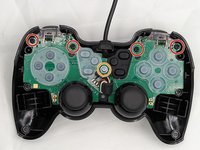
Use a Phillips #1 screwdriver to remove:
-
Four 3 mm screws
-
One 5 mm screw
-
Gently lift the motherboard off of the back case and slide the cord out of the slot on top.
-
-


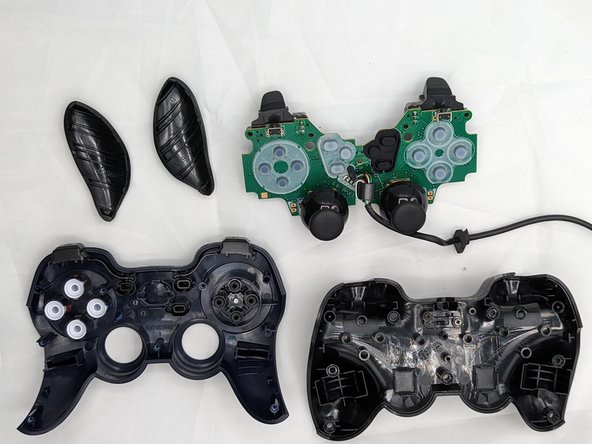
You have successfully taken the case off of your controller! Using the new case, follow these steps in reverse order to assemble your fixed controller.

crwdns2935287:0crwdne2935287:0

University of North Texas, Team 2-6, Kilpatrick Spring 2024 crwdns2935289:0University of North Texas, Team 2-6, Kilpatrick Spring 2024crwdne2935289:0
UNT-KILPATRICK-S24S2G6
crwdns2931471:04crwdne2931471:0
crwdns2935297:072crwdne2935297:0
