crwdns2915892:0crwdne2915892:0
Use this guide to replace the lights of your Logitech G910.
crwdns2942213:0crwdne2942213:0
-
-
-
Unplug the keyboard from the computer.
 crwdns2952109:0crwdne2952109:0
-
-
-
Flip the keyboard and unscrew the 15 back screws. The screws in the palm rest must be unscrewed and the palm rest removed to access the 6 screws at the bottom of the keyboard. (There are 2 lengths of screws the shorter ones are for the palm rest) There are also 2 screws under the nonslip pads of the palm rest.
-
-
-
-
Release the front part using a spudger or flat screwdriver to gently pry. Lift off carefully.
-
-
-
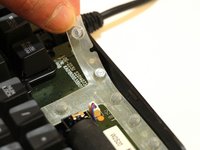
Gently lift up the plastic film in the top right corner.
-
-


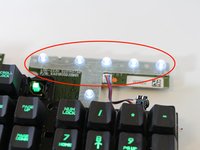
To reassemble your device, follow these instructions in reverse order.
crwdns2935221:0crwdne2935221:0
crwdns2935229:05crwdne2935229:0

crwdns2935287:0crwdne2935287:0

Eastern Washington University, Team S2-G2, Munoz Winter 2018 crwdns2935289:0Eastern Washington University, Team S2-G2, Munoz Winter 2018crwdne2935289:0
EWU-MUNOZ-W18S2G2
crwdns2931471:05crwdne2931471:0
crwdns2935297:048crwdne2935297:0
crwdns2947412:04crwdne2947412:0
So what do I do after I take apart my keyboard?
CuddlyZebesian - crwdns2934203:0crwdne2934203:0 crwdns2950251:0crwdne2950251:0
this guide is currently missing some steps. If you have figured it out, pls edit this guide.
tayola - crwdns2934203:0crwdne2934203:0 crwdns2950251:0crwdne2950251:0
Desolder and replace LEDs the size of a grain of sand xD
This is definitely not a job I'd mark as "easy".
squallloire - crwdns2934203:0crwdne2934203:0 crwdns2950251:0crwdne2950251:0
This is just a guide to open the keyboard, not a light replacement. Finish or rename the guide.
Wesley Mason - crwdns2934203:0crwdne2934203:0 crwdns2950251:0crwdne2950251:0
