
Logitech G432 Microphone Replacement

crwdns2959932:0crwdnd2959932:0Lara Vasquezcrwdnd2959932:0crwdnd2959932:0crwdnd2959932:03crwdnd2959932:0crwdne2959932:0
crwdns2959936:0Kho 1, 2023crwdne2959936:0
crwdns2869540:0crwdne2869540:0: 2.8K
crwdns2959988:0crwdne2959988:0
- crwdns2959990:0crwdne2959990:0
- 3
- crwdns2959992:0crwdne2959992:0
- 33
- crwdns2959994:0crwdne2959994:0
- 111
- crwdns2959996:0crwdne2959996:0
- 2,771
crwdns2955950:0crwdne2955950:0: 1
crwdns2960002:01crwdne2960002:0.
crwdns2959984:0crwdne2959984:0: 1 2
crwdns2959972:01crwdne2959972:0
crwdns2959970:02crwdne2959970:0
crwdns2959986:0crwdne2959986:0: 0 1
crwdns2959958:0crwdne2959958:0
crwdns2959976:01crwdne2959976:0
crwdns2915892:0crwdne2915892:0
crwdns2959928:0crwdne2959928:0 ↓If the microphone in your Logitech G432 headset is loose or needs to be replaced due to being faulty or from wear and tear, use this guide to adjust or replace it.
The Logitech G432 headset includes a built-in microphone that allows you to communicate with other players while gaming. This type of microphone is known as a "gaming microphone," and it is specifically designed to pick up your voice while filtering out background noise and other sounds.
This microphone is a useful tool for gamers who want to communicate with their teammates and coordinate their gameplay effectively. By using a headset with a built-in microphone like the Logitech G432, you can enjoy a more immersive gaming experience and improve your chances of success in multiplayer games.
Before beginning, make sure to turn off the power. If the microphone is powered, make sure to turn it off and unplug it from the power source before making any adjustments or attempting to replace it.
crwdns2959930:0crwdne2959930:0
crwdns2943215:0crwdne2943215:0
-
Spudger4.9


-
-
-
Carefully lift the cushion upward using your hands.
 crwdns2952109:0crwdne2952109:0
-
-
-
-
-
Remove the three 1.0 mm screws from the edge of the earpiece using a Phillips #0 screwdriver.
-
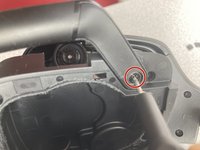
Use the pointed end of a spudger to remove the black sticker covering the fourth screw.
-
Remove the single 1.0 mm screw from beneath the sticker using a Phillips #0 screwdriver.
-
-
-
Gently open the headpiece to prevent accidentally pulling apart any of the internal wiring.
-
Use an iFixit opening tool to separate the four black tabs by pushing them apart.
-
-
-
-
To adjust or remove the microphone piece, use a Phillips #0 Screwdriver to tighten or loosen the 1.0 mm screw that holds it in place.
-
-


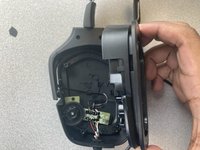
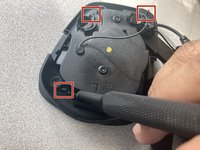


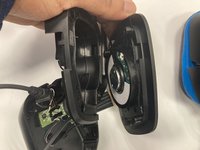
To reassemble your device, follow these instructions in reverse order.
crwdns2935221:0crwdne2935221:0
crwdns2935227:0crwdne2935227:0

crwdns2935287:0crwdne2935287:0

Marist, Team 1-2, Chaterdon Spring 2023 crwdns2935289:0Marist, Team 1-2, Chaterdon Spring 2023crwdne2935289:0
MARS-CHATERDON-S23S1G2
crwdns2931471:03crwdne2931471:0
crwdns2935297:060crwdne2935297:0
