crwdns2933423:0crwdne2933423:0
crwdns2947577:0crwdnd2947577:0crwdne2947577:0

Logitech G402 Left and Right Mouse Buttons Replacement

crwdns2869540:0crwdne2869540:0: 4,5K

crwdns2959988:0crwdne2959988:0

crwdns2959990:0crwdne2959990:0
7
crwdns2959992:0crwdne2959992:0
67
crwdns2959994:0crwdne2959994:0
265
crwdns2959996:0crwdne2959996:0
4.518
crwdns2955950:0crwdne2955950:0: 0

crwdns2959998:0crwdne2959998:0

crwdns2960000:0crwdne2960000:0
crwdns2959984:0crwdne2959984:0: 0

crwdns2959956:0crwdne2959956:0

crwdns2959986:0crwdne2959986:0: 1

crwdns2959980:01crwdne2959980:0

crwdns2955944:0crwdne2955944:0: 25 - 30 crwdns2931279:0crwdne2931279:0
crwdns2955970:0crwdne2955970:0: crwdns2937803:0crwdne2937803:0
crwdns2862591:0crwdne2862591:0

crwdns2862592:0crwdne2862592:0

Logitech G402 Left and Right Mouse Buttons Replacement

crwdns2915892:0crwdne2915892:0

crwdns2959928:0crwdne2959928:0 ↓

This guide is for the purpose of replacing the left and right mouse buttons on the Logitech G402 gaming mouse. The process of replacing a faulty mouse button may be daunting. However, this guide aims to streamline this process, making it as simple as possible.

crwdns2959930:0crwdne2959930:0

crwdns2943215:0crwdne2943215:0

    1. Logitech G402 Left and Right Mouse Buttons Replacement, Left and Right Mouse Buttons: crwdns2935265:01crwdnd2935265:01crwdnd2935265:01crwdne2935265:0
      • Remove the adhesive mouse skates from the bottom casing.

      crwdns2952109:0crwdne2952109:0

      crwdns2917038:0crwdne2917038:0

    2. Logitech G402 Left and Right Mouse Buttons Replacement: crwdns2935265:02crwdnd2935265:01crwdnd2935265:03crwdne2935265:0 Logitech G402 Left and Right Mouse Buttons Replacement: crwdns2935265:02crwdnd2935265:02crwdnd2935265:03crwdne2935265:0 Logitech G402 Left and Right Mouse Buttons Replacement: crwdns2935265:02crwdnd2935265:03crwdnd2935265:03crwdne2935265:0
      • Remove the five 1.2 mm screws using a Phillips #00 screwdriver from the bottom of the mouse.

      • Separate the top casing from the bottom.

      crwdns2952109:0crwdne2952109:0

      crwdns2917038:0crwdne2917038:0

    3. Logitech G402 Left and Right Mouse Buttons Replacement: crwdns2935265:03crwdnd2935265:01crwdnd2935265:02crwdne2935265:0 Logitech G402 Left and Right Mouse Buttons Replacement: crwdns2935265:03crwdnd2935265:02crwdnd2935265:02crwdne2935265:0
      • Remove the two case screws using a Phillips #00 screwdriver.

      • Remove the single 1.2 mm screw from the middle of the circuit board using a Phillips #00 screwdriver.

      crwdns2952109:0crwdne2952109:0

      crwdns2917038:0crwdne2917038:0

    4. Logitech G402 Left and Right Mouse Buttons Replacement: crwdns2935265:04crwdnd2935265:01crwdnd2935265:03crwdne2935265:0 Logitech G402 Left and Right Mouse Buttons Replacement: crwdns2935265:04crwdnd2935265:02crwdnd2935265:03crwdne2935265:0 Logitech G402 Left and Right Mouse Buttons Replacement: crwdns2935265:04crwdnd2935265:03crwdnd2935265:03crwdne2935265:0
      • Remove the perpendicular circuit board containing the side buttons.

      • Remove the remaining 1.2 mm screws under the removed board and next to the mouse buttons using a Phillips #00 screwdriver.

      crwdns2952109:0crwdne2952109:0

      crwdns2917038:0crwdne2917038:0

    5. Logitech G402 Left and Right Mouse Buttons Replacement: crwdns2935265:05crwdnd2935265:01crwdnd2935265:03crwdne2935265:0 Logitech G402 Left and Right Mouse Buttons Replacement: crwdns2935265:05crwdnd2935265:02crwdnd2935265:03crwdne2935265:0 Logitech G402 Left and Right Mouse Buttons Replacement: crwdns2935265:05crwdnd2935265:03crwdnd2935265:03crwdne2935265:0
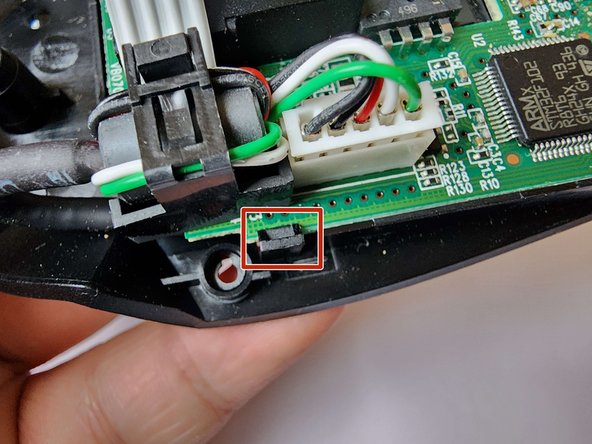
      • Pull back the plastic clip and lift the circuit board out of the bottom casing.

      crwdns2952109:0crwdne2952109:0

      crwdns2917038:0crwdne2917038:0

    6. Logitech G402 Left and Right Mouse Buttons Replacement: crwdns2935265:06crwdnd2935265:01crwdnd2935265:02crwdne2935265:0 Logitech G402 Left and Right Mouse Buttons Replacement: crwdns2935265:06crwdnd2935265:02crwdnd2935265:02crwdne2935265:0
      • Separate the wire from the bottom casing by pulling the wire out.

      crwdns2952109:0crwdne2952109:0

      crwdns2917038:0crwdne2917038:0

    7. Logitech G402 Left and Right Mouse Buttons Replacement: crwdns2935265:07crwdnd2935265:01crwdnd2935265:03crwdne2935265:0 Logitech G402 Left and Right Mouse Buttons Replacement: crwdns2935265:07crwdnd2935265:02crwdnd2935265:03crwdne2935265:0 Logitech G402 Left and Right Mouse Buttons Replacement: crwdns2935265:07crwdnd2935265:03crwdnd2935265:03crwdne2935265:0
      • You can access the iFixit guide to soldering and desoldering here.

      • Please be cautious when using a soldering iron. Soldering irons can reach several hundreds of degrees in temperature and improper use may result in a burn.

      • Please perform soldering and desoldering in a very well ventilated space. Solder containing lead can potentially be toxic and be an irritant. Solder and desolder outside or in the presence of a fume hood or fume extractor.

      • The solder connections for the left and right buttons are labeled in the second picture.

      • The solder connections circled in red are for the left mouse button.

      • The solder connections circled in orange are for the left mouse button.

      crwdns2952109:0crwdne2952109:0

      crwdns2917038:0crwdne2917038:0

    8. Logitech G402 Left and Right Mouse Buttons Replacement: crwdns2935265:08crwdnd2935265:01crwdnd2935265:02crwdne2935265:0 Logitech G402 Left and Right Mouse Buttons Replacement: crwdns2935265:08crwdnd2935265:02crwdnd2935265:02crwdne2935265:0
      • Solder the replacement button onto the circuit board.

      • Make sure the metal contacts are not bent and are touching the soldering contacts before soldering.

      crwdns2952109:0crwdne2952109:0

      crwdns2917038:0crwdne2917038:0

crwdns2915888:0crwdne2915888:0

To reassemble your device, follow these instructions in reverse order. When reassembly is complete, apply the replacement mouse skates.

crwdns2935221:0crwdne2935221:0

crwdns2862417:0crwdne2862417:0

crwdns2935291:0crwdne2935291:0

Aaron C.

crwdns2935283:001/11/24crwdne2935283:0

166 crwdns2915208:0crwdne2915208:0

crwdns2935295:0crwdne2935295:0

crwdns2935287:0crwdne2935287:0

York University, Team O-10, O'Regan Winter 2024 crwdns2935289:0York University, Team O-10, O'Regan Winter 2024crwdne2935289:0

YORK-O'REGAN-W24SOG10

crwdns2934841:01crwdne2934841:0

crwdns2935297:012crwdne2935297:0

crwdns2947412:00crwdne2947412:0

crwdns2917038:0crwdne2917038:0

crwdns2936625:0crwdne2936625:0:

crwdns2936751:024crwdne2936751:0 7

crwdns2936753:07crwdne2936753:0 67

crwdns2936753:030crwdne2936753:0 265

crwdns2959996:0crwdne2959996:0 4,518