
Logitech G27 C-Clamp Replacement

crwdns2959932:0crwdnd2959932:0Daniel Louiscrwdnd2959932:0crwdnd2959932:0crwdnd2959932:02crwdnd2959932:0crwdne2959932:0
crwdns2959936:0Kho 24, 2015crwdne2959936:0
crwdns2869540:0crwdne2869540:0: 51 k
crwdns2959988:0crwdne2959988:0
- crwdns2959990:0crwdne2959990:0
- 7
- crwdns2959992:0crwdne2959992:0
- 60
- crwdns2959994:0crwdne2959994:0
- 223
- crwdns2959996:0crwdne2959996:0
- 50,932
crwdns2955950:0crwdne2955950:0: 32
crwdns2960004:017crwdne2960004:0, crwdns2960008:015crwdne2960008:0
crwdns2960000:0crwdne2960000:0crwdns2959984:0crwdne2959984:0: 24 25
crwdns2959974:024crwdne2959974:0
crwdns2959970:025crwdne2959970:0
crwdns2959986:0crwdne2959986:0: 3 4
crwdns2959982:03crwdne2959982:0
crwdns2959978:04crwdne2959978:0
crwdns2915892:0crwdne2915892:0
crwdns2959928:0crwdne2959928:0 ↓If the C-Clamps on your Logitech G27 break, you will need to replace them before using the steering wheel again. This is a little bit of a pain to do, because the C-Clamps are fully inside the device case. To replace them, you will just need to remove a few screws.
crwdns2959930:0crwdne2959930:0
crwdns2943215:0crwdne2943215:0


-
-
-
Remove the six gray 25mm hex screws with a 4mm allen wrench.
-
Carefully lift up the wheel, but do not disconnect it from the rest of the device.
 crwdns2952109:0crwdne2952109:0
-
-
-
Carefully lift the wheel off of the hub, exposing the 2 shifter paddle wires and PCB board.
-
-
-
Remove the two 7.5 mm silver screws holding the green PCB board in the wheel with a Phillips #1 screwdriver.
-
-
-
Carefully remove the PCB board from the wheel hub.
-
-
-
Carefully pinch and unplug the large 7-pin connector under the PCB board.
-
-
-
You can now fully remove the wheel from the hub. Set it aside until you put the wheel back together.
-
Remove the innermost three 37.5mm silver screws with a Phillips #2 screwdriver.
-
Remove the wheel hub and push the connector through the center of the hub.
-
-
-
The wheel hub can now be set aside and flip over the steering wheel housing to reveal the under side.
-
Remove the eight 15.9mm silver surrounding screws underneath the wheel housing with a Phillips #1 screwdriver.
-
-
-
Rotate the housing back over and remove the top half of the housing revealing the majority of the components of the wheel.
-
The housing cover can be set aside until you put the wheel back together.
-
-
-
Remove the four 7.3mm silver screws attaching the green PCB board to the motor housing with a Phillips #2 screwdriver.
-
-
-
Unplug the three plastic connectors on the left side of the PCB board.
-
Unplug the two plastic connectors on the top of the PCB board.
-
Unplug the three plastic connectors on the right side of the PCB board.
-
-
-
Remove the PCB board after all of the plastic connectors are disconnected.
-
You can now set it aside.
-
-
-
-
Remove the two 12.3mm upper black screws with a Phillips #2 screwdriver.
-
Remove the two 15.5mm bottom silver screws with a Phillips #1 screwdriver.
-
-
-
Remove the PCB board mount and remove the clear plastic piece underneath.
-
Set them aside until you reassemble the wheel.
-
-
-
-
-
Unscrew the piece holding the C-Clamp in place with your hand.
-
-
-
Push the remaining nob forward and then inward through the slot.
-
-
-
The C-Clamp can now be easily pulled out of the bottom of the device.
-
-


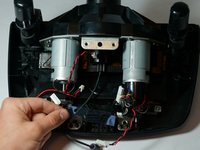
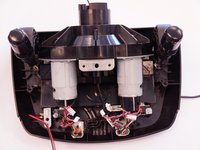


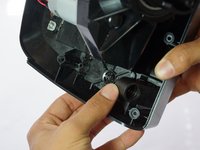
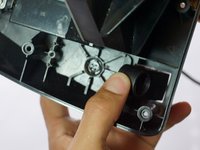


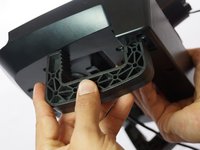
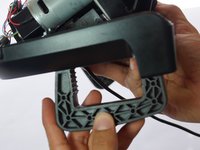
To reassemble your device, follow these instructions in reverse order.
crwdns2935221:0crwdne2935221:0
crwdns2935229:024crwdne2935229:0

crwdns2935287:0crwdne2935287:0

Cal Poly, Team 15-4, Amido Spring 2015 crwdns2935289:0Cal Poly, Team 15-4, Amido Spring 2015crwdne2935289:0
CPSU-AMIDO-S15S15G4
crwdns2931471:04crwdne2931471:0
crwdns2935297:072crwdne2935297:0
crwdns2947412:015crwdne2947412:0
Where would I buy the replacement C-Clamps from because one of mine are broken and I need to install a new one.
Mumin Mazhar - crwdns2934203:0crwdne2934203:0 crwdns2950251:0crwdne2950251:0
Look for it at eBay.
Eduardo - crwdns2934203:0crwdne2934203:0 crwdns2950251:0crwdne2950251:0
I also need to find a place to buy replacement C-clamps from
hockeyjockone - crwdns2934203:0crwdne2934203:0 crwdns2950251:0crwdne2950251:0
Can you tell me where I can buy these clamps?
kholiwen - crwdns2934203:0crwdne2934203:0 crwdns2950251:0crwdne2950251:0
step 9 to 13 not needed ... please confirm
Matt Na - crwdns2934203:0crwdne2934203:0 crwdns2950251:0crwdne2950251:0
