crwdns2933423:0crwdne2933423:0
crwdns2947577:0crwdnd2947577:0crwdne2947577:0

Linsay Model F-7HD2CORE Battery Replacement

crwdns2869540:0crwdne2869540:0: 2K

crwdns2959988:0crwdne2959988:0

crwdns2959990:0crwdne2959990:0
1
crwdns2959992:0crwdne2959992:0
25
crwdns2959994:0crwdne2959994:0
101
crwdns2959996:0crwdne2959996:0
1.956
crwdns2955950:0crwdne2955950:0: 0

crwdns2959998:0crwdne2959998:0

crwdns2960000:0crwdne2960000:0
crwdns2959984:0crwdne2959984:0: 2

crwdns2959974:02crwdne2959974:0

crwdns2959986:0crwdne2959986:0: 1

crwdns2959980:01crwdne2959980:0

crwdns2955944:0crwdne2955944:0: 15 - 30 crwdns2931279:0crwdne2931279:0
crwdns2955970:0crwdne2955970:0: crwdns2937803:0crwdne2937803:0
Linsay Model F-7HD2CORE Battery Replacement

crwdns2915892:0crwdne2915892:0

crwdns2959928:0crwdne2959928:0 ↓

After determining that your battery is permanently damaged or broken, you can replace it with a new one.

crwdns2959930:0crwdne2959930:0

crwdns2943215:0crwdne2943215:0

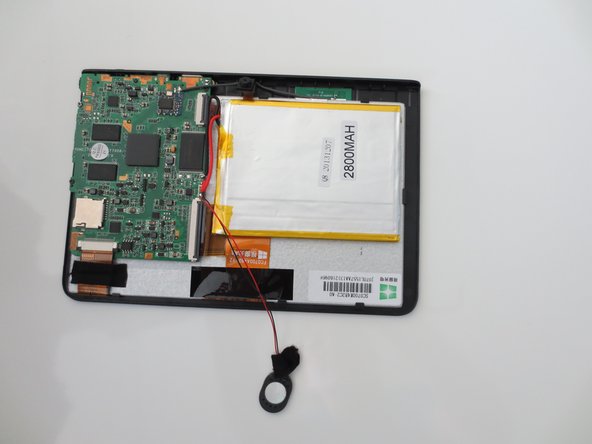
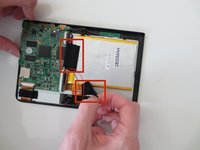
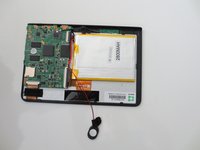
    1. Linsay Model F-7HD2CORE Battery Replacement, Battery: crwdns2935265:01crwdnd2935265:01crwdnd2935265:03crwdne2935265:0 Linsay Model F-7HD2CORE Battery Replacement, Battery: crwdns2935265:01crwdnd2935265:02crwdnd2935265:03crwdne2935265:0 Linsay Model F-7HD2CORE Battery Replacement, Battery: crwdns2935265:01crwdnd2935265:03crwdnd2935265:03crwdne2935265:0
      • Carefully insert your plastic opening tool in between the white and black sections of your device.

      • Gently pry the top screen portion from the base of the tablet.

      • Your tablet should now look like the third image.

      crwdns2952109:0crwdne2952109:0

      crwdns2917038:0crwdne2917038:0

    2. Linsay Model F-7HD2CORE Battery Replacement: crwdns2935265:02crwdnd2935265:01crwdnd2935265:02crwdne2935265:0 Linsay Model F-7HD2CORE Battery Replacement: crwdns2935265:02crwdnd2935265:02crwdnd2935265:02crwdne2935265:0
      • To completely remove the base from the top of the tablet, peel the microphone from the back.

      crwdns2952109:0crwdne2952109:0

      crwdns2917038:0crwdne2917038:0

    3. Linsay Model F-7HD2CORE Battery Replacement: crwdns2935265:03crwdnd2935265:01crwdnd2935265:02crwdne2935265:0 Linsay Model F-7HD2CORE Battery Replacement: crwdns2935265:03crwdnd2935265:02crwdnd2935265:02crwdne2935265:0
      • Remove the two pieces of tape holding the battery in place by gently peeling it off.

      crwdns2952109:0crwdne2952109:0

      crwdns2917038:0crwdne2917038:0

    4. Linsay Model F-7HD2CORE Battery Replacement: crwdns2935265:04crwdnd2935265:01crwdnd2935265:01crwdne2935265:0
      • Using the spudger, carefully peel the battery off of the tablet panel.

      • Tape of the back of the battery will be very strong, pull gently!

      • The metal exterior of the battery can be quite pliable. Use caution when removing the battery from the tablet.

      crwdns2952109:0crwdne2952109:0

      crwdns2917038:0crwdne2917038:0

    5. Linsay Model F-7HD2CORE Battery Replacement: crwdns2935265:05crwdnd2935265:01crwdnd2935265:01crwdne2935265:0
      • To remove the battery, completely desolder the wires connected to the circuit board.

      • To reattach the new battery, you must solder the wires back on.

      crwdns2952109:0crwdne2952109:0

      crwdns2917038:0crwdne2917038:0

crwdns2915888:0crwdne2915888:0

To reassemble your device, follow these instructions in reverse order.

crwdns2935221:0crwdne2935221:0

crwdns2935229:02crwdne2935229:0

Lindsay Byrnes

crwdns2935283:001/28/15crwdne2935283:0

495 crwdns2915208:0crwdne2915208:0

crwdns2935297:02crwdne2935297:0

crwdns2935287:0crwdne2935287:0

Penn State, Team 1-5, Kaschak Winter 2015 crwdns2935289:0Penn State, Team 1-5, Kaschak Winter 2015crwdne2935289:0

PSU-KASCHAK-W15S1G5

crwdns2931471:03crwdne2931471:0

crwdns2935297:024crwdne2935297:0

crwdns2947412:00crwdne2947412:0

crwdns2917038:0crwdne2917038:0

crwdns2936625:0crwdne2936625:0:

crwdns2936751:024crwdne2936751:0 1

crwdns2936753:07crwdne2936753:0 25

crwdns2936753:030crwdne2936753:0 101

crwdns2959996:0crwdne2959996:0 1,956