
Levoit LV-H132 LED Replacement

crwdns2959932:0crwdnd2959932:0Joshua Lopezcrwdnd2959932:0crwdnd2959932:0crwdnd2959932:04crwdnd2959932:0crwdne2959932:0
crwdns2959936:0N'w 19, 2023crwdne2959936:0
crwdns2869540:0crwdne2869540:0: 642
crwdns2959988:0crwdne2959988:0
- crwdns2959990:0crwdne2959990:0
- 3
- crwdns2959992:0crwdne2959992:0
- 12
- crwdns2959994:0crwdne2959994:0
- 64
- crwdns2959996:0crwdne2959996:0
- 642
crwdns2955950:0crwdne2955950:0: 0
crwdns2959998:0crwdne2959998:0
crwdns2960000:0crwdne2960000:0crwdns2959984:0crwdne2959984:0: 1 2
crwdns2959972:01crwdne2959972:0
crwdns2959970:02crwdne2959970:0
crwdns2959986:0crwdne2959986:0: 0 1
crwdns2959958:0crwdne2959958:0
crwdns2959976:01crwdne2959976:0
crwdns2862615:0crwdne2862615:0
crwdns2862616:0crwdne2862616:0
crwdns2915892:0crwdne2915892:0
crwdns2959928:0crwdne2959928:0 ↓Are the LED lights on your Levoit LV-H132 not lighting up, flickering, or dimming? If so, use this guide to replace the LED lights. This repair is required to enable the user to determine the status of their device.
crwdns2959930:0crwdne2959930:0
crwdns2943215:0crwdne2943215:0


-
-
-
Pry off the plastic top using a metal spudger.
 crwdns2952109:0crwdne2952109:0
-
-
-
Remove the three 1.2 mm screws with a Phillips #1 screwdriver.
-
-
-
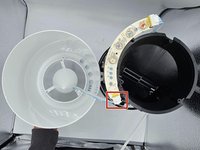
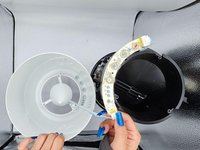
Disconnect the top half from the bottom.
-
-
-
Disconnect the circuit board cable.
-
-
-
-
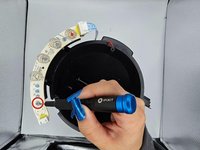
Remove the two 5 mm screws with a Phillips #1 screwdriver.
-
-
-
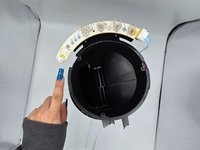
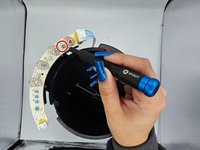
Desolder the joints holding the faulty LED and switch to the PCB.
-
Slide the faulty LED out and replace it with the functional one.
-
-









To reassemble your device, follow these instructions in reverse order.
crwdns2935221:0crwdne2935221:0
crwdns2935227:0crwdne2935227:0

crwdns2935287:0crwdne2935287:0

University of North Texas, Team 2-3, Harold Fall 2023 crwdns2935289:0University of North Texas, Team 2-3, Harold Fall 2023crwdne2935289:0
UNT-HAROLD-F23S2G3
crwdns2931471:04crwdne2931471:0
crwdns2935297:060crwdne2935297:0
