
Levoit Core 300-RAC Control Board Replacement

crwdns2959932:0crwdnd2959932:0Mustafacrwdnd2959932:0crwdnd2959932:0crwdnd2959932:02crwdnd2959932:0crwdne2959932:0
crwdns2959936:0Sun 3, 2024crwdne2959936:0
crwdns2869540:0crwdne2869540:0: 2,2 тыс.
crwdns2959988:0crwdne2959988:0
- crwdns2959990:0crwdne2959990:0
- 4
- crwdns2959992:0crwdne2959992:0
- 35
- crwdns2959994:0crwdne2959994:0
- 153
- crwdns2959996:0crwdne2959996:0
- 2 190
crwdns2955950:0crwdne2955950:0: 0
crwdns2959998:0crwdne2959998:0
crwdns2960000:0crwdne2960000:0crwdns2959984:0crwdne2959984:0: 0 1
crwdns2959956:0crwdne2959956:0
crwdns2959968:01crwdne2959968:0
crwdns2959986:0crwdne2959986:0: 0 1
crwdns2959958:0crwdne2959958:0
crwdns2959976:01crwdne2959976:0
crwdns2915892:0crwdne2915892:0
crwdns2959928:0crwdne2959928:0 ↓The control panel contains buttons that allow the user to power the device on and off, select the fan speed, run time, display brightness, night mode, the display lock, and the air filter status light. If any of these buttons or lights are malfunctioning, use this guide to replace the control board of your Levoit Core 300-RAC air purifier.
Before you begin, make sure to turn off your device and unplug it from the power outlet.
crwdns2959930:0crwdne2959930:0
crwdns2943215:0crwdne2943215:0

-
-
-
Insert the Jimmy between the gray grille cover and the top of the device.
-
Work your way around the grille cover with the Jimmy to release the clips holding it in place.
-
Remove the grille cover gently as it is connected by a ribbon cable.
 crwdns2952109:0crwdne2952109:0
-
-
-
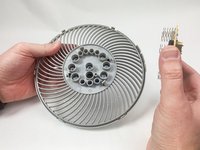
Squeeze the tab on the connector to release the bundled cable from the control board.
-
-
-
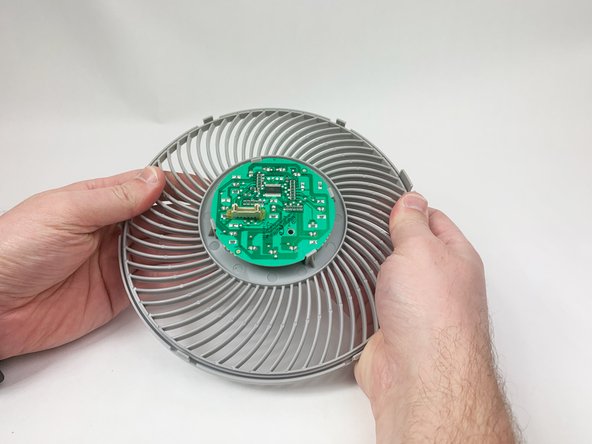
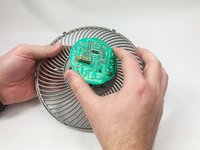
Gently bend the gray plastic cover to release the control board.
-
-
-
-
Lift the control board from the gray plastic cover.
-
-




To reassemble your device, follow these instructions in reverse order.

crwdns2935287:0crwdne2935287:0

UMass Dartmouth, Team 1-6, Petersen Fall 2023 crwdns2935289:0UMass Dartmouth, Team 1-6, Petersen Fall 2023crwdne2935289:0
UMASSD-PETERSEN-F23S1G6
crwdns2931471:05crwdne2931471:0
crwdns2935297:072crwdne2935297:0
