crwdns2956850:0crwdne2956850:0 crwdns2956756:0crwdnd2956756:0crwdne2956756:0

Lens Replacement

crwdns2959934:0crwdnd2959934:0VauWehcrwdnd2959934:0crwdnd2959934:0crwdnd2959934:0crwdne2959934:0
crwdns2959936:0Ndz 2, 2026crwdne2959936:0
crwdns2869540:0crwdne2869540:0: 1.7천
crwdns2959988:0crwdne2959988:0
- crwdns2959990:0crwdne2959990:0
- 5
- crwdns2959992:0crwdne2959992:0
- 43
- crwdns2959994:0crwdne2959994:0
- 145
- crwdns2959996:0crwdne2959996:0
- 1,720
crwdns2955950:0crwdne2955950:0: 0
crwdns2959998:0crwdne2959998:0
crwdns2960000:0crwdne2960000:0crwdns2959984:0crwdne2959984:0: 0 1
crwdns2959956:0crwdne2959956:0
crwdns2959968:01crwdne2959968:0
crwdns2959986:0crwdne2959986:0: 0 1
crwdns2959958:0crwdne2959958:0
crwdns2959976:01crwdne2959976:0
crwdns2944444:0crwdne2944444:0
crwdns2944446:0crwdne2944446:0
crwdns2915892:0crwdne2915892:0
crwdns2959928:0crwdne2959928:0 ↓If the camera lens is malfunctioning, not opening or extending, or if the camera displays a system error, you may need to remove and inspect the lens, or perhaps replace it entirely. This guide shows how to replace the lens of the Panasonic Lumix TZ71.
crwdns2959930:0crwdne2959930:0
crwdns2943215:0crwdne2943215:0


-
-
-
Turn off the camera and, for safety, remove the replacement battery.
-
Remove the four Phillips screws on the bottom.
-
Remove the two Phillips screws on the side with the door.
-
Remove the Phillips screw on the other side.
 crwdns2952109:0crwdne2952109:0
-
-
-
Lift the rear bezel out. Use your fingernails or an opening pick to do so. The bezel is a bit tight.
-
-
-
The back is now exposed.
-
Display
-
button board
-
-
-
-
-
Slide the button board down a small distance.
-
Tilt the PCB up at an angle and hold it in place.
-
Flip up the black locking flap on the ZIF socket of the ribbon cable using the tip of a spudger.
-
Carefully pull the ribbon cable out with tweezers.
-
-
-
Remove the button board
-
-
-
Slide the display slightly to the right.
-
Lift the top edge of the display slightly.
-
Open the display like a book.
-
-
-
Use the tip of a spudger to flip up the black locking flap on the display cable socket.
-
Use tweezers to pull the ribbon cable out of the socket.
-
Remove the display.
-
-
-
-
-
Remove the four Phillips screws from the copper shielding plate.
-
The plate is lightly adhered in the yellow-marked area. Use a spudger to begin prying it up carefully there.
-
Work your way around with the spudger and pry the plate out little by little.
-
Remove the plate.
-
-
-
-
Underneath the button board, there is also a black molded part acting as a bracket.
-
Carefully pry out the bracket with the tip of a spudger and remove it.
-
-
-
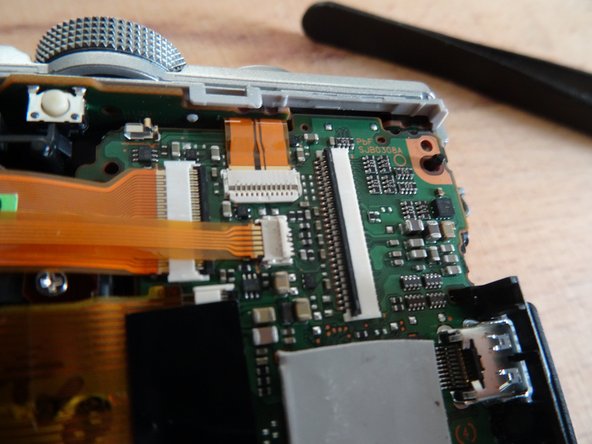
The wide ribbon cable in the middle is secured with a piece of tape. Peel back the tape enough so that the cable can be unplugged.
-
Flip up the marked locking flaps on the ZIF connectors of the ribbon cables with the tip of your spudger.
-
Carefully unplug the ribbon cables one by one using tweezers. To pull out the wide ribbon cable, you can use the adhesive strip.
-
-
-
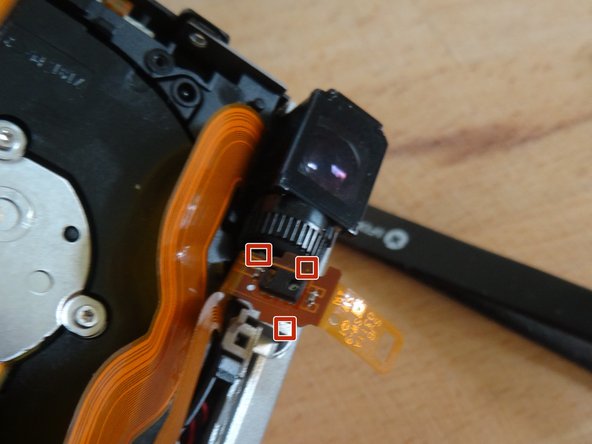
The lens is almost free, but it is obstructed by the small, delicate sensor next to the viewfinder.
-
Gently pull the sensor's ribbon cable out from under the top camera cover.
-
Carefully release the ribbon cable with the sensor from its three small retaining clips.
-
-
-
You can now carefully lift the lens out toward the back of the camera.
-
-






Follow the steps in reverse order to reassemble your device.

crwdns2935287:0crwdne2935287:0

Repair is War on Entropy crwdns2935289:0Repair is War on Entropycrwdne2935289:0
Community
crwdns2931471:043crwdne2931471:0
crwdns2935297:07,058crwdne2935297:0
