crwdns2933423:0crwdne2933423:0
crwdns2947577:0crwdnd2947577:0crwdne2947577:0

Lenovo ThinkPad X100e Screen Replacement

crwdns2942213:0crwdne2942213:0

    1. Lenovo ThinkPad X100e Screen Replacement, Screen: crwdns2935265:01crwdnd2935265:01crwdnd2935265:02crwdne2935265:0 Lenovo ThinkPad X100e Screen Replacement, Screen: crwdns2935265:01crwdnd2935265:02crwdnd2935265:02crwdne2935265:0
      crwdns2935267:0crwdne2935267:0
      Spudger
      $2.99
      • Use a Spudger tool to remove the screw covers on each side of the screen.

      • Be sure not to lose screw covers.

      crwdns2952109:0crwdne2952109:0

      crwdns2917038:0crwdne2917038:0

    2. Lenovo ThinkPad X100e Screen Replacement: crwdns2935265:02crwdnd2935265:01crwdnd2935265:01crwdne2935265:0
      • Using a magnetic screwdriver fit with a PH0 Bit, unscrew the two screws and carefully set the aside.

      crwdns2952109:0crwdne2952109:0

      crwdns2917038:0crwdne2917038:0

    3. Lenovo ThinkPad X100e Screen Replacement: crwdns2935265:03crwdnd2935265:01crwdnd2935265:01crwdne2935265:0
      • Pry open the bezel carefully with the spudger tool.

      • You will want to do this until the frame is completely off.

      crwdns2952109:0crwdne2952109:0

      crwdns2917038:0crwdne2917038:0

    4. Lenovo ThinkPad X100e Screen Replacement: crwdns2935265:04crwdnd2935265:01crwdnd2935265:01crwdne2935265:0
      • Remove all exposed screws and carefully set them aside. There should be 6 visible screws.

      • Be sure to set the screws aside on the magnetic mat.

      crwdns2952109:0crwdne2952109:0

      crwdns2917038:0crwdne2917038:0

    5. Lenovo ThinkPad X100e Screen Replacement: crwdns2935265:05crwdnd2935265:01crwdnd2935265:01crwdne2935265:0
      • Lift the screen up carefully, and remove the screws on both sides of the panel. There should be 4 screws.

      • The other two screws are located in the exact place on the other side.

      • Don't forget to place the screws on the magnetic mat, separate from other screws.

      crwdns2952109:0crwdne2952109:0

      crwdns2917038:0crwdne2917038:0

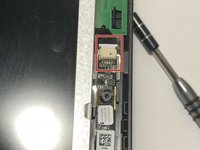
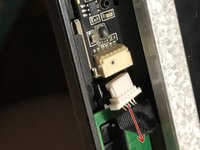
    6. Lenovo ThinkPad X100e Screen Replacement: crwdns2935265:06crwdnd2935265:01crwdnd2935265:02crwdne2935265:0 Lenovo ThinkPad X100e Screen Replacement: crwdns2935265:06crwdnd2935265:02crwdnd2935265:02crwdne2935265:0
      • Remove the connector located at the very top of the screen beside the webcam.

      • To remove the connector, simply pull the connector out.

      crwdns2952109:0crwdne2952109:0

      crwdns2917038:0crwdne2917038:0

    7. Lenovo ThinkPad X100e Screen Replacement: crwdns2935265:07crwdnd2935265:01crwdnd2935265:01crwdne2935265:0
      • Fold the panel over until a strip of black tape is visible.

      • Peel the tape down until you get to the base.

      crwdns2952109:0crwdne2952109:0

      crwdns2917038:0crwdne2917038:0

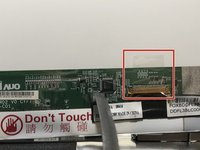
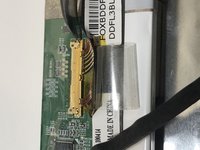
    8. Lenovo ThinkPad X100e Screen Replacement: crwdns2935265:08crwdnd2935265:01crwdnd2935265:02crwdne2935265:0 Lenovo ThinkPad X100e Screen Replacement: crwdns2935265:08crwdnd2935265:02crwdnd2935265:02crwdne2935265:0
      • Peel the piece of transparent tape back.

      • At this point there should be some exposed wires underneath the tape.

      crwdns2952109:0crwdne2952109:0

      crwdns2917038:0crwdne2917038:0

    9. Lenovo ThinkPad X100e Screen Replacement: crwdns2935265:09crwdnd2935265:01crwdnd2935265:01crwdne2935265:0
      • Remove the connector carefully with the spudger tool.

      crwdns2952109:0crwdne2952109:0

      crwdns2917038:0crwdne2917038:0

    10. Lenovo ThinkPad X100e Screen Replacement: crwdns2935265:010crwdnd2935265:01crwdnd2935265:01crwdne2935265:0
      • Remove the black tape fully.

      • Now your device is ready for a new panel.

      crwdns2952109:0crwdne2952109:0

      crwdns2917038:0crwdne2917038:0

crwdns2915888:0crwdne2915888:0

To reassemble your device, follow these instructions in reverse order.

crwdns2935221:0crwdne2935221:0

crwdns2935227:0crwdne2935227:0

Orly Guerra

crwdns2935283:002/08/18crwdne2935283:0

448 crwdns2915208:0crwdne2915208:0

crwdns2935297:02crwdne2935297:0

crwdns2947410:01crwdne2947410:0

What can be used as a replacement screen, as it's listed not for sale?

Keith Bowe - crwdns2934203:0crwdne2934203:0 crwdns2950251:0crwdne2950251:0

crwdns2917038:0crwdne2917038:0

crwdns2936625:0crwdne2936625:0:

crwdns2936751:024crwdne2936751:0 2

crwdns2936753:07crwdne2936753:0 16

crwdns2936753:030crwdne2936753:0 39

crwdns2942667:0crwdne2942667:0 1,401