
Lenovo G780 RAM Replacement

crwdns2959932:0crwdnd2959932:0Robert Bishopcrwdnd2959932:0crwdnd2959932:0crwdnd2959932:02crwdnd2959932:0crwdne2959932:0
crwdns2959936:0Mha 1, 2017crwdne2959936:0
crwdns2869540:0crwdne2869540:0: 1.7K
crwdns2959988:0crwdne2959988:0
- crwdns2959990:0crwdne2959990:0
- 3
- crwdns2959992:0crwdne2959992:0
- 14
- crwdns2959994:0crwdne2959994:0
- 94
- crwdns2959996:0crwdne2959996:0
- 1,674
crwdns2955950:0crwdne2955950:0: 0
crwdns2959998:0crwdne2959998:0
crwdns2960000:0crwdne2960000:0crwdns2959984:0crwdne2959984:0: 0 1
crwdns2959956:0crwdne2959956:0
crwdns2959968:01crwdne2959968:0
crwdns2959986:0crwdne2959986:0: 0 1
crwdns2959958:0crwdne2959958:0
crwdns2959976:01crwdne2959976:0
crwdns2915892:0crwdne2915892:0
crwdns2959928:0crwdne2959928:0 ↓If you wish to upgrade or replace RAM on the Lenovo G780, follow this guide.
crwdns2959930:0crwdne2959930:0
crwdns2943215:0crwdne2943215:0

-
-
-
Turn off the computer.
-
Slide the battery-lock switch on the bottom of the laptop to the unlocked position.
 crwdns2952109:0crwdne2952109:0
-
-
-
Hold the battery release switch in the unlocked position and remove the battery.
-
-
-
-
-
-
Using a #0 Phillips screwdriver, remove the six 9mm panel screws from the bottom of the device.
-
-
-
Remove the back panel.
-
-
-
-
-
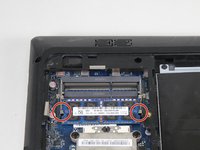
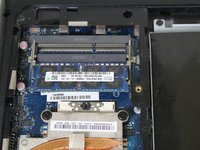
Push the two locks outwards to release the RAM.
-
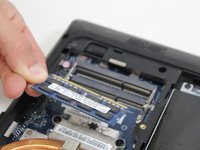
Carefully pull the RAM module from its socket.
-
-


To reassemble your device, follow these instructions in reverse order.

crwdns2935287:0crwdne2935287:0

Carson-Newman University, Team S1-G3, Sobiech Spring 2017 crwdns2935289:0Carson-Newman University, Team S1-G3, Sobiech Spring 2017crwdne2935289:0
CNU-SOBIECH-S17S1G3
crwdns2931471:04crwdne2931471:0
crwdns2935297:060crwdne2935297:0
