crwdns2933423:0crwdne2933423:0
crwdns2947577:0crwdnd2947577:0crwdne2947577:0

Lenovo Essential B570 Keyboard Replacement

crwdns2942213:0crwdne2942213:0

  1. Lenovo Essential B570 Keyboard Replacement, Battery: crwdns2935265:01crwdnd2935265:01crwdnd2935265:01crwdne2935265:0
    • Turn over laptop.

    • Switch open the left battery lock.

    • If you are replacing inner components of the laptop, it is recommended to remove the battery first to avoid damage to the laptop.

    crwdns2952109:0crwdne2952109:0

    crwdns2917038:0crwdne2917038:0

  2. Lenovo Essential B570 Keyboard Replacement: crwdns2935265:02crwdnd2935265:01crwdnd2935265:01crwdne2935265:0
    • Hold the right battery lock open with one hand while removing the battery itself with the other.

    crwdns2952109:0crwdne2952109:0

    crwdns2917038:0crwdne2917038:0

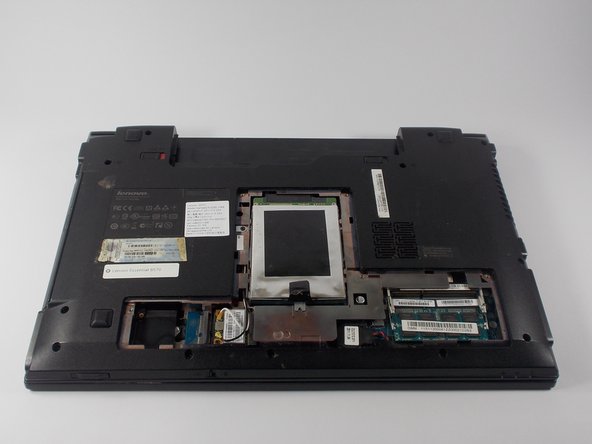
  3. Lenovo Essential B570 Keyboard Replacement, Back Panel: crwdns2935265:03crwdnd2935265:01crwdnd2935265:01crwdne2935265:0
    • Loosen the five Philips screws that secure the panel.

    • The screws do not actually fully remove from the panel. Loosening them as much as you can will be enough to disconnect them from the laptop.

    crwdns2952109:0crwdne2952109:0

    crwdns2917038:0crwdne2917038:0

  4. Lenovo Essential B570 Keyboard Replacement: crwdns2935265:04crwdnd2935265:01crwdnd2935265:03crwdne2935265:0 Lenovo Essential B570 Keyboard Replacement: crwdns2935265:04crwdnd2935265:02crwdnd2935265:03crwdne2935265:0 Lenovo Essential B570 Keyboard Replacement: crwdns2935265:04crwdnd2935265:03crwdnd2935265:03crwdne2935265:0
    • Prop open the cover with a plastic opening tool.

    • If the cover does not come off easily, do not force it. Make sure all screws are loosened.

    crwdns2952109:0crwdne2952109:0

    crwdns2917038:0crwdne2917038:0

  5. Lenovo Essential B570 Keyboard Replacement, Keyboard: crwdns2935265:05crwdnd2935265:01crwdnd2935265:01crwdne2935265:0
    • Remove the three 3 mm Phillips screws holding the keyboard in. These screws are designated by an imprinted keyboard picture next to them.

    crwdns2952109:0crwdne2952109:0

    crwdns2917038:0crwdne2917038:0

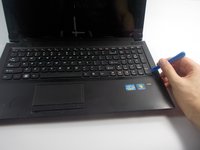
  6. Lenovo Essential B570 Keyboard Replacement: crwdns2935265:06crwdnd2935265:01crwdnd2935265:02crwdne2935265:0 Lenovo Essential B570 Keyboard Replacement: crwdns2935265:06crwdnd2935265:02crwdnd2935265:02crwdne2935265:0
    • Carefully pry off the keyboard with your plastic opening tool , moving along the edges.

    • DO NOT immediately remove the keyboard as it is still connected underneath by a wire.

    crwdns2952109:0crwdne2952109:0

    crwdns2917038:0crwdne2917038:0

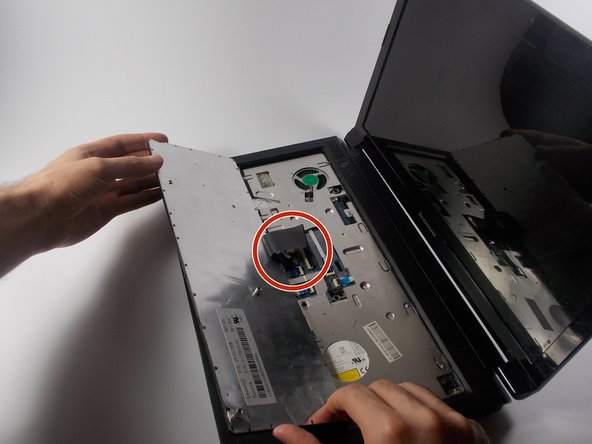
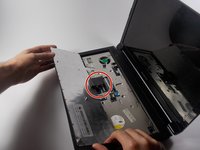
  7. Lenovo Essential B570 Keyboard Replacement: crwdns2935265:07crwdnd2935265:01crwdnd2935265:02crwdne2935265:0 Lenovo Essential B570 Keyboard Replacement: crwdns2935265:07crwdnd2935265:02crwdnd2935265:02crwdne2935265:0
    • Carefully lift the keyboard.

    • The keyboard is still connected to the laptop. Lift it slowly.

    • Turn over the keyboard to locate the keyboards ribbon cable.

    crwdns2952109:0crwdne2952109:0

    crwdns2917038:0crwdne2917038:0

  8. Lenovo Essential B570 Keyboard Replacement: crwdns2935265:08crwdnd2935265:01crwdnd2935265:02crwdne2935265:0 Lenovo Essential B570 Keyboard Replacement: crwdns2935265:08crwdnd2935265:02crwdnd2935265:02crwdne2935265:0
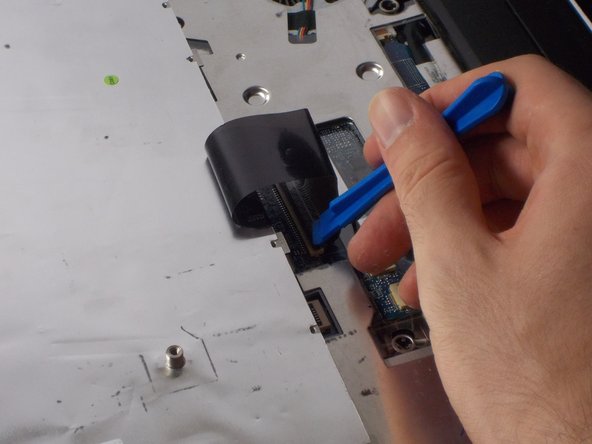
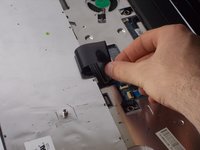
    • Use the plastic opening tool to lift open the ribbon connector that is holding the ribbon cable in its slot.

    crwdns2952109:0crwdne2952109:0

    crwdns2917038:0crwdne2917038:0

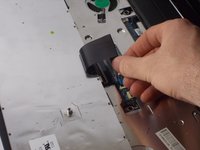
  9. Lenovo Essential B570 Keyboard Replacement: crwdns2935265:09crwdnd2935265:01crwdnd2935265:02crwdne2935265:0 Lenovo Essential B570 Keyboard Replacement: crwdns2935265:09crwdnd2935265:02crwdnd2935265:02crwdne2935265:0
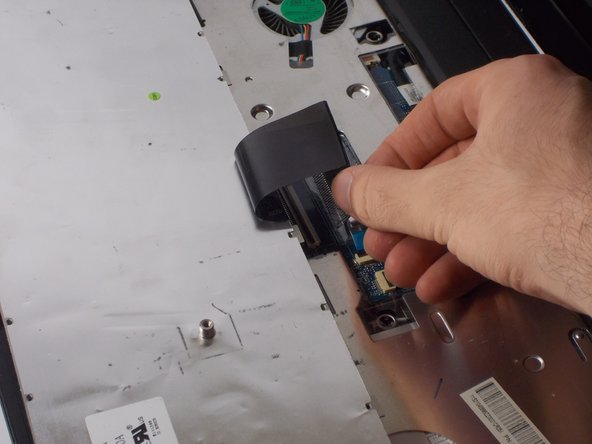
    • Remove the cable from its slot.

    • If the cable does not come out easily, ensure that the black ribbon has been completely released.

    crwdns2952109:0crwdne2952109:0

    crwdns2917038:0crwdne2917038:0

crwdns2915888:0crwdne2915888:0

To reassemble your device, follow these instructions in reverse order.

crwdns2935221:0crwdne2935221:0

crwdns2935229:03crwdne2935229:0

Samuel Filliettaz

crwdns2935283:010/20/15crwdne2935283:0

891 crwdns2915208:0crwdne2915208:0

crwdns2935297:05crwdne2935297:0

crwdns2935287:0crwdne2935287:0

UMass Dartmouth, Team 4-5, Catania Fall 2015 crwdns2935289:0UMass Dartmouth, Team 4-5, Catania Fall 2015crwdne2935289:0

UMASSD-CATANIA-F15S4G5

crwdns2931471:04crwdne2931471:0

crwdns2935297:06crwdne2935297:0

crwdns2947412:00crwdne2947412:0

crwdns2917038:0crwdne2917038:0

crwdns2936625:0crwdne2936625:0:

crwdns2936751:024crwdne2936751:0 1

crwdns2936753:07crwdne2936753:0 8

crwdns2936753:030crwdne2936753:0 25

crwdns2942667:0crwdne2942667:0 3,104