crwdns2933423:0crwdne2933423:0
crwdns2947577:0crwdnd2947577:0crwdne2947577:0

LeapFrog LeapPad Ultra Repair Screen Replacement

crwdns2942213:0crwdne2942213:0

    1. LeapFrog LeapPad Ultra Repair Screen Replacement, Battery: crwdns2935265:01crwdnd2935265:01crwdnd2935265:01crwdne2935265:0
      • Remove the barcode covering the two screws on the lower back of the Leap Pad.

      crwdns2952109:0crwdne2952109:0

      crwdns2917038:0crwdne2917038:0

    2. LeapFrog LeapPad Ultra Repair Screen Replacement: crwdns2935265:02crwdnd2935265:01crwdnd2935265:01crwdne2935265:0
      • Remove the two 5 mm screws that were covered by the sticker.

      crwdns2952109:0crwdne2952109:0

      crwdns2917038:0crwdne2917038:0

    3. LeapFrog LeapPad Ultra Repair Screen Replacement: crwdns2935265:03crwdnd2935265:01crwdnd2935265:01crwdne2935265:0
      • Using a plastic opening tool, pry off the outer protective child proof casing, starting from the bottom.

      crwdns2952109:0crwdne2952109:0

      crwdns2917038:0crwdne2917038:0

    4. LeapFrog LeapPad Ultra Repair Screen Replacement: crwdns2935265:04crwdnd2935265:01crwdnd2935265:01crwdne2935265:0
      • Remove the 7 mm screw to the right of the cartridge dock, two 8 mm screws in the top left, and the nine 8 mm screws holding the the green shell.

      crwdns2952109:0crwdne2952109:0

      crwdns2917038:0crwdne2917038:0

    5. LeapFrog LeapPad Ultra Repair Screen Replacement: crwdns2935265:05crwdnd2935265:01crwdnd2935265:01crwdne2935265:0
      • Remove the hard plastic casing, exposing the motherboard and battery.

      crwdns2952109:0crwdne2952109:0

      crwdns2917038:0crwdne2917038:0

    6. LeapFrog LeapPad Ultra Repair Screen Replacement: crwdns2935265:06crwdnd2935265:01crwdnd2935265:02crwdne2935265:0 LeapFrog LeapPad Ultra Repair Screen Replacement: crwdns2935265:06crwdnd2935265:02crwdnd2935265:02crwdne2935265:0
      crwdns2935267:0crwdne2935267:0
      Tweezers
      $4.99
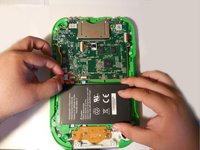
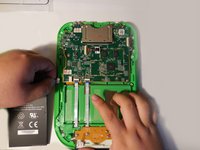
      • Disconnect the battery using tweezers or your fingernails.

      • The battery is glued down, if available put some isopropyl alcohol around the edges of the battery to soften the glue.

      • Gently pry of the battery lose using a spudger or another thin prying tool.

      • Be careful, damaging/puncturing the battery may cause an explosion.

      crwdns2952109:0crwdne2952109:0

      crwdns2917038:0crwdne2917038:0

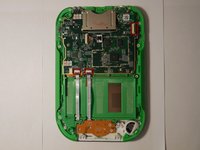
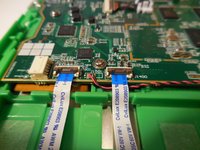
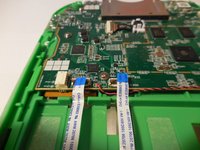
    1. LeapFrog LeapPad Ultra Repair Screen Replacement, Motherboard: crwdns2935265:07crwdnd2935265:01crwdnd2935265:03crwdne2935265:0 LeapFrog LeapPad Ultra Repair Screen Replacement, Motherboard: crwdns2935265:07crwdnd2935265:02crwdnd2935265:03crwdne2935265:0 LeapFrog LeapPad Ultra Repair Screen Replacement, Motherboard: crwdns2935265:07crwdnd2935265:03crwdnd2935265:03crwdne2935265:0
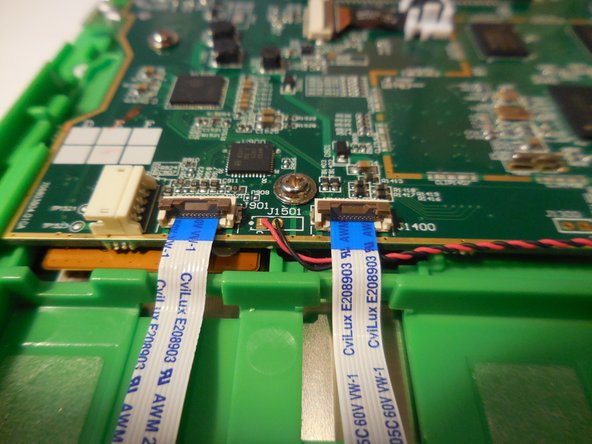
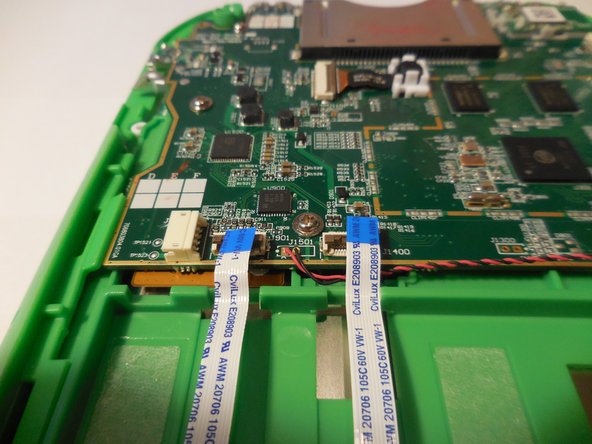
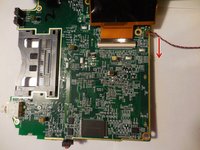
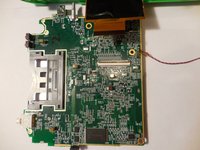
      • Disconnect the three wires that will be visible on top of the motherboard. The wires need to be disconnected by pulling them up vertically.

      crwdns2952109:0crwdne2952109:0

      crwdns2917038:0crwdne2917038:0

    2. LeapFrog LeapPad Ultra Repair Screen Replacement: crwdns2935265:08crwdnd2935265:01crwdnd2935265:01crwdne2935265:0
      • Unscrew the five screws holding the motherboard into the housing.

      crwdns2952109:0crwdne2952109:0

      crwdns2917038:0crwdne2917038:0

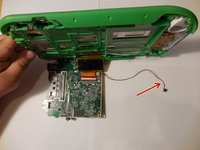
    3. LeapFrog LeapPad Ultra Repair Screen Replacement: crwdns2935265:09crwdnd2935265:01crwdnd2935265:03crwdne2935265:0 LeapFrog LeapPad Ultra Repair Screen Replacement: crwdns2935265:09crwdnd2935265:02crwdnd2935265:03crwdne2935265:0 LeapFrog LeapPad Ultra Repair Screen Replacement: crwdns2935265:09crwdnd2935265:03crwdnd2935265:03crwdne2935265:0
      • Lift the motherboard up exposing the fourth and final wire. Once you lift up the motherboard you will need to pull down on the wire to disconnect.

      crwdns2952109:0crwdne2952109:0

      crwdns2917038:0crwdne2917038:0

    4. LeapFrog LeapPad Ultra Repair Screen Replacement: crwdns2935265:010crwdnd2935265:01crwdnd2935265:01crwdne2935265:0
      • Remove and replace motherboard.

      crwdns2952109:0crwdne2952109:0

      crwdns2917038:0crwdne2917038:0

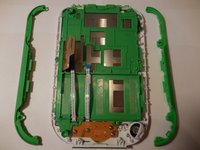
    1. LeapFrog LeapPad Ultra Repair Screen Replacement, Screen: crwdns2935265:011crwdnd2935265:01crwdnd2935265:02crwdne2935265:0 LeapFrog LeapPad Ultra Repair Screen Replacement, Screen: crwdns2935265:011crwdnd2935265:02crwdnd2935265:02crwdne2935265:0
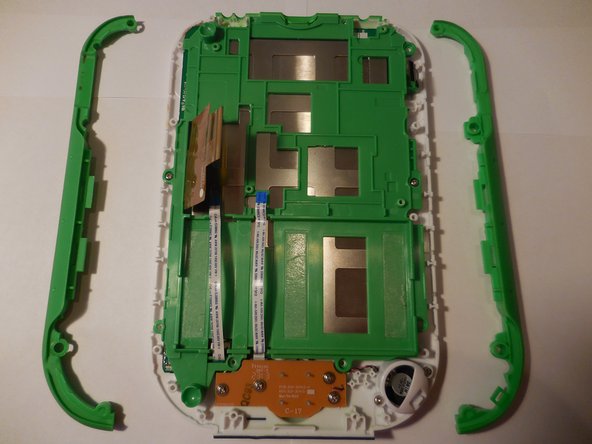
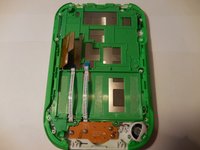
      • Remove the side grips simply pulling them both vertically exposing eight screws.

      crwdns2952109:0crwdne2952109:0

      crwdns2917038:0crwdne2917038:0

    2. LeapFrog LeapPad Ultra Repair Screen Replacement: crwdns2935265:012crwdnd2935265:01crwdnd2935265:01crwdne2935265:0
      • Using the screwdriver with the PH1 bit, unscrew all nine of the exposed screws holding the plastic base down and remove the base.

      crwdns2952109:0crwdne2952109:0

      crwdns2917038:0crwdne2917038:0

    3. LeapFrog LeapPad Ultra Repair Screen Replacement: crwdns2935265:013crwdnd2935265:01crwdnd2935265:01crwdne2935265:0
      • Using the screwdriver with the PH00 bit, unscrew the twelve screws holding the screen casing down.

      crwdns2952109:0crwdne2952109:0

      crwdns2917038:0crwdne2917038:0

    4. LeapFrog LeapPad Ultra Repair Screen Replacement: crwdns2935265:014crwdnd2935265:01crwdnd2935265:01crwdne2935265:0
      • Separate the screen from the casing and circuit board.

      crwdns2952109:0crwdne2952109:0

      crwdns2917038:0crwdne2917038:0

    5. LeapFrog LeapPad Ultra Repair Screen Replacement: crwdns2935265:015crwdnd2935265:01crwdnd2935265:01crwdne2935265:0
      • Replace screen.

      crwdns2952109:0crwdne2952109:0

      crwdns2917038:0crwdne2917038:0

crwdns2915888:0crwdne2915888:0

To reassemble your device, follow these instructions in reverse order.

crwdns2935221:0crwdne2935221:0

crwdns2935229:011crwdne2935229:0

Rocky Hirsch

crwdns2935283:008/27/15crwdne2935283:0

902 crwdns2915208:0crwdne2915208:0

crwdns2935297:03crwdne2935297:0

crwdns2935287:0crwdne2935287:0

USF Tampa, Team 4-99, Meier Fall 2015 crwdns2935289:0USF Tampa, Team 4-99, Meier Fall 2015crwdne2935289:0

USFT-MEIER-F15S4G99

crwdns2931471:04crwdne2931471:0

crwdns2935297:060crwdne2935297:0

crwdns2947412:08crwdne2947412:0

I need a source for the LCD screen. Anyone have a connection?

rhilscher - crwdns2934203:0crwdne2934203:0 crwdns2950251:0crwdne2950251:0

Where would i purchase the new screen?

gaildavies282 - crwdns2934203:0crwdne2934203:0 crwdns2950251:0crwdne2950251:0

You cannot get the screens. I had to get one from a parted device. Best you could try for is finding one the correct size with the connector in the proper place that is 50 pin.

crhouk - crwdns2934203:0crwdne2934203:0 crwdns2950251:0crwdne2950251:0

Could you send the link to where you bought yours

Michelle Popoff - crwdns2934203:0crwdne2934203:0 crwdns2950251:0crwdne2950251:0

crwdns2917038:0crwdne2917038:0

crwdns2936625:0crwdne2936625:0:

crwdns2936751:024crwdne2936751:0 3

crwdns2936753:07crwdne2936753:0 24

crwdns2936753:030crwdne2936753:0 134

crwdns2942667:0crwdne2942667:0 17,886