
LG1010 Speaker Replacement

crwdns2959932:0crwdnd2959932:0Nicholas Schmidtcrwdnd2959932:0crwdnd2959932:0crwdnd2959932:07crwdnd2959932:0crwdne2959932:0
crwdns2959936:0Yan 5, 2018crwdne2959936:0
crwdns2869540:0crwdne2869540:0: 1438
crwdns2959988:0crwdne2959988:0
- crwdns2959990:0crwdne2959990:0
- 2
- crwdns2959992:0crwdne2959992:0
- 23
- crwdns2959994:0crwdne2959994:0
- 85
- crwdns2959996:0crwdne2959996:0
- 1.438
crwdns2955950:0crwdne2955950:0: 0
crwdns2959998:0crwdne2959998:0
crwdns2960000:0crwdne2960000:0crwdns2959984:0crwdne2959984:0: 1 2
crwdns2959972:01crwdne2959972:0
crwdns2959970:02crwdne2959970:0
crwdns2959986:0crwdne2959986:0: 0 1
crwdns2959958:0crwdne2959958:0
crwdns2959976:01crwdne2959976:0
crwdns2869446:0crwdne2869446:0
crwdns2869447:0crwdne2869447:0
crwdns2862617:0crwdne2862617:0
crwdns2862618:0crwdne2862618:0
crwdns2959930:0crwdne2959930:0
crwdns2943215:0crwdne2943215:0


-
-
-
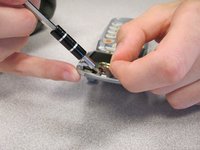
Remove the two plastic screw covers below the inside phone screen.
 crwdns2952109:0crwdne2952109:0
-
-
-
Unscrew both screws using a Torx T6 screwdriver.
-
-
-
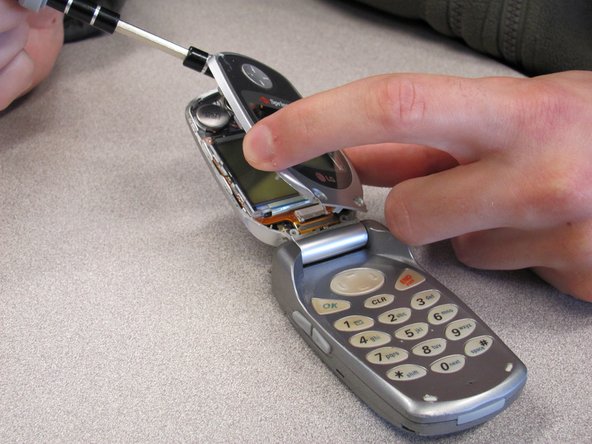
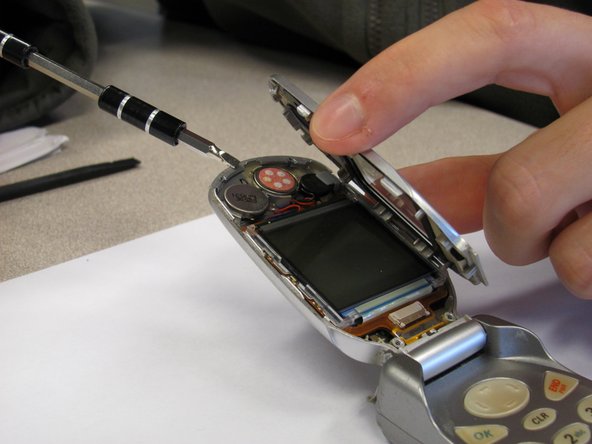
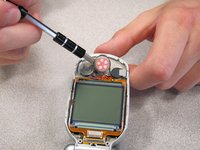
Pry off the screen front cover with a 3mm flathead screwdriver.
-
-
-
-
Pry off the speaker, which is glued onto the front cover, using a small flathead screwdriver.
-
-
-
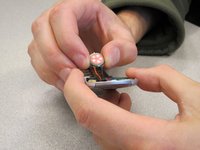
Unsolder the black and red wires of the speaker from where they are attached to the base of the screen.
-
-
-
Obtain replacement speaker and solder the new black and red wires back to the base of the screen.
-
-
-
Apply glue to the back of the speaker and place it back in its original position.
-
-







To reassemble your device, follow these instructions in reverse order.
crwdns2935221:0crwdne2935221:0
crwdns2935227:0crwdne2935227:0

crwdns2935287:0crwdne2935287:0

Cal Poly, Team 3-25, Regan Fall 2010 crwdns2935289:0Cal Poly, Team 3-25, Regan Fall 2010crwdne2935289:0
CPSU-REGAN-F10S3G25
crwdns2931471:04crwdne2931471:0
crwdns2935297:084crwdne2935297:0
