crwdns2933423:0crwdne2933423:0
crwdns2947577:0crwdnd2947577:0crwdne2947577:0

LG X Style Camera Flash Replacement

crwdns2942213:0crwdne2942213:0

    1. LG X Style Camera Flash Replacement, Battery: crwdns2935265:01crwdnd2935265:01crwdnd2935265:01crwdne2935265:0
      • Power down the device and make sure that it is turned off.

      • Insert the plastic opening tool into the bracket space on the back bottom left of the phone.

      • Gently twist tool clockwise until the back case pops open [this will create a small gap].

      • Slide the tool along the gap around the entire device.

      crwdns2952109:0crwdne2952109:0

      crwdns2917038:0crwdne2917038:0

    2. LG X Style Camera Flash Replacement: crwdns2935265:02crwdnd2935265:01crwdnd2935265:02crwdne2935265:0 LG X Style Camera Flash Replacement: crwdns2935265:02crwdnd2935265:02crwdnd2935265:02crwdne2935265:0
      • Insert the plastic opening tool into the indent below the battery, and pry up to lift and remove the battery.

      crwdns2952109:0crwdne2952109:0

      crwdns2917038:0crwdne2917038:0

    1. LG X Style Camera Flash Replacement, Screen: crwdns2935265:03crwdnd2935265:01crwdnd2935265:02crwdne2935265:0 LG X Style Camera Flash Replacement, Screen: crwdns2935265:03crwdnd2935265:02crwdnd2935265:02crwdne2935265:0
      • With a Phillips #000 screwdriver, remove the twelve 3mm screws.

      crwdns2952109:0crwdne2952109:0

      crwdns2917038:0crwdne2917038:0

    2. LG X Style Camera Flash Replacement: crwdns2935265:04crwdnd2935265:01crwdnd2935265:03crwdne2935265:0 LG X Style Camera Flash Replacement: crwdns2935265:04crwdnd2935265:02crwdnd2935265:03crwdne2935265:0 LG X Style Camera Flash Replacement: crwdns2935265:04crwdnd2935265:03crwdnd2935265:03crwdne2935265:0
      • Create a gap with plastic opening tool by applying pressure between glass screen and plastic edge of device.

      • Slide prying tool around entire device beginning toward the top.

      • Lift off and remove the screen from the device.

      crwdns2952109:0crwdne2952109:0

      crwdns2917038:0crwdne2917038:0

    1. LG X Style Camera Flash Replacement, Camera Flash: crwdns2935265:05crwdnd2935265:01crwdnd2935265:02crwdne2935265:0 LG X Style Camera Flash Replacement, Camera Flash: crwdns2935265:05crwdnd2935265:02crwdnd2935265:02crwdne2935265:0
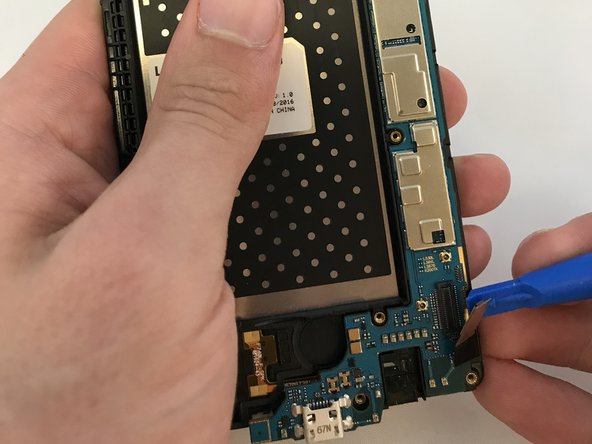
      • Using a plastic opening tool, lift up display connection until disconnected from the lower right hand of the phone.

      • Carefully lift the metal connection perpendicular to the mother board.

      crwdns2952109:0crwdne2952109:0

      crwdns2917038:0crwdne2917038:0

    2. LG X Style Camera Flash Replacement: crwdns2935265:06crwdnd2935265:01crwdnd2935265:02crwdne2935265:0 LG X Style Camera Flash Replacement: crwdns2935265:06crwdnd2935265:02crwdnd2935265:02crwdne2935265:0
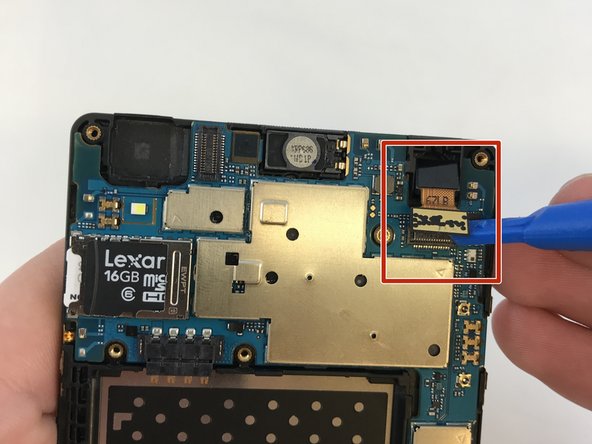
      • Gently lift the camera ribbon cable until the entire front camera housing is removed.

      crwdns2952109:0crwdne2952109:0

      crwdns2917038:0crwdne2917038:0

    3. LG X Style Camera Flash Replacement: crwdns2935265:07crwdnd2935265:01crwdnd2935265:03crwdne2935265:0 LG X Style Camera Flash Replacement: crwdns2935265:07crwdnd2935265:02crwdnd2935265:03crwdne2935265:0 LG X Style Camera Flash Replacement: crwdns2935265:07crwdnd2935265:03crwdnd2935265:03crwdne2935265:0
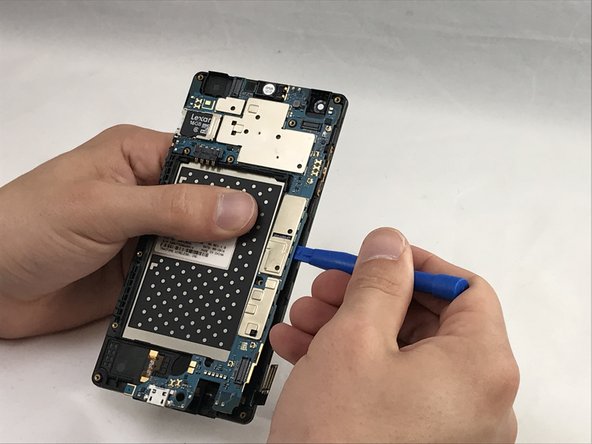
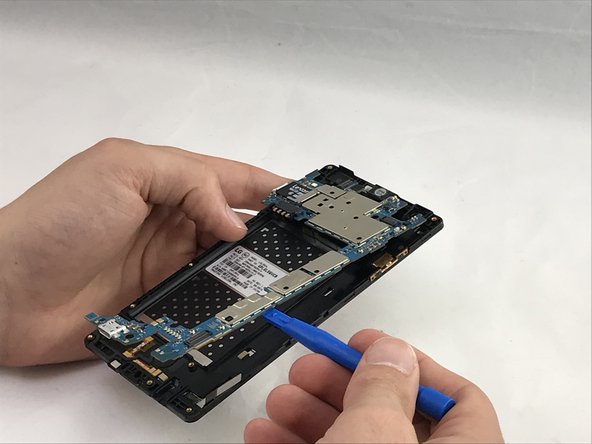
      • Use the opening tool, gently pry up along the edge of the motherboard.

      • Gently pull up and remove the motherboard from the device.

      crwdns2952109:0crwdne2952109:0

      crwdns2917038:0crwdne2917038:0

crwdns2915888:0crwdne2915888:0

To reassemble your device, follow these instructions in reverse order.

crwdns2935221:0crwdne2935221:0

cecilia morales

crwdns2935283:004/09/18crwdne2935283:0

361 crwdns2915208:0crwdne2915208:0

crwdns2935297:04crwdne2935297:0

crwdns2935287:0crwdne2935287:0

Eastern Washington University, Team S1-G2, Carnegie Spring 2018 crwdns2935289:0Eastern Washington University, Team S1-G2, Carnegie Spring 2018crwdne2935289:0

EWU-CARNEGIE-S18S1G2

crwdns2931471:04crwdne2931471:0

crwdns2935297:060crwdne2935297:0

crwdns2947412:00crwdne2947412:0

crwdns2917038:0crwdne2917038:0

crwdns2936625:0crwdne2936625:0:

crwdns2936751:024crwdne2936751:0 0

crwdns2936753:07crwdne2936753:0 3

crwdns2936753:030crwdne2936753:0 39

crwdns2942667:0crwdne2942667:0 599