
LG VX8560 Battery Replacement

crwdns2959932:0crwdnd2959932:0Kevincrwdnd2959932:0crwdnd2959932:0crwdnd2959932:06crwdnd2959932:0crwdne2959932:0
crwdns2959936:0Sun 9, 2025crwdne2959936:0
crwdns2869540:0crwdne2869540:0: 739
crwdns2959988:0crwdne2959988:0
- crwdns2959990:0crwdne2959990:0
- 1
- crwdns2959992:0crwdne2959992:0
- 8
- crwdns2959994:0crwdne2959994:0
- 27
- crwdns2959996:0crwdne2959996:0
- 739
crwdns2955950:0crwdne2955950:0: 0
crwdns2959998:0crwdne2959998:0
crwdns2960000:0crwdne2960000:0crwdns2959984:0crwdne2959984:0: 0 1
crwdns2959956:0crwdne2959956:0
crwdns2959968:01crwdne2959968:0
crwdns2959986:0crwdne2959986:0: 0 1
crwdns2959958:0crwdne2959958:0
crwdns2959976:01crwdne2959976:0
crwdns2862611:0crwdne2862611:0
crwdns2862612:0crwdne2862612:0
crwdns2915892:0crwdne2915892:0
crwdns2959928:0crwdne2959928:0 ↓This guide provides instructions for removing the battery on your LG VX8560 cellphone. Batteries are one of the most vital components of equipment on any electronic device; replacement may be necessary to ensure your device remains operational.
If your device is not powering on properly, it may be a sign that the battery is in need of replacement. Follow the instructions below to safely remove and replace your current battery.
-
-
-
Turn the phone over so that the backside is facing up.
 crwdns2952109:0crwdne2952109:0
-
-
-
-
Push the battery cover from the indentation and slide it away from the phone to remove it.
-
-
-
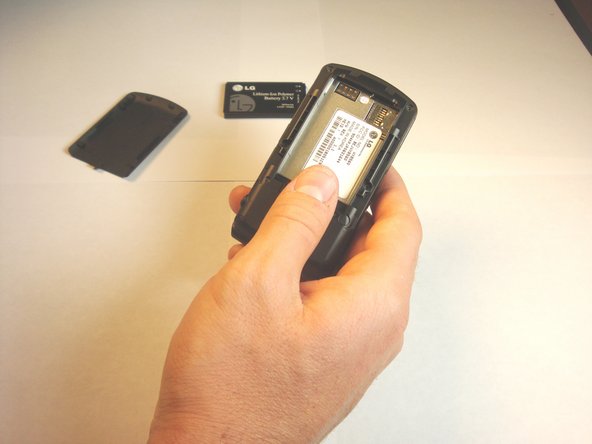
Remove the battery from the phone.
-
-


To reassemble your device, follow these instructions in reverse order.

crwdns2935287:0crwdne2935287:0

Cal Poly, Team 13-62, Johann Spring 2013 crwdns2935289:0Cal Poly, Team 13-62, Johann Spring 2013crwdne2935289:0
CPSU-JOHANN-S13S13G62
crwdns2931471:04crwdne2931471:0
crwdns2935297:072crwdne2935297:0
