crwdns2933423:0crwdne2933423:0
crwdns2947577:0crwdnd2947577:0crwdne2947577:0

LG VX5600 Plastic Screen Protector Replacement

crwdns2942213:0crwdne2942213:0

  1. LG VX5600 Plastic Screen Protector Replacement, Battery: crwdns2935265:01crwdnd2935265:01crwdnd2935265:02crwdne2935265:0 LG VX5600 Plastic Screen Protector Replacement, Battery: crwdns2935265:01crwdnd2935265:02crwdnd2935265:02crwdne2935265:0
    • Hold your phone with the back casing facing you and the bottom of the phone towards the sky.

    • Push down on the cover and slide down to remove. You should only have to apply minimal pressure.

    crwdns2952109:0crwdne2952109:0

    crwdns2917038:0crwdne2917038:0

  2. LG VX5600 Plastic Screen Protector Replacement: crwdns2935265:02crwdnd2935265:01crwdnd2935265:02crwdne2935265:0 LG VX5600 Plastic Screen Protector Replacement: crwdns2935265:02crwdnd2935265:02crwdnd2935265:02crwdne2935265:0
    • Insert your finger into the small indentation above the battery.

    • Push down on the battery and pull it away from the phone; it will pop out.

    crwdns2952109:0crwdne2952109:0

    crwdns2917038:0crwdne2917038:0

  3. LG VX5600 Plastic Screen Protector Replacement, Plastic Screen Protector: crwdns2935265:03crwdnd2935265:01crwdnd2935265:01crwdne2935265:0
    crwdns2935267:0crwdne2935267:0
    Tweezers
    $4.99
    • Use tweezers to remove the two rubber covers found at the left and right corners below the inside screen.

    crwdns2952109:0crwdne2952109:0

    crwdns2917038:0crwdne2917038:0

  4. LG VX5600 Plastic Screen Protector Replacement: crwdns2935265:04crwdnd2935265:01crwdnd2935265:01crwdne2935265:0
    • Grasp the phone and rotate it 90 degrees counterclockwise for a better grip.

    • Unscrew the two 3.0-mm Phillips #000 screws, found under the rubber covers at the bottom left and right corners.

    • Some of the pictures show the bottom of the phone disassembled. It is unneccessary to disassemble the bottom of the phone for this guide.

    crwdns2952109:0crwdne2952109:0

    crwdns2917038:0crwdne2917038:0

  5. LG VX5600 Plastic Screen Protector Replacement: crwdns2935265:05crwdnd2935265:01crwdnd2935265:02crwdne2935265:0 LG VX5600 Plastic Screen Protector Replacement: crwdns2935265:05crwdnd2935265:02crwdnd2935265:02crwdne2935265:0
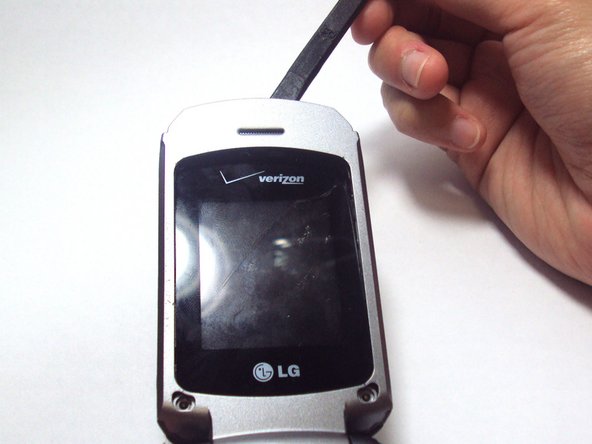
    • Hold the opened phone upright.

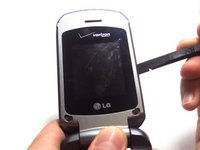
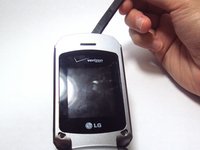
    • Use the spudger to pry around the edges of the phone and detach the tabs.

    • Make sure all the tabs around the grey cover are detached. They are located on the top and on both sides of the screen.

    crwdns2952109:0crwdne2952109:0

    crwdns2917038:0crwdne2917038:0

  6. LG VX5600 Plastic Screen Protector Replacement: crwdns2935265:06crwdnd2935265:01crwdnd2935265:01crwdne2935265:0
    • Use your finger to lift up the grey plastic cover.

    • Use the tweezers to grasp the plastic screen, and pull the plastic screen protector up and out of the phone.

    • The plastic screen protector is adhered with glue to the back of the phone, so a little force is required to remove it.

    crwdns2952109:0crwdne2952109:0

    crwdns2917038:0crwdne2917038:0

crwdns2915888:0crwdne2915888:0

To reassemble your device, follow these instructions in reverse order.

crwdns2935221:0crwdne2935221:0

crwdns2935227:0crwdne2935227:0

Irena Tran

crwdns2935283:006/04/13crwdne2935283:0

435 crwdns2915208:0crwdne2915208:0

crwdns2935297:04crwdne2935297:0

crwdns2935287:0crwdne2935287:0

University of Kentucky Louisville, Team 1-5, Chamberlain Spring 2013 crwdns2935289:0University of Kentucky Louisville, Team 1-5, Chamberlain Spring 2013crwdne2935289:0

LOUISVILLE-CHAMBERLAIN-S13S1G5

crwdns2931471:02crwdne2931471:0

crwdns2935297:012crwdne2935297:0

crwdns2947412:00crwdne2947412:0

crwdns2917038:0crwdne2917038:0

crwdns2936625:0crwdne2936625:0:

crwdns2936751:024crwdne2936751:0 2

crwdns2936753:07crwdne2936753:0 8

crwdns2936753:030crwdne2936753:0 50

crwdns2942667:0crwdne2942667:0 761