crwdns2933423:0crwdne2933423:0
crwdns2947577:0crwdnd2947577:0crwdne2947577:0

LG VX5500 Audio Port Replacement

crwdns2942213:0crwdne2942213:0

    1. LG VX5500 Audio Port Replacement, Battery: crwdns2935265:01crwdnd2935265:01crwdnd2935265:03crwdne2935265:0 LG VX5500 Audio Port Replacement, Battery: crwdns2935265:01crwdnd2935265:02crwdnd2935265:03crwdne2935265:0 LG VX5500 Audio Port Replacement, Battery: crwdns2935265:01crwdnd2935265:03crwdnd2935265:03crwdne2935265:0
      • Remove the battery cover by placing your thumb on the small ridge near the top of the phone back and push downward, exposing the battery.

      • Our device did not come with a battery cover so it is not shown here.

      • Remove the battery using your finger to pry it out of the battery housing.

      crwdns2952109:0crwdne2952109:0

      crwdns2917038:0crwdne2917038:0

    1. LG VX5500 Audio Port Replacement, Audio Port: crwdns2935265:02crwdnd2935265:01crwdnd2935265:02crwdne2935265:0 LG VX5500 Audio Port Replacement, Audio Port: crwdns2935265:02crwdnd2935265:02crwdnd2935265:02crwdne2935265:0
      crwdns2935267:0crwdne2935267:0
      Tweezers
      $4.99
      • Remove the (2) rubber screw covers located near the hinge of the phone using tweezers or a thumb tack.

      • Unscrew the (4) 3.6mm screws using a #00 Phillip's head screw driver.

      crwdns2952109:0crwdne2952109:0

      crwdns2917038:0crwdne2917038:0

    2. LG VX5500 Audio Port Replacement: crwdns2935265:03crwdnd2935265:01crwdnd2935265:03crwdne2935265:0 LG VX5500 Audio Port Replacement: crwdns2935265:03crwdnd2935265:02crwdnd2935265:03crwdne2935265:0 LG VX5500 Audio Port Replacement: crwdns2935265:03crwdnd2935265:03crwdnd2935265:03crwdne2935265:0
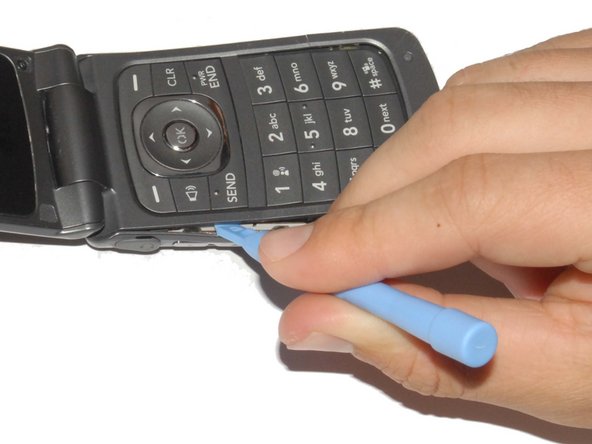
      • Carefully pry off the phone's backing using a plastic opening tool.

      • Slip the tool into the crack between the keypad (front panel) and the back panel.

      • Slide the tool along the sides of the phone to detach the tabs holding the backing on.

      crwdns2952109:0crwdne2952109:0

      crwdns2917038:0crwdne2917038:0

    3. LG VX5500 Audio Port Replacement: crwdns2935265:04crwdnd2935265:01crwdnd2935265:02crwdne2935265:0 LG VX5500 Audio Port Replacement: crwdns2935265:04crwdnd2935265:02crwdnd2935265:02crwdne2935265:0
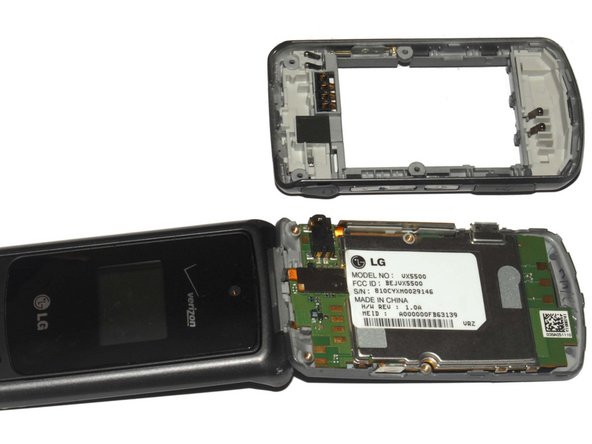
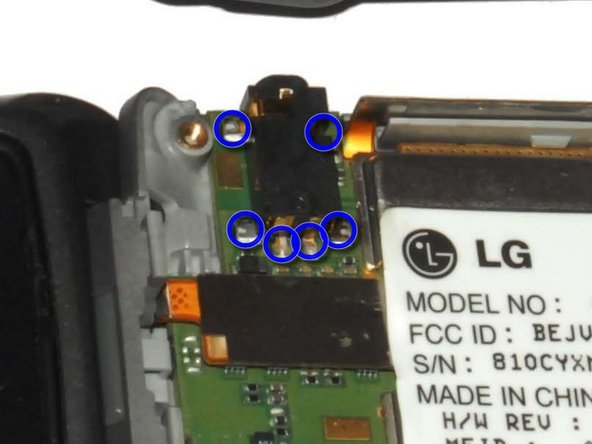
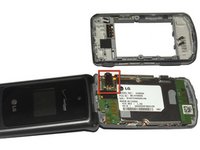
      • Locate the audio port; this is what it should look like.

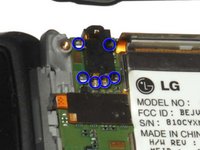
      • The audio port is mounted and connected at 6 points. Check the integrity of these connections.

      • If any of the connections are dislodged or the audio port is damaged, desolder the port and install a new one.

      crwdns2952109:0crwdne2952109:0

      crwdns2917038:0crwdne2917038:0

crwdns2915888:0crwdne2915888:0

To reassemble your device, follow these instructions in reverse order.

crwdns2935221:0crwdne2935221:0

crwdns2935229:02crwdne2935229:0

Kurt Beske

crwdns2935283:005/07/12crwdne2935283:0

70 crwdns2915208:0crwdne2915208:0

crwdns2935295:0crwdne2935295:0

crwdns2935287:0crwdne2935287:0

Cal Poly, Team 7-33, Maness Spring 2012 crwdns2935289:0Cal Poly, Team 7-33, Maness Spring 2012crwdne2935289:0

CPSU-MANESS-S12S7G33

crwdns2931471:04crwdne2931471:0

crwdns2935297:025crwdne2935297:0

crwdns2947412:00crwdne2947412:0

crwdns2917038:0crwdne2917038:0

crwdns2936625:0crwdne2936625:0:

crwdns2936751:024crwdne2936751:0 1

crwdns2936753:07crwdne2936753:0 3

crwdns2936753:030crwdne2936753:0 24

crwdns2942667:0crwdne2942667:0 775