
LG VX5400 Keypad Replacement

crwdns2959932:0crwdnd2959932:0Vanessa Panchalcrwdnd2959932:0crwdnd2959932:0crwdnd2959932:06crwdnd2959932:0crwdne2959932:0
crwdns2959936:0Yan 4, 2018crwdne2959936:0
crwdns2869540:0crwdne2869540:0: 2822
crwdns2959988:0crwdne2959988:0
- crwdns2959990:0crwdne2959990:0
- 0
- crwdns2959992:0crwdne2959992:0
- 13
- crwdns2959994:0crwdne2959994:0
- 51
- crwdns2959996:0crwdne2959996:0
- 2,822
crwdns2955950:0crwdne2955950:0: 0
crwdns2959998:0crwdne2959998:0
crwdns2960000:0crwdne2960000:0crwdns2959984:0crwdne2959984:0: 0 1
crwdns2959956:0crwdne2959956:0
crwdns2959968:01crwdne2959968:0
crwdns2959986:0crwdne2959986:0: 0 1
crwdns2959958:0crwdne2959958:0
crwdns2959976:01crwdne2959976:0
crwdns2890100:0crwdne2890100:0
crwdns2944378:0crwdne2944378:0
crwdns2915892:0crwdne2915892:0
crwdns2959928:0crwdne2959928:0 ↓Often times the key pad could break or become worn. This repair guide will show you how to replace the the keypad of the LG VX5400.
crwdns2959930:0crwdne2959930:0
crwdns2943215:0crwdne2943215:0

-
-
-
Turn off the cell phone and turn it over on its back side
 crwdns2952109:0crwdne2952109:0
-
-
-
Hold the phone case in your palm and slide the back cover towards yourself using your thumb
-
-
-
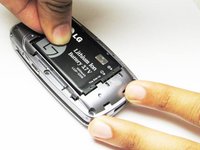
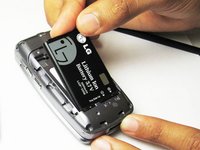
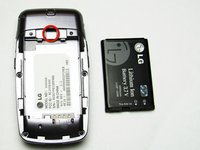
Slide a tool or finger into the notch at the top of the battery to carefully remove it.
-
-
-
-
-
-
Remove the rubber stopper from the back top of the phone with the pointed end of a spudger.
-
-
-
Use the Phillip screw driver to remove the hidden screw, which is marked by the red square
-
-
-
Gently split open the front and back of the bottom casing of the phone with fingers.
-
-
-
Carefully pull the key pad from the phone through the opening.
-
-
-
See here for parts that have been removed.
-
-




To reassemble your device, follow these instructions in reverse order.

crwdns2935287:0crwdne2935287:0

Cal Poly, Team 26-26, Regan Spring 2010 crwdns2935289:0Cal Poly, Team 26-26, Regan Spring 2010crwdne2935289:0
CPSU-REGAN-S10S26G26
crwdns2931471:04crwdne2931471:0
crwdns2935297:060crwdne2935297:0
