crwdns2933423:0crwdne2933423:0
crwdns2947577:0crwdnd2947577:0crwdne2947577:0

LG Tribute Rear-Facing Camera Replacement

crwdns2942213:0crwdne2942213:0

    1. LG Tribute Rear-Facing Camera Replacement, Battery: crwdns2935265:01crwdnd2935265:01crwdnd2935265:02crwdne2935265:0 LG Tribute Rear-Facing Camera Replacement, Battery: crwdns2935265:01crwdnd2935265:02crwdnd2935265:02crwdne2935265:0
      • Use the plastic opening tool to pry off the back cover.

      crwdns2952109:0crwdne2952109:0

      crwdns2917038:0crwdne2917038:0

    2. LG Tribute Rear-Facing Camera Replacement: crwdns2935265:02crwdnd2935265:01crwdnd2935265:01crwdne2935265:0
      • Lift the battery out of place.

      • When replacing the battery, the (+) and (-) symbols must match up with the phone's charging nodes.

      crwdns2952109:0crwdne2952109:0

      crwdns2917038:0crwdne2917038:0

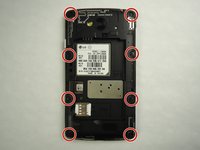
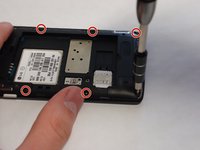
    1. LG Tribute Rear-Facing Camera Replacement, Mid-panel: crwdns2935265:03crwdnd2935265:01crwdnd2935265:02crwdne2935265:0 LG Tribute Rear-Facing Camera Replacement, Mid-panel: crwdns2935265:03crwdnd2935265:02crwdnd2935265:02crwdne2935265:0
      • Remove eight 4mm screws using a Phillips head 000 screwdriver (PH000).

      crwdns2952109:0crwdne2952109:0

      crwdns2917038:0crwdne2917038:0

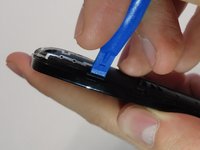
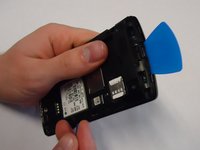
    2. LG Tribute Rear-Facing Camera Replacement: crwdns2935265:04crwdnd2935265:01crwdnd2935265:02crwdne2935265:0 LG Tribute Rear-Facing Camera Replacement: crwdns2935265:04crwdnd2935265:02crwdnd2935265:02crwdne2935265:0
      • Use a plastic opening tool to loosen the tabs around the edge of the phone.

      • Inserting a thin piece of plastic will help prevent opened tabs from locking back into place.

      • This step can be frustrating, but requires patience. Avoid the temptation to pry the panel loose. Using excessive force may break the delicate tabs.

      crwdns2952109:0crwdne2952109:0

      crwdns2917038:0crwdne2917038:0

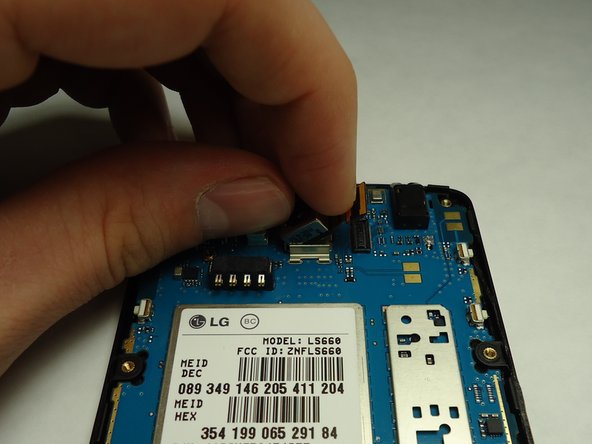
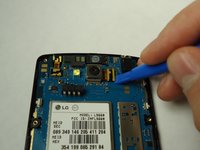
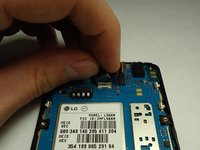
    1. LG Tribute Rear-Facing Camera Replacement, Rear Facing Camera: crwdns2935265:05crwdnd2935265:01crwdnd2935265:02crwdne2935265:0 LG Tribute Rear-Facing Camera Replacement, Rear Facing Camera: crwdns2935265:05crwdnd2935265:02crwdnd2935265:02crwdne2935265:0
      • Disconnect the rear facing camera from the motherboard using a plastic opening tool.

      • Lift the rear facing camera out of its housing.

      crwdns2952109:0crwdne2952109:0

      crwdns2917038:0crwdne2917038:0

crwdns2915888:0crwdne2915888:0

To reassemble your device, follow these instructions in reverse order.

crwdns2935221:0crwdne2935221:0

crwdns2935229:02crwdne2935229:0

Gustav Wolter

crwdns2935283:001/25/16crwdne2935283:0

196 crwdns2915208:0crwdne2915208:0

crwdns2935295:0crwdne2935295:0

crwdns2935287:0crwdne2935287:0

University of Wisconsin Stout, Team 1-1, Schneider-Bateman Spring 2016 crwdns2935289:0University of Wisconsin Stout, Team 1-1, Schneider-Bateman Spring 2016crwdne2935289:0

UWSTOUT-SCHNEIDER-BATEMAN-S16S1G1

crwdns2931471:03crwdne2931471:0

crwdns2935297:096crwdne2935297:0

crwdns2947412:00crwdne2947412:0

crwdns2917038:0crwdne2917038:0

crwdns2936625:0crwdne2936625:0:

crwdns2936751:024crwdne2936751:0 0

crwdns2936753:07crwdne2936753:0 4

crwdns2936753:030crwdne2936753:0 35

crwdns2942667:0crwdne2942667:0 934