
LG Tribute Front Facing Camera Replacement

crwdns2959932:0crwdnd2959932:0Marissa Eubankcrwdnd2959932:0crwdnd2959932:0crwdne2959932:0
crwdns2959936:0Kul 23, 2016crwdne2959936:0
crwdns2869540:0crwdne2869540:0: 1.6K
crwdns2959988:0crwdne2959988:0
- crwdns2959990:0crwdne2959990:0
- 2
- crwdns2959992:0crwdne2959992:0
- 20
- crwdns2959994:0crwdne2959994:0
- 78
- crwdns2959996:0crwdne2959996:0
- 1,601
crwdns2955950:0crwdne2955950:0: 0
crwdns2959998:0crwdne2959998:0
crwdns2960000:0crwdne2960000:0crwdns2959984:0crwdne2959984:0: 4 5
crwdns2959974:04crwdne2959974:0
crwdns2959970:05crwdne2959970:0
crwdns2959986:0crwdne2959986:0: 2 3
crwdns2959982:02crwdne2959982:0
crwdns2959978:03crwdne2959978:0
crwdns2862591:0crwdne2862591:0
crwdns2862592:0crwdne2862592:0
crwdns2915892:0crwdne2915892:0
crwdns2959928:0crwdne2959928:0 ↓This guide will teach you how to properly replace the front facing camera in the phone.
crwdns2959930:0crwdne2959930:0
crwdns2943213:0crwdne2943213:0
crwdns2943215:0crwdne2943215:0


-
-
-
Use the plastic opening tool to pry off the back cover.
 crwdns2952109:0crwdne2952109:0
-
-
-
Lift the battery out of place.
-
-
-
-
-
-
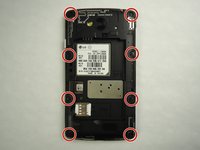
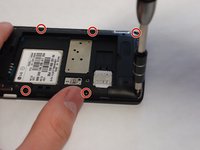
Remove eight 4mm screws using a Phillips head 000 screwdriver (PH000).
-
-
-
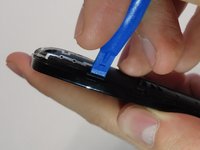
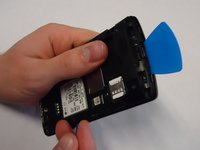
Use a plastic opening tool to loosen the tabs around the edge of the phone.
-
-
-
-
-
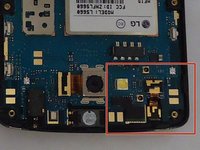
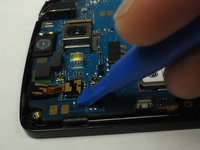
Use the plastic opening tool to carefully pry the front-facing camera from the motherboard.
-
-






To reassemble your device, follow these instructions in reverse order.
crwdns2935221:0crwdne2935221:0
crwdns2935229:04crwdne2935229:0

crwdns2935287:0crwdne2935287:0

University of Wisconsin Stout, Team 1-1, Schneider-Bateman Spring 2016 crwdns2935289:0University of Wisconsin Stout, Team 1-1, Schneider-Bateman Spring 2016crwdne2935289:0
UWSTOUT-SCHNEIDER-BATEMAN-S16S1G1
crwdns2931471:03crwdne2931471:0
crwdns2935297:096crwdne2935297:0
