crwdns2933423:0crwdne2933423:0
crwdns2947577:0crwdnd2947577:0crwdne2947577:0

LG Thrill 4G Phone Buttons Replacement

crwdns2942213:0crwdne2942213:0

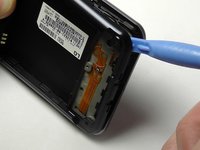
    1. LG Thrill 4G Phone Buttons Replacement, Back Cover Removal: crwdns2935265:01crwdnd2935265:01crwdnd2935265:02crwdne2935265:0 LG Thrill 4G Phone Buttons Replacement, Back Cover Removal: crwdns2935265:01crwdnd2935265:02crwdnd2935265:02crwdne2935265:0
      • Pry open the back cover by using a fingernail or a plastic opening tool.

      • There is a small notch at the bottom of the cover for easy removal.

      crwdns2952109:0crwdne2952109:0

      crwdns2917038:0crwdne2917038:0

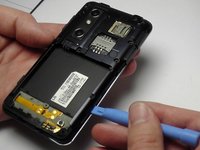
    2. LG Thrill 4G Phone Buttons Replacement, Battery Removal: crwdns2935265:02crwdnd2935265:01crwdnd2935265:02crwdne2935265:0 LG Thrill 4G Phone Buttons Replacement, Battery Removal: crwdns2935265:02crwdnd2935265:02crwdnd2935265:02crwdne2935265:0
      • Remove the battery from the phone.

      • There is a small ledge located at the bottom of the battery for easy removal.

      crwdns2952109:0crwdne2952109:0

      crwdns2917038:0crwdne2917038:0

    1. LG Thrill 4G Phone Buttons Replacement, Screw Removal: crwdns2935265:03crwdnd2935265:01crwdnd2935265:01crwdne2935265:0
      • Remove the three Philips #00 screws from the bottom of the phone.

      • Two 5.5 mm screws

      • One 4 mm screw

      crwdns2952109:0crwdne2952109:0

      crwdns2917038:0crwdne2917038:0

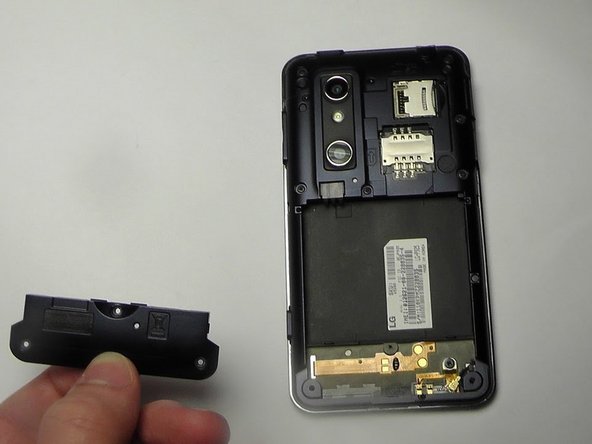
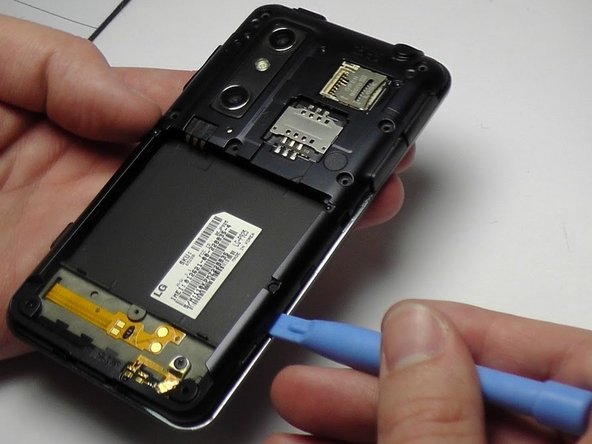
    2. LG Thrill 4G Phone Buttons Replacement, Speaker Removal: crwdns2935265:04crwdnd2935265:01crwdnd2935265:02crwdne2935265:0 LG Thrill 4G Phone Buttons Replacement, Speaker Removal: crwdns2935265:04crwdnd2935265:02crwdnd2935265:02crwdne2935265:0
      • Use your finger or opening tool to wedge the speaker out starting at the small notch at the bottom of the phone.

      crwdns2952109:0crwdne2952109:0

      crwdns2917038:0crwdne2917038:0

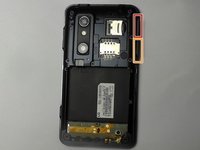
    1. LG Thrill 4G Phone Buttons Replacement, Buttons: crwdns2935265:05crwdnd2935265:01crwdnd2935265:01crwdne2935265:0
      • Remove the three buttons from the side and the top of the phone.

      • Power button

      • Volume button

      • 3D camera button

      crwdns2952109:0crwdne2952109:0

      crwdns2917038:0crwdne2917038:0

    2. LG Thrill 4G Phone Buttons Replacement: crwdns2935265:06crwdnd2935265:01crwdnd2935265:03crwdne2935265:0 LG Thrill 4G Phone Buttons Replacement: crwdns2935265:06crwdnd2935265:02crwdnd2935265:03crwdne2935265:0 LG Thrill 4G Phone Buttons Replacement: crwdns2935265:06crwdnd2935265:03crwdnd2935265:03crwdne2935265:0
      • Place the plastic opening tool under the bezel at either bottom corner of the HDMI cover.

      • This loosens both the HDMI and USB covers for easy removal.

      • USB Cover

      • HDMI Cover

      crwdns2952109:0crwdne2952109:0

      crwdns2917038:0crwdne2917038:0

    3. LG Thrill 4G Phone Buttons Replacement: crwdns2935265:07crwdnd2935265:01crwdnd2935265:01crwdne2935265:0
      • Remove the six Phillips #00 screws within the mid-cover bezel.

      crwdns2952109:0crwdne2952109:0

      crwdns2917038:0crwdne2917038:0

crwdns2915888:0crwdne2915888:0

To reassemble your device, follow these instructions in reverse order.

crwdns2935221:0crwdne2935221:0

Kenny Richmond

crwdns2935283:001/20/15crwdne2935283:0

260 crwdns2915208:0crwdne2915208:0

crwdns2935297:02crwdne2935297:0

crwdns2935287:0crwdne2935287:0

USF Tampa, Team 1-6, Blackwell Winter 2015 crwdns2935289:0USF Tampa, Team 1-6, Blackwell Winter 2015crwdne2935289:0

USFT-BLACKWELL-W15S1G6

crwdns2931471:03crwdne2931471:0

crwdns2935297:060crwdne2935297:0

crwdns2947412:00crwdne2947412:0

crwdns2917038:0crwdne2917038:0

crwdns2936625:0crwdne2936625:0:

crwdns2936751:024crwdne2936751:0 0

crwdns2936753:07crwdne2936753:0 3

crwdns2936753:030crwdne2936753:0 28

crwdns2942667:0crwdne2942667:0 922