crwdns2933423:0crwdne2933423:0
crwdns2947577:0crwdnd2947577:0crwdne2947577:0

LG TP 1100 Microphone Replacement

crwdns2942213:0crwdne2942213:0

    1. LG TP 1100 Microphone Replacement, Microphone: crwdns2935265:01crwdnd2935265:01crwdnd2935265:01crwdne2935265:0
      • Hold antenna between your fingers and unscrew in a counterclockwise direction.

      crwdns2952109:0crwdne2952109:0

      crwdns2917038:0crwdne2917038:0

    2. LG TP 1100 Microphone Replacement: crwdns2935265:02crwdnd2935265:01crwdnd2935265:01crwdne2935265:0
      • You will remove antenna by pulling it in an upward motion away from the socket.

      crwdns2952109:0crwdne2952109:0

      crwdns2917038:0crwdne2917038:0

    3. LG TP 1100 Microphone Replacement: crwdns2935265:03crwdnd2935265:01crwdnd2935265:01crwdne2935265:0
      • Turn phone so that the back is facing you.

      crwdns2952109:0crwdne2952109:0

      crwdns2917038:0crwdne2917038:0

    4. LG TP 1100 Microphone Replacement: crwdns2935265:04crwdnd2935265:01crwdnd2935265:01crwdne2935265:0
      • Use your thumb to pull the tab in an upward motion to release the battery.

      crwdns2952109:0crwdne2952109:0

      crwdns2917038:0crwdne2917038:0

    5. LG TP 1100 Microphone Replacement: crwdns2935265:05crwdnd2935265:01crwdnd2935265:01crwdne2935265:0
      • Hold phone securely in one hand and pull the battery away from the phone with your other hand.

      crwdns2952109:0crwdne2952109:0

      crwdns2917038:0crwdne2917038:0

    6. LG TP 1100 Microphone Replacement: crwdns2935265:06crwdnd2935265:01crwdnd2935265:01crwdne2935265:0
      • Use your screwdriver to unscrew the four screws from the back plate.

      crwdns2952109:0crwdne2952109:0

      crwdns2917038:0crwdne2917038:0

    7. LG TP 1100 Microphone Replacement: crwdns2935265:07crwdnd2935265:01crwdnd2935265:01crwdne2935265:0
      • Turn phone to the side as indicated in the picture.

      crwdns2952109:0crwdne2952109:0

      crwdns2917038:0crwdne2917038:0

    8. LG TP 1100 Microphone Replacement: crwdns2935265:08crwdnd2935265:01crwdnd2935265:01crwdne2935265:0
      • Remove the back cover that you just unscrewed and set aside.

      crwdns2952109:0crwdne2952109:0

      crwdns2917038:0crwdne2917038:0

    9. LG TP 1100 Microphone Replacement: crwdns2935265:09crwdnd2935265:01crwdnd2935265:01crwdne2935265:0
      • Open the remaining parts like a book but do not separate the two pieces.

      • Do not tear the tape connecting the two pieces.

      crwdns2952109:0crwdne2952109:0

      crwdns2917038:0crwdne2917038:0

    10. LG TP 1100 Microphone Replacement: crwdns2935265:010crwdnd2935265:01crwdnd2935265:02crwdne2935265:0 LG TP 1100 Microphone Replacement: crwdns2935265:010crwdnd2935265:02crwdnd2935265:02crwdne2935265:0
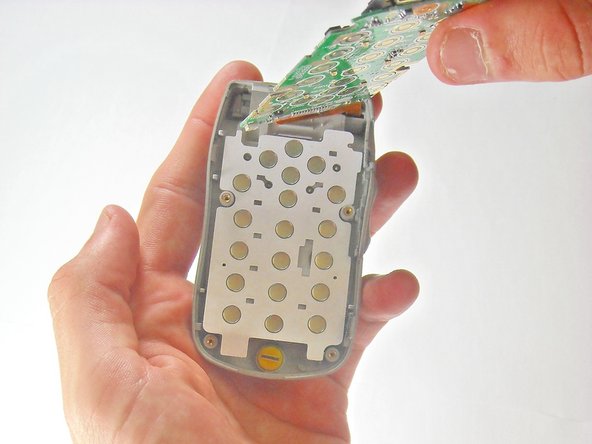
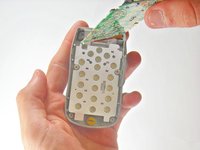
      • Rotate the phone so that the circuit board is in the palm of your hand and the part connected with tape hangs behind.

      • Use your opening tool to pry the circuit board from the front cover. Do not let the number pad to fall out.

      crwdns2952109:0crwdne2952109:0

      crwdns2917038:0crwdne2917038:0

    11. LG TP 1100 Microphone Replacement: crwdns2935265:011crwdnd2935265:01crwdnd2935265:01crwdne2935265:0
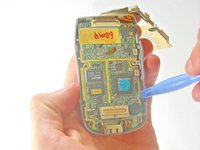
      • To remove the microphone, insert your opening tool under microphone and push upward to pry microphone away from the front cover.

      crwdns2952109:0crwdne2952109:0

      crwdns2917038:0crwdne2917038:0

crwdns2915888:0crwdne2915888:0

To reassemble your device, follow these instructions in reverse order.

crwdns2935221:0crwdne2935221:0

crwdns2935227:0crwdne2935227:0

Johnny Inlow

crwdns2935283:004/10/10crwdne2935283:0

19 crwdns2915208:0crwdne2915208:0

crwdns2935297:03crwdne2935297:0

crwdns2935287:0crwdne2935287:0

Cal Poly, Team 27-91, Amido Spring 2010 crwdns2935289:0Cal Poly, Team 27-91, Amido Spring 2010crwdne2935289:0

CPSU-AMIDO-S10S27G91

crwdns2931471:05crwdne2931471:0

crwdns2935297:072crwdne2935297:0

crwdns2947412:00crwdne2947412:0

crwdns2917038:0crwdne2917038:0

crwdns2936625:0crwdne2936625:0:

crwdns2936751:024crwdne2936751:0 0

crwdns2936753:07crwdne2936753:0 7

crwdns2936753:030crwdne2936753:0 28

crwdns2942667:0crwdne2942667:0 1,681