
LG Spectrum Camera Replacement

crwdns2959932:0crwdnd2959932:0Aiman Sallamcrwdnd2959932:0crwdnd2959932:0crwdne2959932:0
crwdns2959936:0Mud 9, 2016crwdne2959936:0
crwdns2869540:0crwdne2869540:0: 686
crwdns2959988:0crwdne2959988:0
- crwdns2959990:0crwdne2959990:0
- 7
- crwdns2959992:0crwdne2959992:0
- 25
- crwdns2959994:0crwdne2959994:0
- 85
- crwdns2959996:0crwdne2959996:0
- 686
crwdns2955950:0crwdne2955950:0: 0
crwdns2959998:0crwdne2959998:0
crwdns2960000:0crwdne2960000:0crwdns2959984:0crwdne2959984:0: 0 1
crwdns2959956:0crwdne2959956:0
crwdns2959968:01crwdne2959968:0
crwdns2959986:0crwdne2959986:0: 0 1
crwdns2959958:0crwdne2959958:0
crwdns2959976:01crwdne2959976:0
crwdns2915892:0crwdne2915892:0
crwdns2959928:0crwdne2959928:0 ↓If your camera continues to malfunction, such as taking blurry pictures, or if the camera lens is broken. This guide should show you how to easily replace your LG Spectrum Camera.
crwdns2959930:0crwdne2959930:0
crwdns2943215:0crwdne2943215:0


-
-
-
Using your thumbnail, lift up on the notch in the middle of the bottom side of the phone.
 crwdns2952109:0crwdne2952109:0
-
-
-
Using either your thumbnail or a plastic opening tool, lift up on the battery using the notch in the bottom left hand corner of the battery and remove it from the phone.
-
-
-
-
-
-
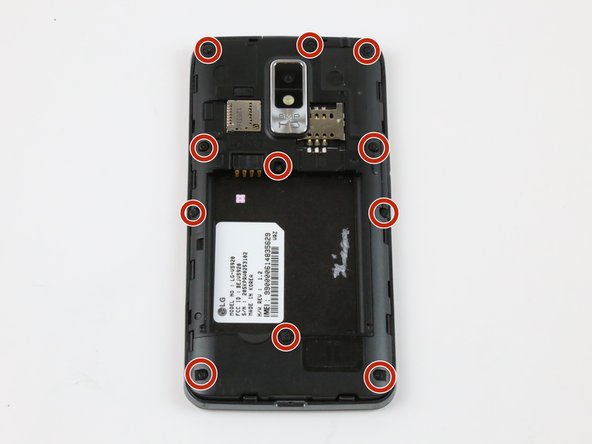
Remove eleven 4mm Phillips #000 screws with a PH000 screwdriver.
-
-
-
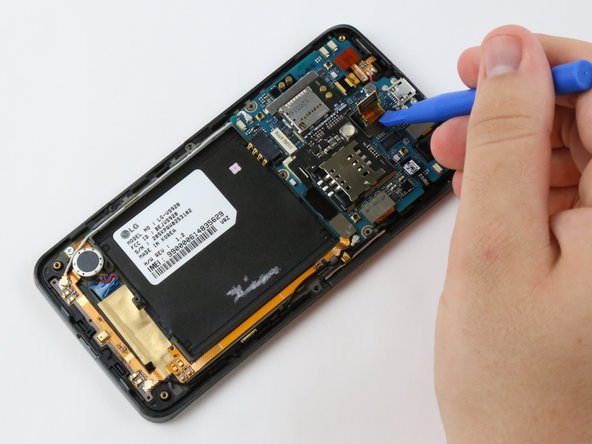
Use the plastic opening tool to firmly pry up the plastic backing around the perimeter of the phone.
-
-
-
Remove the camera by gently lifting the film that is attached to it from motherboard with the plastic opening tool.
-
-
-
Use the plastic opening tool, or your hand, to pull up on the camera and remove it from the motherboard.
-
-






To reassemble your device, follow these instructions in reverse order.

crwdns2935287:0crwdne2935287:0

USF Tampa, Team 1-4, Sullivan Spring 2016 crwdns2935289:0USF Tampa, Team 1-4, Sullivan Spring 2016crwdne2935289:0
USFT-SULLIVAN-S16S1G4
crwdns2931471:03crwdne2931471:0
crwdns2935297:060crwdne2935297:0
