crwdns2933423:0crwdne2933423:0
crwdns2947577:0crwdnd2947577:0crwdne2947577:0

LG Optimus L7 P705 Home Button Replacement

crwdns2942213:0crwdne2942213:0

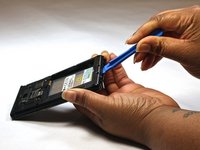
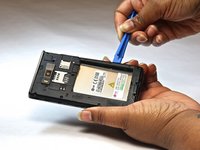
    1. LG Optimus L7 P705 Home Button Replacement, Home Button: crwdns2935265:01crwdnd2935265:01crwdnd2935265:02crwdne2935265:0 LG Optimus L7 P705 Home Button Replacement, Home Button: crwdns2935265:01crwdnd2935265:02crwdnd2935265:02crwdne2935265:0
      • Insert a plastic opening tool between the seams of the device and pry the back cover away from the phone.

      • Remove the battery and SIM card.

      crwdns2952109:0crwdne2952109:0

      crwdns2917038:0crwdne2917038:0

    2. LG Optimus L7 P705 Home Button Replacement: crwdns2935265:02crwdnd2935265:01crwdnd2935265:01crwdne2935265:0
      • Remove the twelve screws using the Phillips 000 screwdriver.

      crwdns2952109:0crwdne2952109:0

      crwdns2917038:0crwdne2917038:0

    3. LG Optimus L7 P705 Home Button Replacement: crwdns2935265:03crwdnd2935265:01crwdnd2935265:01crwdne2935265:0
      • Remove bottom plate where the charger port is located.

      crwdns2952109:0crwdne2952109:0

      crwdns2917038:0crwdne2917038:0

    4. LG Optimus L7 P705 Home Button Replacement: crwdns2935265:04crwdnd2935265:01crwdnd2935265:02crwdne2935265:0 LG Optimus L7 P705 Home Button Replacement: crwdns2935265:04crwdnd2935265:02crwdnd2935265:02crwdne2935265:0
      • Insert a plastic opening tool between the seams of the device and apply some pressure to lift off the cover.

      crwdns2952109:0crwdne2952109:0

      crwdns2917038:0crwdne2917038:0

    5. LG Optimus L7 P705 Home Button Replacement: crwdns2935265:05crwdnd2935265:01crwdnd2935265:01crwdne2935265:0
      • Flip over to the face of the device.

      • Lift off the glass screen (display).

      crwdns2952109:0crwdne2952109:0

      crwdns2917038:0crwdne2917038:0

    6. LG Optimus L7 P705 Home Button Replacement: crwdns2935265:06crwdnd2935265:01crwdnd2935265:01crwdne2935265:0
      • Remove the home screen button. Replace as needed.

      crwdns2952109:0crwdne2952109:0

      crwdns2917038:0crwdne2917038:0

crwdns2915888:0crwdne2915888:0

To reassemble your device, follow these instructions in reverse order.

crwdns2935221:0crwdne2935221:0

crwdns2935227:0crwdne2935227:0

Bruna

crwdns2935283:010/08/14crwdne2935283:0

525 crwdns2915208:0crwdne2915208:0

crwdns2935297:04crwdne2935297:0

crwdns2935287:0crwdne2935287:0

USF Tampa, Team 9-1, Leahy Fall 2014 crwdns2935289:0USF Tampa, Team 9-1, Leahy Fall 2014crwdne2935289:0

USFT-LEAHY-F14S9G1

crwdns2931471:03crwdne2931471:0

crwdns2935297:060crwdne2935297:0

crwdns2947410:01crwdne2947410:0

in the step 2, one red ring is in the wrong position.

The ring in the midle at the left side is in the center of the telephone

Tiago - crwdns2934203:0crwdne2934203:0 crwdns2950251:0crwdne2950251:0

crwdns2917038:0crwdne2917038:0

crwdns2936625:0crwdne2936625:0:

crwdns2936751:024crwdne2936751:0 1

crwdns2936753:07crwdne2936753:0 5

crwdns2936753:030crwdne2936753:0 27

crwdns2942667:0crwdne2942667:0 2,119