
LG K7 T-Mobile Back Controls Replacement

crwdns2959932:0crwdnd2959932:0Nam Phamcrwdnd2959932:0crwdnd2959932:0crwdne2959932:0
crwdns2959936:0N'w 15, 2017crwdne2959936:0
crwdns2869540:0crwdne2869540:0: 1,2K
crwdns2959988:0crwdne2959988:0
- crwdns2959990:0crwdne2959990:0
- 5
- crwdns2959992:0crwdne2959992:0
- 23
- crwdns2959994:0crwdne2959994:0
- 87
- crwdns2959996:0crwdne2959996:0
- 1.155
crwdns2955950:0crwdne2955950:0: 3
crwdns2960004:03crwdne2960004:0.
crwdns2959984:0crwdne2959984:0: 0 1
crwdns2959956:0crwdne2959956:0
crwdns2959968:01crwdne2959968:0
crwdns2959986:0crwdne2959986:0: 0 1
crwdns2959958:0crwdne2959958:0
crwdns2959976:01crwdne2959976:0
crwdns2915892:0crwdne2915892:0
crwdns2959928:0crwdne2959928:0 ↓Remove the battery before removing the back controls to avoid electric shock. Do not lose any screws or the middle button of the back controls.
crwdns2959930:0crwdne2959930:0
crwdns2943215:0crwdne2943215:0


-
-
-
Flip the LG K7 over so that the back of the phone is facing up.
-
Locate the small notch on the bottom left side of the phone.
 crwdns2952109:0crwdne2952109:0
-
-
-
Insert a plastic opening tool into the notch and lift the back cover upward while holding the bottom portion of the phone down to remove it.
-
-
-
-
-
-
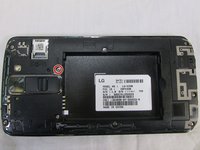
Locate the screw keeping the back controls in place.
-
Use a Phillips 00 screwdriver to remove the 3.4 mm screw.
-
-
-
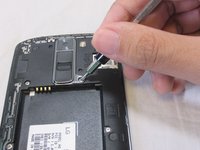
Using the plastic opening tool create a space between the chrome bezel of the back buttons and the phone's casing.
-
Using the plastic opening tool pry the back buttons upward to remove them from the phone's casing.
-
-



To reassemble your device, follow these instructions in reverse order.

crwdns2935287:0crwdne2935287:0

USF Tampa, Team S2-G5, Nance Fall 2017 crwdns2935289:0USF Tampa, Team S2-G5, Nance Fall 2017crwdne2935289:0
USFT-NANCE-F17S2G5
crwdns2931471:03crwdne2931471:0
crwdns2935297:048crwdne2935297:0
