
LG G5 Rear Camera Replacement

crwdns2959932:0crwdnd2959932:0Parker Reynoldscrwdnd2959932:0crwdnd2959932:0crwdnd2959932:05crwdnd2959932:0crwdne2959932:0
crwdns2959936:0Mud 7, 2024crwdne2959936:0
crwdns2869540:0crwdne2869540:0: 18 k
crwdns2959988:0crwdne2959988:0
- crwdns2959990:0crwdne2959990:0
- 6
- crwdns2959992:0crwdne2959992:0
- 18
- crwdns2959994:0crwdne2959994:0
- 111
- crwdns2959996:0crwdne2959996:0
- 18,358
crwdns2955950:0crwdne2955950:0: 14
crwdns2960004:08crwdne2960004:0, crwdns2960008:06crwdne2960008:0
crwdns2960000:0crwdne2960000:0crwdns2959984:0crwdne2959984:0: 34 35
crwdns2959974:034crwdne2959974:0
crwdns2959970:035crwdne2959970:0
crwdns2959986:0crwdne2959986:0: 3 4
crwdns2959982:03crwdne2959982:0
crwdns2959978:04crwdne2959978:0
crwdns2862591:0crwdne2862591:0
crwdns2862592:0crwdne2862592:0
crwdns2915892:0crwdne2915892:0
crwdns2959928:0crwdne2959928:0 ↓This guide will show you the steps to replace a damaged rear facing camera.
crwdns2959930:0crwdne2959930:0


-
-
-
While holding the battery release button, pull the bottom end of the phone out of the body.
 crwdns2952109:0crwdne2952109:0
-
-
-
Insert the sim card eject tool (0.8mm sim card eject head) into the small hole on the sim card tray.
-
Press inward with some force to eject the tray.
-
Pull the sim card tray out of the phone.
-
-
-
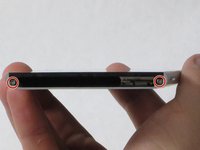
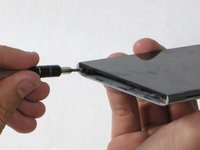
Remove the two 5.5mm Phillips #00 screws from the base of the phone.
-
-
-
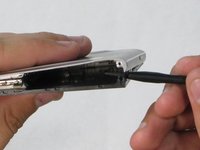
Insert the plastic opening tool into the seam between the glass screen and the metal body.
-
Pry the glass from the body only a slight amount.
-
-
-
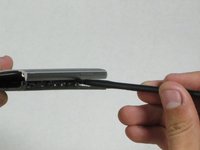
Insert the Spudger into the now open space between the body and screen.
-
Push inward to separate the screen even more.
-
Slowly slide the nylon spudger up the edge the phone till the screen pops out of the body.
-
-
-
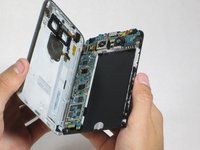
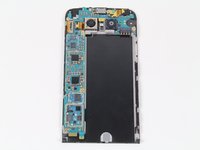
Peel the screen away from the body. The two parts should be completely separated.
-
-
-
-
-
-
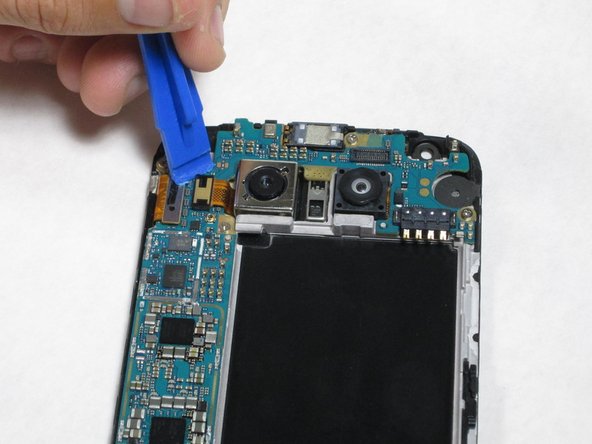
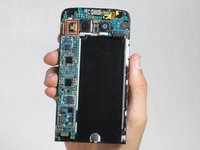
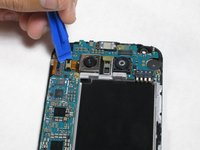
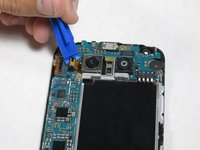
Insert the plastic opening tool between the camera-ribbon connector and the motherboard, then pull up. It should pop out easily.
-
-
crwdns2935267:0crwdne2935267:0Tweezers$4.99
-
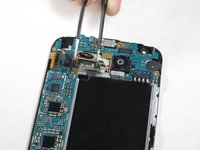
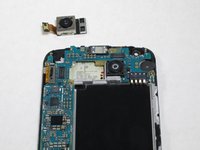
After detaching the ribbon, carefully remove the camera using tweezers
-
-










To reassemble your device, follow these instructions in reverse order.
crwdns2935221:0crwdne2935221:0
crwdns2935229:034crwdne2935229:0

crwdns2935287:0crwdne2935287:0

Cal Poly, Team 18-2, Forte Fall 2016 crwdns2935289:0Cal Poly, Team 18-2, Forte Fall 2016crwdne2935289:0
CPSU-FORTE-F16S18G2
crwdns2931471:04crwdne2931471:0
crwdns2935297:072crwdne2935297:0
crwdns2947412:06crwdne2947412:0
This worked great and took me about 10 minutes!
Mark - crwdns2934203:0crwdne2934203:0 crwdns2950251:0crwdne2950251:0
Great instructions. This was my first time taking apart any phone. Everything went smoothly and my camera now works! thank you
Christopher Piatt - crwdns2934203:0crwdne2934203:0 crwdns2950251:0crwdne2950251:0
the camera is held down with sticky tape and I wasn’t comfortable pulling hard under the processing board, so I pulled the six screws holding that down and removed it first. Unfortunately for me the new camera still doesn’t focus…
Ray White - crwdns2934203:0crwdne2934203:0 crwdns2950251:0crwdne2950251:0
This worked great for me. I was a little nervous prying on my phone, especially when I heard the first POP. But after that, it was not hard at all. The new camera focuses great for me now and I can get back to taking great pictures with my G5!
Thanks for the detailed instructions, tools and affordable part!
Brad - crwdns2934203:0crwdne2934203:0 crwdns2950251:0crwdne2950251:0
You may want to mention that the original camera is glued in. It takes a bit of prying to pop it out.
Ryan - crwdns2934203:0crwdne2934203:0 crwdns2950251:0crwdne2950251:0
