crwdns2933423:0crwdne2933423:0
crwdns2947577:0crwdnd2947577:0crwdne2947577:0

LG G5 Auxiliary Port Replacement

crwdns2942213:0crwdne2942213:0

    1. LG G5 Auxiliary Port Replacement, Front Panel Assembly: crwdns2935265:01crwdnd2935265:01crwdnd2935265:02crwdne2935265:0 LG G5 Auxiliary Port Replacement, Front Panel Assembly: crwdns2935265:01crwdnd2935265:02crwdnd2935265:02crwdne2935265:0
      • While holding the battery release button, pull the bottom end of the phone out of the body.

      crwdns2952109:0crwdne2952109:0

      crwdns2917038:0crwdne2917038:0

    2. LG G5 Auxiliary Port Replacement: crwdns2935265:02crwdnd2935265:01crwdnd2935265:03crwdne2935265:0 LG G5 Auxiliary Port Replacement: crwdns2935265:02crwdnd2935265:02crwdnd2935265:03crwdne2935265:0 LG G5 Auxiliary Port Replacement: crwdns2935265:02crwdnd2935265:03crwdnd2935265:03crwdne2935265:0
      • Insert the sim card eject tool (0.8mm sim card eject head) into the small hole on the sim card tray.

      • Press inward with some force to eject the tray.

      • Pull the sim card tray out of the phone.

      crwdns2952109:0crwdne2952109:0

      crwdns2917038:0crwdne2917038:0

    3. LG G5 Auxiliary Port Replacement: crwdns2935265:03crwdnd2935265:01crwdnd2935265:02crwdne2935265:0 LG G5 Auxiliary Port Replacement: crwdns2935265:03crwdnd2935265:02crwdnd2935265:02crwdne2935265:0
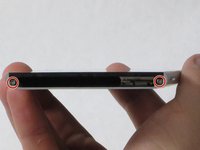
      • Remove the two 5.5mm Phillips #00 screws from the base of the phone.

      crwdns2952109:0crwdne2952109:0

      crwdns2917038:0crwdne2917038:0

    4. LG G5 Auxiliary Port Replacement: crwdns2935265:04crwdnd2935265:01crwdnd2935265:01crwdne2935265:0
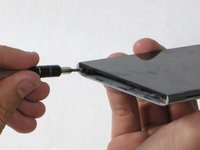
      • Insert the plastic opening tool into the seam between the glass screen and the metal body.

      • Pry the glass from the body only a slight amount.

      crwdns2952109:0crwdne2952109:0

      crwdns2917038:0crwdne2917038:0

    5. LG G5 Auxiliary Port Replacement: crwdns2935265:05crwdnd2935265:01crwdnd2935265:02crwdne2935265:0 LG G5 Auxiliary Port Replacement: crwdns2935265:05crwdnd2935265:02crwdnd2935265:02crwdne2935265:0
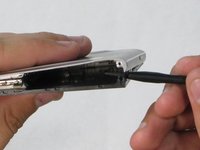
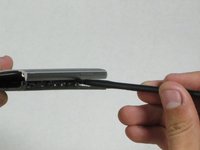
      • Insert the Spudger into the now open space between the body and screen.

      • Push inward to separate the screen even more.

      • Slowly slide the nylon spudger up the edge the phone till the screen pops out of the body.

      • When putting the screen back in, press the edges down from the top of the phone to the bottom. The screen should "pop" into place.

      crwdns2952109:0crwdne2952109:0

      crwdns2917038:0crwdne2917038:0

    6. LG G5 Auxiliary Port Replacement: crwdns2935265:06crwdnd2935265:01crwdnd2935265:02crwdne2935265:0 LG G5 Auxiliary Port Replacement: crwdns2935265:06crwdnd2935265:02crwdnd2935265:02crwdne2935265:0
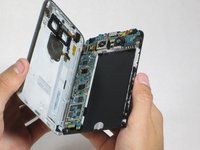
      • Peel the screen away from the body. The two parts should be completely separated.

      crwdns2952109:0crwdne2952109:0

      crwdns2917038:0crwdne2917038:0

    1. LG G5 Auxiliary Port Replacement, Auxiliary Port: crwdns2935265:07crwdnd2935265:01crwdnd2935265:01crwdne2935265:0
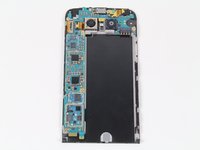
      • Locate the auxiliary port on the top right of the phone

      • Using a finger, carefully take the port out

      • Replace the old auxiliary port with a new one by orienting the hole towards the top of the phone and the gold ribbon to the left (as shown in the picture).

      crwdns2952109:0crwdne2952109:0

      crwdns2917038:0crwdne2917038:0

crwdns2915888:0crwdne2915888:0

To reassemble your device, follow these instructions in reverse order.

crwdns2935221:0crwdne2935221:0

crwdns2935229:08crwdne2935229:0

Joshua Zalmanowitz

crwdns2935283:009/27/16crwdne2935283:0

1,817 crwdns2915208:0crwdne2915208:0

crwdns2935297:04crwdne2935297:0

crwdns2935287:0crwdne2935287:0

Cal Poly, Team 18-2, Forte Fall 2016 crwdns2935289:0Cal Poly, Team 18-2, Forte Fall 2016crwdne2935289:0

CPSU-FORTE-F16S18G2

crwdns2931471:04crwdne2931471:0

crwdns2935297:072crwdne2935297:0

crwdns2947412:03crwdne2947412:0

I saw a video where someone used a guitar pick as the plastic opening tool, seems safer to me. And that person also had a great idea to shove a pencil in the battery bay to apply a separating force, so that as you work the seam with a guitar pick, the the two halves will naturally want to separate.

Adam Mizban - crwdns2934203:0crwdne2934203:0 crwdns2950251:0crwdne2950251:0

Hi, I have two LG G5 phone. Let's call them

A & B.

So , B overheats and the battery last less than an hour. So I took the battery from A and I put it in B and I put the B battery in the A. Results: B still overheats and not the A ??? I also left the connector blocks on the batteries when I did the switching. So what could be the cause of this?

Julie Desruisseaux - crwdns2934203:0crwdne2934203:0 crwdns2950251:0crwdne2950251:0

crwdns2917038:0crwdne2917038:0

crwdns2936625:0crwdne2936625:0:

crwdns2936751:024crwdne2936751:0 0

crwdns2936753:07crwdne2936753:0 10

crwdns2936753:030crwdne2936753:0 53

crwdns2942667:0crwdne2942667:0 6,118