crwdns2933423:0crwdne2933423:0
crwdns2947577:0crwdnd2947577:0crwdne2947577:0

LG Enact Screen Replacement

crwdns2942213:0crwdne2942213:0

    1. LG Enact Screen Replacement, Battery: crwdns2935265:01crwdnd2935265:01crwdnd2935265:03crwdne2935265:0 LG Enact Screen Replacement, Battery: crwdns2935265:01crwdnd2935265:02crwdnd2935265:03crwdne2935265:0 LG Enact Screen Replacement, Battery: crwdns2935265:01crwdnd2935265:03crwdnd2935265:03crwdne2935265:0
      • Open the back cover by prying into the bottom tab with an iFixit opening tool.

      crwdns2952109:0crwdne2952109:0

      crwdns2917038:0crwdne2917038:0

    2. LG Enact Screen Replacement: crwdns2935265:02crwdnd2935265:01crwdnd2935265:03crwdne2935265:0 LG Enact Screen Replacement: crwdns2935265:02crwdnd2935265:02crwdnd2935265:03crwdne2935265:0 LG Enact Screen Replacement: crwdns2935265:02crwdnd2935265:03crwdnd2935265:03crwdne2935265:0
      • Use an iFixit opening tool to remove the battery.

      crwdns2952109:0crwdne2952109:0

      crwdns2917038:0crwdne2917038:0

    1. LG Enact Screen Replacement, Speaker: crwdns2935265:03crwdnd2935265:01crwdnd2935265:01crwdne2935265:0
      • Remove the three 1.2 mm screws from the speaker using a Phillips #00 screwdriver.

      crwdns2952109:0crwdne2952109:0

      crwdns2917038:0crwdne2917038:0

    2. LG Enact Screen Replacement: crwdns2935265:04crwdnd2935265:01crwdnd2935265:02crwdne2935265:0 LG Enact Screen Replacement: crwdns2935265:04crwdnd2935265:02crwdnd2935265:02crwdne2935265:0
      • Use an iFixit opening pick to pop out the speaker.

      crwdns2952109:0crwdne2952109:0

      crwdns2917038:0crwdne2917038:0

    1. LG Enact Screen Replacement, Midframe: crwdns2935265:05crwdnd2935265:01crwdnd2935265:02crwdne2935265:0 LG Enact Screen Replacement, Midframe: crwdns2935265:05crwdnd2935265:02crwdnd2935265:02crwdne2935265:0
      • Remove the nine 1.2 mm screws from the midframe using a Phillips #00 screwdriver.

      crwdns2952109:0crwdne2952109:0

      crwdns2917038:0crwdne2917038:0

    2. LG Enact Screen Replacement: crwdns2935265:06crwdnd2935265:01crwdnd2935265:01crwdne2935265:0
      • Use the iFixit opening pick to pry out the midframe.

      crwdns2952109:0crwdne2952109:0

      crwdns2917038:0crwdne2917038:0

    1. LG Enact Screen Replacement, Motherboard: crwdns2935265:07crwdnd2935265:01crwdnd2935265:02crwdne2935265:0 LG Enact Screen Replacement, Motherboard: crwdns2935265:07crwdnd2935265:02crwdnd2935265:02crwdne2935265:0
      • Unplug the four ports connected to the motherboard.

      • Disconnect the two wires on top of the battery.

      • Disconnect the two wires under the battery.

      crwdns2952109:0crwdne2952109:0

      crwdns2917038:0crwdne2917038:0

    2. LG Enact Screen Replacement: crwdns2935265:08crwdnd2935265:01crwdnd2935265:02crwdne2935265:0 LG Enact Screen Replacement: crwdns2935265:08crwdnd2935265:02crwdnd2935265:02crwdne2935265:0
      • Slowly pry out the motherboard using an iFixit opening pick.

      crwdns2952109:0crwdne2952109:0

      crwdns2917038:0crwdne2917038:0

    1. LG Enact Screen Replacement, Charging Port: crwdns2935265:09crwdnd2935265:01crwdnd2935265:02crwdne2935265:0 LG Enact Screen Replacement, Charging Port: crwdns2935265:09crwdnd2935265:02crwdnd2935265:02crwdne2935265:0
      • Gently peel off the orange strip attached to the charging port using an iFixit opening pick.

      crwdns2952109:0crwdne2952109:0

      crwdns2917038:0crwdne2917038:0

    1. LG Enact Screen Replacement, Keyboard: crwdns2935265:010crwdnd2935265:01crwdnd2935265:03crwdne2935265:0 LG Enact Screen Replacement, Keyboard: crwdns2935265:010crwdnd2935265:02crwdnd2935265:03crwdne2935265:0 LG Enact Screen Replacement, Keyboard: crwdns2935265:010crwdnd2935265:03crwdnd2935265:03crwdne2935265:0
      • Gently remove the blue metal plate using an iFixit opening pick.

      • Gently remove the black plastic from inside the battery compartment.

      crwdns2952109:0crwdne2952109:0

      crwdns2917038:0crwdne2917038:0

    2. LG Enact Screen Replacement: crwdns2935265:011crwdnd2935265:01crwdnd2935265:01crwdne2935265:0
      • Remove seven 1.2 mm screws with a Phillips #00 screwdriver.

      crwdns2952109:0crwdne2952109:0

      crwdns2917038:0crwdne2917038:0

    3. LG Enact Screen Replacement: crwdns2935265:012crwdnd2935265:01crwdnd2935265:01crwdne2935265:0
      • Remove the ribbon cable from the battery compartment.

      crwdns2952109:0crwdne2952109:0

      crwdns2917038:0crwdne2917038:0

    4. LG Enact Screen Replacement: crwdns2935265:013crwdnd2935265:01crwdnd2935265:03crwdne2935265:0 LG Enact Screen Replacement: crwdns2935265:013crwdnd2935265:02crwdnd2935265:03crwdne2935265:0 LG Enact Screen Replacement: crwdns2935265:013crwdnd2935265:03crwdnd2935265:03crwdne2935265:0
      • Remove the plastic half containing the keyboard.

      crwdns2952109:0crwdne2952109:0

      crwdns2917038:0crwdne2917038:0

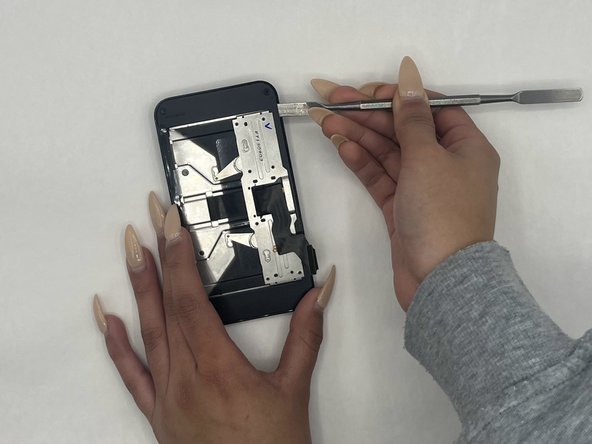
    1. LG Enact Screen Replacement, Screen: crwdns2935265:014crwdnd2935265:01crwdnd2935265:01crwdne2935265:0
      • Remove the four 1.2 mm screws from the corners using a Phillips #00 screwdriver.

      crwdns2952109:0crwdne2952109:0

      crwdns2917038:0crwdne2917038:0

    2. LG Enact Screen Replacement: crwdns2935265:015crwdnd2935265:01crwdnd2935265:02crwdne2935265:0 LG Enact Screen Replacement: crwdns2935265:015crwdnd2935265:02crwdnd2935265:02crwdne2935265:0
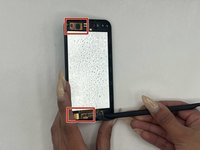
      • Gently pry the screen open with a nylon spudger, making sure you’re not damaging the LCD or the plastic.

      crwdns2952109:0crwdne2952109:0

      crwdns2917038:0crwdne2917038:0

    3. LG Enact Screen Replacement: crwdns2935265:016crwdnd2935265:01crwdnd2935265:02crwdne2935265:0 LG Enact Screen Replacement: crwdns2935265:016crwdnd2935265:02crwdnd2935265:02crwdne2935265:0
      • Detach the two connectors from the screen and pop the screen open using a spudger.

      crwdns2952109:0crwdne2952109:0

      crwdns2917038:0crwdne2917038:0

    4. LG Enact Screen Replacement: crwdns2935265:017crwdnd2935265:01crwdnd2935265:01crwdne2935265:0
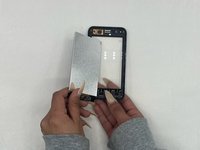
      • Disconnect the touch button sensors using a spudger.

      crwdns2952109:0crwdne2952109:0

      crwdns2917038:0crwdne2917038:0

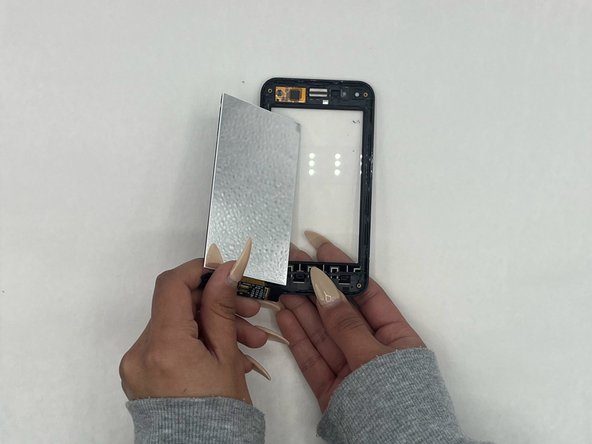
    5. LG Enact Screen Replacement: crwdns2935265:018crwdnd2935265:01crwdnd2935265:01crwdne2935265:0
      • Gently disconnect and remove the LCD using a spudger.

      crwdns2952109:0crwdne2952109:0

      crwdns2917038:0crwdne2917038:0

crwdns2915888:0crwdne2915888:0

To reassemble your device, follow these instructions in reverse order.

crwdns2935221:0crwdne2935221:0

pranay_munikuntla

crwdns2935283:009/12/23crwdne2935283:0

621 crwdns2915208:0crwdne2915208:0

crwdns2935297:04crwdne2935297:0

crwdns2935287:0crwdne2935287:0

University of North Texas, Team 4-11, Harold Fall 2023 crwdns2935289:0University of North Texas, Team 4-11, Harold Fall 2023crwdne2935289:0

UNT-HAROLD-F23S4G11

crwdns2931471:04crwdne2931471:0

crwdns2935297:060crwdne2935297:0

crwdns2947412:00crwdne2947412:0

crwdns2917038:0crwdne2917038:0

crwdns2936625:0crwdne2936625:0:

crwdns2936751:024crwdne2936751:0 8

crwdns2936753:07crwdne2936753:0 15

crwdns2936753:030crwdne2936753:0 29

crwdns2942667:0crwdne2942667:0 340