crwdns2933423:0crwdne2933423:0
crwdns2947577:0crwdnd2947577:0crwdne2947577:0

LG Cosmos Side Case Replacement

crwdns2869540:0crwdne2869540:0: 1.6K

crwdns2959988:0crwdne2959988:0

crwdns2959990:0crwdne2959990:0
2
crwdns2959992:0crwdne2959992:0
23
crwdns2959994:0crwdne2959994:0
78
crwdns2959996:0crwdne2959996:0
1,588
crwdns2955950:0crwdne2955950:0: 0

crwdns2959998:0crwdne2959998:0

crwdns2960000:0crwdne2960000:0
crwdns2959984:0crwdne2959984:0: 0

crwdns2959956:0crwdne2959956:0

crwdns2959986:0crwdne2959986:0: 0

crwdns2959958:0crwdne2959958:0

crwdns2955944:0crwdne2955944:0: 45 - 50 crwdns2931279:0crwdne2931279:0
crwdns2955970:0crwdne2955970:0: crwdns2937801:0crwdne2937801:0
crwdns2869444:0crwdne2869444:0

crwdns2869445:0crwdne2869445:0

crwdns2862611:0crwdne2862611:0

crwdns2862612:0crwdne2862612:0

LG Cosmos Side Case Replacement

crwdns2915892:0crwdne2915892:0

crwdns2959928:0crwdne2959928:0 ↓

If you have damaged your side case, it is possible to replace. It requires time, a lot of disassembling, and includes many small parts.

crwdns2959930:0crwdne2959930:0

crwdns2943213:0crwdne2943213:0

crwdns2943215:0crwdne2943215:0

    1. LG Cosmos Side Case Replacement, Battery: crwdns2935265:01crwdnd2935265:01crwdnd2935265:01crwdne2935265:0
      • Apply an upward force to slide the back cover off.

      crwdns2952109:0crwdne2952109:0

      crwdns2917038:0crwdne2917038:0

    2. LG Cosmos Side Case Replacement: crwdns2935265:02crwdnd2935265:01crwdnd2935265:01crwdne2935265:0
      • Use your finger to push down on the top of the battery and pull it out.

      crwdns2952109:0crwdne2952109:0

      crwdns2917038:0crwdne2917038:0

    1. LG Cosmos Side Case Replacement, Rear Case: crwdns2935265:03crwdnd2935265:01crwdnd2935265:01crwdne2935265:0
      • Remove the five 3.0mm Phillips #000 screws along the edge of the rear case.

      crwdns2952109:0crwdne2952109:0

      crwdns2917038:0crwdne2917038:0

    2. LG Cosmos Side Case Replacement: crwdns2935265:04crwdnd2935265:01crwdnd2935265:01crwdne2935265:0
      • Use a plastic opening tool to pry the rear case loose.

      crwdns2952109:0crwdne2952109:0

      crwdns2917038:0crwdne2917038:0

    3. LG Cosmos Side Case Replacement: crwdns2935265:05crwdnd2935265:01crwdnd2935265:01crwdne2935265:0
      • Once the rear case is loose, lift it from the rest of the phone.

      crwdns2952109:0crwdne2952109:0

      crwdns2917038:0crwdne2917038:0

    1. LG Cosmos Side Case Replacement, Motherboard: crwdns2935265:06crwdnd2935265:01crwdnd2935265:01crwdne2935265:0
      • Remove the two 2.9 mm Phillips #000 screws that are slightly off-centered to the right.

      crwdns2952109:0crwdne2952109:0

      crwdns2917038:0crwdne2917038:0

    2. LG Cosmos Side Case Replacement: crwdns2935265:07crwdnd2935265:01crwdnd2935265:01crwdne2935265:0
      • Use the plastic opening tool to pry the motherboard loose.

      crwdns2952109:0crwdne2952109:0

      crwdns2917038:0crwdne2917038:0

    3. LG Cosmos Side Case Replacement: crwdns2935265:08crwdnd2935265:01crwdnd2935265:01crwdne2935265:0
      • Hold the motherboard from the top and bottom and slowly lift the motherboard until you feel a pull.

      • The flex cable is attached at the bottom of the motherboard and can be damaged if too much lifting force is applied.

      crwdns2952109:0crwdne2952109:0

      crwdns2917038:0crwdne2917038:0

    4. LG Cosmos Side Case Replacement: crwdns2935265:09crwdnd2935265:01crwdnd2935265:01crwdne2935265:0
      • Once the motherboard is lifted , rotate the motherboard up 90 degrees to the right.

      crwdns2952109:0crwdne2952109:0

      crwdns2917038:0crwdne2917038:0

    5. LG Cosmos Side Case Replacement: crwdns2935265:010crwdnd2935265:01crwdnd2935265:01crwdne2935265:0
      • Use your finger to pull the flex cable out from its connector.

      crwdns2952109:0crwdne2952109:0

      crwdns2917038:0crwdne2917038:0

    6. LG Cosmos Side Case Replacement: crwdns2935265:011crwdnd2935265:01crwdnd2935265:01crwdne2935265:0
      • Pull the motherboard away from the rest of the phone.

      crwdns2952109:0crwdne2952109:0

      crwdns2917038:0crwdne2917038:0

    1. LG Cosmos Side Case Replacement, Silicon Keypad: crwdns2935265:012crwdnd2935265:01crwdnd2935265:01crwdne2935265:0
      • Lift the silicon keypad away from the rest of the phone.

      crwdns2952109:0crwdne2952109:0

      crwdns2917038:0crwdne2917038:0

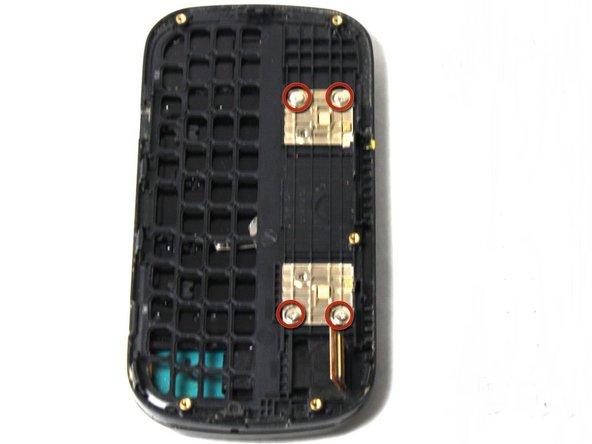
    1. LG Cosmos Side Case Replacement, Side Case: crwdns2935265:013crwdnd2935265:01crwdnd2935265:01crwdne2935265:0
      • Remove the four 2.0mm Phillips #000 screws on the golden squares.

      crwdns2952109:0crwdne2952109:0

      crwdns2917038:0crwdne2917038:0

    2. LG Cosmos Side Case Replacement: crwdns2935265:014crwdnd2935265:01crwdnd2935265:01crwdne2935265:0
      • Slowly lift the side case away from the rest of the phone.

      • The flex cable can be torn if it is caught on the frame of the side case.

      crwdns2952109:0crwdne2952109:0

      crwdns2917038:0crwdne2917038:0

crwdns2915888:0crwdne2915888:0

To reassemble your device, follow these instructions in reverse order.

crwdns2935221:0crwdne2935221:0

Johnny Phane

crwdns2935283:004/15/13crwdne2935283:0

91 crwdns2915208:0crwdne2915208:0

crwdns2935297:05crwdne2935297:0

crwdns2935287:0crwdne2935287:0

Cal Poly, Team 13-63, Johann Spring 2013 crwdns2935289:0Cal Poly, Team 13-63, Johann Spring 2013crwdne2935289:0

CPSU-JOHANN-S13S13G63

crwdns2931471:03crwdne2931471:0

crwdns2935297:060crwdne2935297:0

crwdns2947412:00crwdne2947412:0

crwdns2917038:0crwdne2917038:0

crwdns2936625:0crwdne2936625:0:

crwdns2936751:024crwdne2936751:0 2

crwdns2936753:07crwdne2936753:0 23

crwdns2936753:030crwdne2936753:0 78

crwdns2959996:0crwdne2959996:0 1,588